Van's Air Force

The definitive Van's Aircraft support community! Buying, building or flying an RV? Join our exclusive family of mentors and enthusiasts!

DIY dynamic prop balancer?

Thanks. That looks good enough selection work for me. ADXL355 it is. Has a lot of options including built-in filtering, able to sample by external sync pulse, if needed, etc.

Reasonably priced at Mouser on breakout board. Should be able to get down to 0.001 ips resolution at reasonable RPMs with it.

I guess I need to move into this decade and lean how to use AI.

Your overall design plan looks very well thought out. Bit concerned by side mounting it (Rotax has horizontal cylinders?) but solid mounting of accelerometer is probably paramount and in theory (having a gearbox) should be able to average out combustion pulses. Never mind, just because it's side mounted doesn't mean you can't use the up/down axis (just don't use accelerometer Z-axis -- I think that has worse specs).

Interesting idea to combine it all in one box rather than running wires into the cockpit. Probably makes a lot of sense to just turn it on with certain settings and go fly and then come back and analyze the logged data. That's pretty much what I did anyway even after having built an Arduino box with color display and switches, able to change between polar plot, spectrum, FFT windows, sample rate, etc. Hard to read in sun anyway.
 
Your overall design plan looks very well thought out. Bit concerned by side mounting it (Rotax has horizontal cylinders?) but solid mounting of accelerometer is probably paramount and in theory (having a gearbox) should be able to average out combustion pulses. Never mind, just because it's side mounted doesn't mean you can't use the up/down axis (just don't use accelerometer Z-axis -- I think that has worse specs).
The reason for mounting it on the side of the angle, is just what you said. The performance of the Z accelerometer is not quite as good as X and Y. With it orientated in this direction, X will measure up/down and Y will be left/right.

Interesting idea to combine it all in one box rather than running wires into the cockpit. Probably makes a lot of sense to just turn it on with certain settings and go fly and then come back and analyze the logged data. That's pretty much what I did anyway even after having built an Arduino box with color display and switches, able to change between polar plot, spectrum, FFT windows, sample rate, etc. Hard to read in sun anyway.
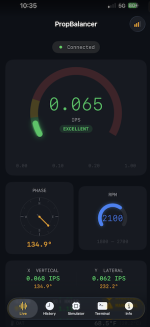
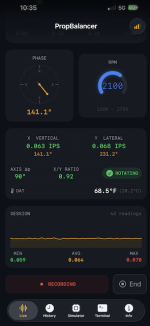
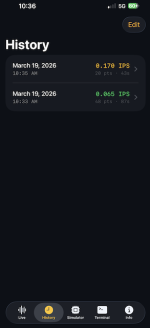
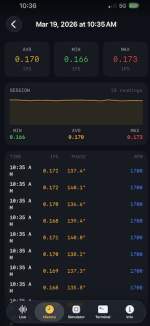
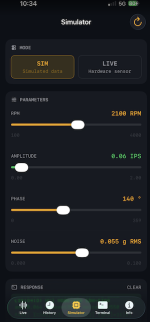
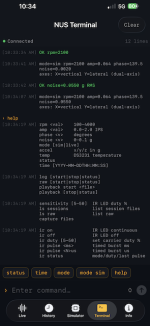
I actually have a Bluetooth Low Energy connection to an app on my phone. It's not fast enough to stream all the sensor data, but it is attempting to calculate IPS and phase every 64 rotations and passes that to the app. There's also some configuration that can be done from the app.

Screenshot 2026-03-19 at 10.40.45 AM.pngScreenshot 2026-03-19 at 10.40.38 AM.pngScreenshot 2026-03-19 at 10.40.31 AM.pngScreenshot 2026-03-19 at 10.40.21 AM.pngScreenshot 2026-03-19 at 10.40.52 AM.pngScreenshot 2026-03-19 at 10.41.00 AM.png

  1. The first page shows an overview of live data. You can scroll down for more info or to start logging reported vibration data.
  2. The second page shows you all recorded sessions. You can click on any individual session to pull up details. Note: this is different from logs stored on the SD card. This is only for sessions recorded on the phone from the first page of the app.
  3. The third page allows you to select between live or simulated data. If you have simulated selected, you can also configure that here. -The simulated data is only for development purposes. Although the simulated data is configured from the app, the app is not actually generating the simulated data. That's being done just above the hardware interface layer in the firmware. The plan is to eventually not only be able to simulate data, but to be able to replay sensor logs stored on the SD card. This will allow me to make changes to the algorithms in firmware and retest with actual accelerometer data without leaving my workbench. This also has the added benefit of eliminating environmental variables in between testing runs. If I tweak the firmware and results change (with the exact same accelerometer readings), I'll know it's because of the firmware and not just because the weather was different from the previous run.
  4. The fourth page is the command terminal interface. This one is mostly self explanatory. The screen capture above shows the result of a 'help' command. This list shows you most of the items you can tweak. This is also where you start/stop logging data to the SD card. -Speaking of log files on the SD card, there are two different types. Session and Raw. Raw stores every single accelerometer reading and optical sensor data. I did a 25 minute test on this yesterday, and the resulting file was over 50 megabytes. Almost 1.5 million lines of data! This amount of data is needed for the playback mentioned above, but is way too much to store on a regular basis. This is where the session data comes into play. This only stores the vibration results and provides a much more manageable file size.
 
I'm impressed!
Your original post made it sound like you were just starting out with this. You're way ahead!
 
Last edited:
I'm impressed!
Your original post made it sound like you were just starting out with this. You're way ahead!
Thank you. I feel like I've made a bunch of progress since my initial post. But this is the easy part. I've still yet to actually hook up an accelerometer to an airplane and collect any data.
 
I guess I need to move into this decade and lean how to use AI.
I pay Anthropic a little over $20/month to use Claude with much broader limits than the free version, and I find it enhances my coding productivity by as much as 10:1. It's much better than I am at creating user-friendly web pages to be served up by an ESP32 or Pi. Sometimes it struggles with seemingly-simple math problems, though. I still spend some time debugging its code and refining my prompts/questions, but I'm pretty happy with the eventual outcomes. One step that I find useful for both creating and documenting is to collaboratively (with Claude) write a detailed software/system spec. When I've got a working hardware breadboard, or at least a good idea of what I want in one, I use KiCad to design a PCB. I haven't tried to use an AI to help with that yet.
 
Last edited:
Screenshot 2026-03-19 at 10.40.45 AM.png
Screenshot 2026-03-19 at 10.40.38 AM.png
Screenshot 2026-03-19 at 10.40.31 AM.png
Legendary work is happening in front of our eyes. I cannot believe how fast you are moving along! The real time view of phase and amplitude data puts to shame some of the mega expensive certified balancers out there.
 
I'm tapping into the crank shaft signal of my homebrew ignition system to get position info and will run the balancer on the same esp32 as my ignition monitor - just code now - waiting on some hardware to show up.

Very cool project here - i'll share whatever i end up with.
 
I had Claude write a driver for the ADXL355 interfaced to an ESP32 for the Arduino IDE and posted the Arduino library here. The example compiles, but it has not been tested with hardware. It might be of some use in speeding up development and testing for those who want to use an ESP32.
 
For those using the EVAL-ADXL355Z board, the mounting holes are 14.732 mm = 0.58" apart, in a square pattern. The holes are 3.098 mm = 0.122" in diameter. These measurements are based on the 3D model posted on DigiKey, using Autodesk Fusion 360.
 
I'm tapping into the crank shaft signal of my homebrew ignition system to get position info and will run the balancer on the same esp32 as my ignition monitor - just code now - waiting on some hardware to show up.

Very cool project here - i'll share whatever i end up with.
After a trip to the pub with Andi and Gizmo, I was able to get the crank signal into the ESP32 and it reliably fires at the same spot every revolution. I'll map this to prop position and flywheel bolt holes .

Next up EVAL-ADXL355Z should be here mid next week - I'll use CF86301's dims to make a mount. Is this good mounting info? I am not well versed here.

Location — as far forward as possible, on the top of the crankcase

Mount it the ADXL vertically — meaning the board face is vertical, flat against the engine case, with the sensing axis (X or Y) pointing inward toward the crank center line.
 
Nice work, have been working on something similar. I too use the ai services to knock out a bunch of coding tasks.
Couple of thoughts for you, at the end of the day, we just care if it’s in balance and how we are doing realtime, all the high end data analysis helps pinpoint the sources of the vibration but overall magnitude is what really matters. On the Boeing at work, it just shows the vib and it’s actually the highest of the 3 it monitors:N1,N2,Fan

That lead me to incorporate a DAC to output ips in a 0-5v fashion that can be used by my Dynon. Custom sensor map
I have emags so I pick up the rpm from that as it passes a square wave that follows the #1 spark. Answer could be 180 out of phase easy enough if you get it wrong while doing the balancing to correct. Yours is better for that

Your positioning is about optimum being close to the prop but if you can get the accelerometer aligned with the case parting line as the max out of balance force is realized when the out of balance is passing through the vertical with the help of God’s G. This allows the code to just do a >max type loop and all the calculations go away . the angle is just the delta time since #1 spark or whatever trigger you used given you have an angular speed that you calculate once per rev

Fun project and look forward to seeing the progress

Mike
 
I had Claude write a driver for the ADXL355 interfaced to an ESP32 for the Arduino IDE and posted the Arduino library here. The example compiles, but it has not been tested with hardware. It might be of some use in speeding up development and testing for those who want to use an ESP32.
Thanks. Installed Arduino IDE 2.3.8. Using Library Manager and search for adxl355, I only get adxl355-arduino by plasmapper. Now what?
Tried to look through his code and yours look simpler.
 
Nice work, have been working on something similar. I too use the ai services to knock out a bunch of coding tasks.
Couple of thoughts for you, at the end of the day, we just care if it’s in balance and how we are doing realtime, all the high end data analysis helps pinpoint the sources of the vibration but overall magnitude is what really matters. On the Boeing at work, it just shows the vib and it’s actually the highest of the 3 it monitors:N1,N2,Fan

That lead me to incorporate a DAC to output ips in a 0-5v fashion that can be used by my Dynon. Custom sensor map
I have emags so I pick up the rpm from that as it passes a square wave that follows the #1 spark. Answer could be 180 out of phase easy enough if you get it wrong while doing the balancing to correct. Yours is better for that

Your positioning is about optimum being close to the prop but if you can get the accelerometer aligned with the case parting line as the max out of balance force is realized when the out of balance is passing through the vertical with the help of God’s G. This allows the code to just do a >max type loop and all the calculations go away . the angle is just the delta time since #1 spark or whatever trigger you used given you have an angular speed that you calculate once per rev

Fun project and look forward to seeing the progress

Mike
With all these new tools and relatively inexpensive hardware it's easy to get carried away. But, those of us with gearboxes may eventually like to see a spectrum to compare prop vs engine vibration. Possible to balance both, I think.
 
Thanks. Installed Arduino IDE 2.3.8. Using Library Manager and search for adxl355, I only get adxl355-arduino by plasmapper. Now what?
Tried to look through his code and yours look simpler.
Claude's ADXL355 library is not available through the Arduino Library Mangler (sorry). But you can go to the repo on GitHub, click on the green Code button, then click on Download ZIP, then open the zip. Copy everything in the zip to a new folder in your Arduino library folder, which you could call "ADXL355 by Claude" or something. Then you should be able to open and compile the example. You may have to restart the Arduino IDE to get it to recognize the new library.
 
Location — as far forward as possible, on the top of the crankcase

Mount it the ADXL vertically — meaning the board face is vertical, flat against the engine case, with the sensing axis (X or Y) pointing inward toward the crank center line.
Instead of saying "vertically", I'd say "parallel to the plane of the flywheel" or "parallel to the plane of the prop spinner," with one axis parallel to and preferably aligned with the crankcase seam. QCAD and SendCutSend would be my friends here.
 
With all these new tools and relatively inexpensive hardware it's easy to get carried away. But, those of us with gearboxes may eventually like to see a spectrum to compare prop vs engine vibration. Possible to balance both, I think.
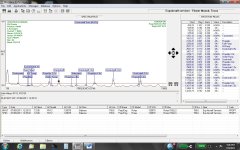
From my MVib II on a RV12
(Can't balance the engine, just the prop)

1774108147328.jpeg
 
From my MVib II on a RV12
(Can't balance the engine, just the prop)
Interesting plot. Does DSS supply profiles for different engine/prop combinations that allow their software to label the various sources based on known RPM ratios? Is that what the Component Identification feature does?
 
The reason for mounting it on the side of the angle, is just what you said. The performance of the Z accelerometer is not quite as good as X and Y. With it orientated in this direction, X will measure up/down and Y will be left/right.


I actually have a Bluetooth Low Energy connection to an app on my phone. It's not fast enough to stream all the sensor data, but it is attempting to calculate IPS and phase every 64 rotations and passes that to the app. There's also some configuration that can be done from the app.

View attachment 112863View attachment 112864View attachment 112866View attachment 112865View attachment 112867View attachment 112868

  1. The first page shows an overview of live data. You can scroll down for more info or to start logging reported vibration data.
  2. The second page shows you all recorded sessions. You can click on any individual session to pull up details. Note: this is different from logs stored on the SD card. This is only for sessions recorded on the phone from the first page of the app.
  3. The third page allows you to select between live or simulated data. If you have simulated selected, you can also configure that here. -The simulated data is only for development purposes. Although the simulated data is configured from the app, the app is not actually generating the simulated data. That's being done just above the hardware interface layer in the firmware. The plan is to eventually not only be able to simulate data, but to be able to replay sensor logs stored on the SD card. This will allow me to make changes to the algorithms in firmware and retest with actual accelerometer data without leaving my workbench. This also has the added benefit of eliminating environmental variables in between testing runs. If I tweak the firmware and results change (with the exact same accelerometer readings), I'll know it's because of the firmware and not just because the weather was different from the previous run.
  4. The fourth page is the command terminal interface. This one is mostly self explanatory. The screen capture above shows the result of a 'help' command. This list shows you most of the items you can tweak. This is also where you start/stop logging data to the SD card. -Speaking of log files on the SD card, there are two different types. Session and Raw. Raw stores every single accelerometer reading and optical sensor data. I did a 25 minute test on this yesterday, and the resulting file was over 50 megabytes. Almost 1.5 million lines of data! This amount of data is needed for the playback mentioned above, but is way too much to store on a regular basis. This is where the session data comes into play. This only stores the vibration results and provides a much more manageable file size.

Nice job! I'm curious, what do you do for your day job?
Can you post some pictures of your sensors and electronics?
Which tools do you use to write and debug the software?
 
Last edited:
Interesting plot. Does DSS supply profiles for different engine/prop combinations that allow their software to label the various sources based on known RPM ratios? Is that what the Component Identification feature does?
Yes they do.
 
Sorry, wasn't aware that anybody can't view all of threads there. Free to sign up. Anyway, I guess I can summarize some lessons learned here.

Converting acceleration to ips:
View attachment 112529
View attachment 112530
where acceleration is in Gs, velocity in ips and Frequency is cycles per minute (RPM).
If running prop at 1000 RPM and want to detect 0.07 ips or less, we're looking for 0.015 Gs. If using the ADXL335, that has a sensitivity of 300 mV/G, that's 4.5mV!
Doubling the RPM to 2,000 we're looking to get the vibration below 9 mV from the ADXL335.
As you can see we're working close to the 4.9mV/bit resolution of a 10-bit A/D converter @5V.
If feeding the ADXL335 signal to an Arduino Nano or Mega (has a 0 to 5V range and 4.9mV resolution) I'll probably first have to amplify the signal 100 to 200 times to get a reasonable resolution.

Trying to understand FFT (DFT):
See attached FFT tutorial.
I think the light bulb finally came on:
Sample two channels simultaneously:
1) trigger signal
and
2) accelerometer signal.
Then do FFT on both sample sets.
Note the frequency "bin" with the highest accelerometer peak (should also be RPM/60)
Read the phase from the trigger channel same bin.
Most stable phase results if sampling starts on trigger signal.

Summary of last posts:
"Seems the prop balancers out there brags about bringing it below 0.07 ips.
So what I already have (ADXL335 with 20x, 60x and 100x amplification) should be adequate. Still, it will be interesting to see what the ADXL313 can do. Output data rate sets bandwidth:
Output Data Rate (Hz) - Bandwidth (Hz) Rate
400 - 200
200 - 100
100 - 50
50 - 25
25 - 12.5
12.5 - 6.25
50Hz (3,000RPM) should be quite adequate for prop balancing.

Wanted to post an update one using the ADXL335 all-digital accelerometer because it may be a while before I get to continue testing.
I decided to try it out because I had already purchased it and because I should be able to get fairly accurate absolute acceleration values. (One LSB is 1/1024 Gs.)

Prop is already pretty well balanced by adding 1/4" carbide rods in heavy side of hub and painting the light blade black on backside, so this is mainly curiosity.

So the objective here is to measure absolute prop acceleration.

Some points I encountered:
Even though the ADXL335 is capable of 1,600 samples/second, the digital SPI or I2C interfaces limits how fast you can get the data into for example my Arduino Mega 2560.
The built-in bandwidths (low pass filter) fixed to 1/2 of sample rate may not be ideal.

During actual ground runs I saw what I thought were much too high values. After some research I found out that one needs to divide the values gotten after doing FFT (DFT) by number-of-samples/2 to get correct (peak acceleration) values!

I still don't know if the ips vibration that, for example Dynavibe reports, is peak, peak-peak or RMS.

I tried different algorithms to determine prop vibration. I've given up on the 2-channel FFT amplitude and phase method. It may work with an electrical motor but not with impossibly noisy phase signal on a combustion engine and prop. Instead I've gone to the 4-run test-weight spreadsheet method to determine weight and angle.

My latest algorithm is to measure prop period (RPM) by trigger signals, and then take 32 samples (the ADXL335 set to 1600 samples/sec but reading the data at 1/32 prop rotation period intervals) through one full prop revolution. That can be repeated (for example 1, 2, 4, 8, 16, 32 or 64 times) and averaged to get rid of noise. The prop vibration amplitude should be found in the lowest frequency (non-DC) FFT "bin". The frequency of that bin of course is prop-RPM/ 60.
I decided on that algorithm after doing some simulations. Unless you can set the sample rate to a multiple of the prop RPM or frequency (not possible with the ADXL335), the adjacent FFT frequency or spectrum "bins" will get part of the amplitude, unless you can hit and maintain the exact RPM for that sample rate. In other words, at a fixed sample rate, as you vary RPM, looking at the FFT spectrum, you'll see one frequency peak and adjacent frequencies being zero and then grow. I was not able to calculate accurate values by pro-rating the adjacent bin amplitude values by RPM frequency ratio to bin frequencies (by how far the measured frequency is from bin frequencies).

Another method I need to look into is quadrature. If a signal frequency (RPM) is known, one can apparently multiply samples of that signal with exponential or trig functions and obtain amplitude of the sampled signal? Probably the same that's done in FFT/DFT but for a one-channel FFT? Question will be how stable is the rotational speed (frequency or RPM) of a prop through one or more sampled rotations?

Will be interesting to see results from actual flight data collection runs."

Maybe I was limited by the speed of the Arduino Mega and may be able to get better results using an ESP32 and the "Step 3: Extracting the 1× Vibration Vector" in the ESP32_Propeller_Balancer_Design.pdf in post #11 above.

Have fun and by all means posts your experience and results.

Finn

EDIT: Of course the above reveals my complete ignorance on how FFT or DFT is actually done. I simply included an Arduino FFT library in my code.

I suspect they are averaging peak not rms because the peak value measures the maximum vibration "damage"; think of it as stress/strain.
Any chance you can post the FFT options and any documentation? Things to be aware of are aliasing- so sample at least 2x max frequency (nyquist frequency), sample window type affects spectral leakage (frequency resolution vs amplitude accuracy) , acquisition time affects lowest frequency you can detect, input SNR limits FFT SNR (this is where good analog design practices come into play), and using full precision 64 bit floating point (this is a biggie, round off noise affects low amplitude measurements). It's best to play around with the different options, then understand why the results went the way they did- when the last change doesn't do much, you've "arrived".

Edit: window overlap is another effective option that is worth optimizing.
 
Last edited:
I did not do an exhaustive search. There may be better options out there. I just started with the 345. When I began to question if it was going to be good enough, I searched for alternatives. Looked at a few options and found the 355. I didn't look much after that.

I've attached a summary from my friend Claude. An excerpt from this document is shown below.
View attachment 112849

I was really impressed with Walt's spectrum plot- the noise floor looks very clean, about a factor of 10 below the red 0.07 ips threshold (I'm guessing on the magnitude).
From the ADXL355 data sheet: Ultra low noise spectral density, all axes: 22.5 µg/√Hz.
Grinding through the math, I get a noise floor of 0.008 ips (this is based on a noise bandwidth of 15.8 rootHertz and with a lower measurement frequency of 2.5hz.
This puts the ADXL355 noise floor on par with the microVib II; the caveats are the FFT is done well and the DSP (low and high pass ADXL filers) filtering is also done well.
You have a shot at a good system. MicroVib could still have some proprietary IP going on but the accelerometer itself looks high quality.
 
I was really impressed with Walt's spectrum plot- the noise floor looks very clean, about a factor of 10 below the red 0.07 ips threshold (I'm guessing on the magnitude).
From the ADXL355 data sheet: Ultra low noise spectral density, all axes: 22.5 µg/√Hz.
Grinding through the math, I get a noise floor of 0.008 ips (this is based on a noise bandwidth of 15.8 rootHertz and with a lower measurement frequency of 2.5hz.
This puts the ADXL355 noise floor on par with the microVib II; the caveats are the FFT is done well and the DSP (low and high pass ADXL filers) filtering is also done well.
You have a shot at a good system. MicroVib could still have some proprietary IP going on but the accelerometer itself looks high quality.
Please excuse my ignorance. I've only looked at the sensitivity. Could you walk me through the math? I don't have a good grip on the noise level. Why is it expressed as square root of frequency?
Will a multiple of samples cancel out noise or make it worse?
 
Please excuse my ignorance. I've only looked at the sensitivity. Could you walk me through the math? I don't have a good grip on the noise level. Why is it expressed as square root of frequency?
Will a multiple of samples cancel out noise or make it worse?

A great question, which requires a little background. Noise is measured as power spectral density per unit of bandwidth:
--- (1) power is what is measured, not amplitude because noise sources are thought of in terms of the energy such kT (Boltzman constant times temperature-" thermal")
--- (2) spectral means noise can vary with frequency and the noise measured is dependent on the bandwidth measured (1kz to 4kz for example)
--- (3) the density ties into the statistics (probablity density function) of the noise type and is powerful in understanding DSP (digital signal processing) convolution
------ (a) white noise (or thermal noise such as a resistor) is broad band
------ (b) 1/f low frequency noise seen in transistors falls off to zero at high frequency
------ (c) other types as such as pink, brown, ...
So noise gets measured as power which is proportional to volts squared- the accelerometer package output reports g's but the sensor itself actually measures mv (key to understanding why it's volts/roothertz) which is then converted to g's via knowing the "proof" mass on the accelerometer beam.

Putting it all together: power or volts squared (v**2) over the measurement's bandwidth is V**2/hz. The spec sheet stated g/rootHz = 22.5, so that means they've taken the square root of the measured V**2/hz then applied their mv to g's conversion factor. If you multiply 22.5 times the square root of the bandwidth you are interested in, you will come up with the random noise g's for that bandwidth. I'm assuming it's white noise and not 1/f noise because a single number is quoted; low frequency 1/f would be separately spec'd.

Putting it all together:
--- ips=g*rootbandwidth*(32ft/sec)/(2*pi*freq) ; g is 1 sigma
------ 32 ft/sec = 12*32inches/sec
------ rootbandwidth= squareroot(15000cpm/60); 15000 is from Walt's plot
------ freq=150CPM/60=2.5hz; 150 is from Walt's plot; I chose the lowest frequency to "maximize" the g noise

Your other question about sampling. The minimum sample rate is the Nyquist frequency or 2 times the maximum frequency of interest. Sampling at higher sample rates (oversampling) decreases the noise because the noise is "spread out" over a wider bandwidth which digital filtering can then filter out downstream; CD digital music over samples for example. The sample length defines the bandwidth, the noise is random, sampling longer allows more averaging of the random component of noise, however when the sample stops, there is some residue of noise not averaged out, so you still have some noise present in the sample. When you oversample you can reduce the bandwidth back to the desired bandwidth downstream digitally, thereby removing noise from the output. Filtering is called "decimation"; you effectively filter the oversampled data downstream by ignoring the FFT higher frequency bins. Oversampling is a big deal in noise management, if you have the bandwidth and memory to do it. For every doubling of sample rate, SNR improves by about 3db; one bit of resolution is 6db for comparison. Google "noise shaping" and "delta sigma modulators" to dig deeper.

I hope that makes sense, it's a big bite from the apple, feel free to ask followup questions.
 
Last edited:
Nice job! I'm curious, what do you do for your day job?
Embedded systems design for a small company.

Can you post some pictures of your sensors and electronics?
Screenshot 2026-03-24 at 3.22.48 PM.png
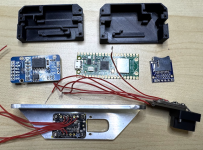
Here's a photo of what I'm currently putting together. Mounted to the aluminum bracket is an ADXL345 board from Adafruit. (This will likely be replaced with an ADXL355. I've got a module ordered, but it hasn't arrived yet.) On the bottom right is my hacked together photo tachometer. Then there is the Pi Pico 2W in the middle. The DS3231 RTC module is on the left, and SD card on the right. -For the breadboard version, refer to this post: https://vansairforce.net/threads/diy-dynamic-prop-balancer.241927/post-1918763

Which tools do you use to write and debug the software?
I'm assuming you're talking about the embedded firmware. For this project I'm using VS Code with a Pi debug probe. If you're talking about the app, I have an iPhone. So that's being done in Xcode.
 
Nice work, have been working on something similar. I too use the ai services to knock out a bunch of coding tasks.
Couple of thoughts for you, at the end of the day, we just care if it’s in balance and how we are doing realtime, all the high end data analysis helps pinpoint the sources of the vibration but overall magnitude is what really matters. On the Boeing at work, it just shows the vib and it’s actually the highest of the 3 it monitors:N1,N2,Fan
For general vibration monitoring during flight I would agree. However, on the RV-12 there is a service letter (SL-00024) that specifically requires a dynamic balance of the prop. For that we have to separate the prop from the engine vibration. (I've already performed this with a calibrated Dynavibe. But I like the idea of being able to check at least once a year to see if it's getting worse.) Plus, eventually I'd love to be able to generate a spectrum plot like Walt posted above.

That lead me to incorporate a DAC to output ips in a 0-5v fashion that can be used by my Dynon. Custom sensor map
If I end up permanently mounting the sensor, I plan to do this as well. In fact, currently the firmware is outputting a variable frequency signal on GP13. (0 Hz = 0.00 IPS, 1000 Hz = 1.00 IPS). Unfortunately I'm unsure if the G3X can use a variable frequency signal for anything other than fuel. So this may need to be converted to an analog signal as you did.
 
Embedded systems design for a small company.


View attachment 113299
Here's a photo of what I'm currently putting together. Mounted to the aluminum bracket is an ADXL345 board from Adafruit. (This will likely be replaced with an ADXL355. I've got a module ordered, but it hasn't arrived yet.) On the bottom right is my hacked together photo tachometer. Then there is the Pi Pico 2W in the middle. The DS3231 RTC module is on the left, and SD card on the right. -For the breadboard version, refer to this post: https://vansairforce.net/threads/diy-dynamic-prop-balancer.241927/post-1918763


I'm assuming you're talking about the embedded firmware. For this project I'm using VS Code with a Pi debug probe. If you're talking about the app, I have an iPhone. So that's being done in Xcode.
Totally cool! 😀
 
A great question, which requires a little background. Noise is measured as power spectral density per unit of bandwidth:
--- (1) power is what is measured, not amplitude because noise sources are thought of in terms of the energy such kT (Boltzman constant times temperature-" thermal")
--- (2) spectral means noise can vary with frequency and the noise measured is dependent on the bandwidth measured (1kz to 4kz for example)
--- (3) the density ties into the statistics (probablity density function) of the noise type and is powerful in understanding DSP (digital signal processing) convolution
------ (a) white noise (or thermal noise such as a resistor) is broad band
------ (b) 1/f low frequency noise seen in transistors falls off to zero at high frequency
------ (c) other types as such as pink, brown, ...
So noise gets measured as power which is proportional to volts squared- the accelerometer package output reports g's but the sensor itself actually measures mv (key to understanding why it's volts/roothertz) which is then converted to g's via knowing the "proof" mass on the accelerometer beam.

Putting it all together: power or volts squared (v**2) over the measurement's bandwidth is V**2/hz. The spec sheet stated g/rootHz = 22.5, so that means they've taken the square root of the measured V**2/hz then applied their mv to g's conversion factor. If you multiply 22.5 times the square root of the bandwidth you are interested in, you will come up with the random noise g's for that bandwidth. I'm assuming it's white noise and not 1/f noise because a single number is quoted; low frequency 1/f would be separately spec'd.

Putting it all together:
--- ips=g*rootbandwidth*(32ft/sec)/(2*pi*freq)
------ 32 ft/sec = 12*32inches/sec
------ rootbandwidth= squareroot(15000cpm/60); 15000 is from Walt's plot
------ freq=150CPM/60=2.5hz; 150 is from Walt's plot; I chose the lowest frequency to "maximize" the g noise

Your other question about sampling. The minimum sample rate is the Nyquist frequency or 2 times the maximum frequency of interest. Sampling at higher sample rates (oversampling) decreases the noise because the noise is "spread out" over a wider bandwidth which digital filtering can then filter out downstream; CD digital music over samples for example. The sample length defines the bandwidth, the noise is random, sampling longer allows more averaging of the random component of noise, however when the sample stops, there is some residue of noise not averaged out, so you still have some noise present in the sample. When you oversample you can reduce the bandwidth back to the desired bandwidth downstream digitally, thereby removing noise from the output. Filtering is called "decimation"; you effectively filter the oversampled data downstream by ignoring the FFT higher frequency bins. Oversampling is a big deal in noise management, if you have the bandwidth and memory to do it. For every doubling of sample rate, SNR improves by about 3db; one bit of resolution is 6db for comparison. Google "noise shaping" and "delta sigma modulators" to dig deeper.

I hope that makes sense, it's a big bite from the apple, feel free to ask followup questions.
Sorry don't get it. You wrote "Grinding through the math, I get a noise floor of 0.008 ips (this is based on a noise bandwidth of 15.8 rootHertz and with a lower measurement frequency of 2.5hz."
But then in your explanation you refer to Walt's plot.

How exactly did you arrive at the 0.008 ips noise floor for the ADXL355?

Finn
 
On the bottom right is my hacked together photo tachometer.
I understand the receiving photo sensor decodes a 38 KHz signal.
But what drives the LED? Is it on the same board as the photo sensor or did you make a 38 KHz oscillator/driver for it?
Does seem a good idea to make it impervious to ambient heat/light.
Oh, and focal distance?
 
Sorry don't get it. You wrote "Grinding through the math, I get a noise floor of 0.008 ips (this is based on a noise bandwidth of 15.8 rootHertz and with a lower measurement frequency of 2.5hz."
But then in your explanation you refer to Walt's plot.

How exactly did you arrive at the 0.008 ips noise floor for the ADXL355?

Finn

The equation:

(22.5*10**-06)*((15000/60)**0.5)*(32*12)/(2*3.14*150/60) = 0.00866 ips

we are using Walt's plot to get the noise bandwidth: 150cpm to 15000cpm or approximately 15000/60=250hz; we take the square root to get root hertz
--- also using Walt's plot for the lowest frequency of 150cpm to calculate the ips based on the spec g's: acceleration/frequency=(inches/sec**2)/(cycles/second)=ips

I'm choosing to use Walt's plot for bandwidth because I was wondering if the ADXL355 would give comparable results; in another words the microVibe is world class very impressive spectrum with no usual jagged noise floor. It's the real deal.

Another way to look at the spec of 22.5u g per root hertz: the root hertz means it's for a bandwidth of 1 root hertz and we need to increase it by our application's bandwidth which is 250 hz. I'm using bandwidth in hz and bandwidth in root hz interchangeably since root hz is implied when doing noise, while hz is implied when looking at a spectrum plot like Walt's.

I hope that makes sense, this stuff can be a little tricky, and I'm totally impressed you are asking questions until it makes sense. :)
 
I understand the receiving photo sensor decodes a 38 KHz signal.
But what drives the LED? Is it on the same board as the photo sensor or did you make a 38 KHz oscillator/driver for it?
Does seem a good idea to make it impervious to ambient heat/light.
Oh, and focal distance?
The 38 kHz signal is generated from the RP2350 micro. This goes to a mosfet which turns the LED on/off. This output is somewhat configurable from the command line in the app. You can turn it on/off and adjust the duty cycle between 5 and 50 percent.

If I crank up the LED brightness the sensor works from multiple feet away. But without lenses to focus the light, I would limit it to inches.

So far I've only bench tested it. Once I'm happy with how it works on an actual engine, I'll share all the details.
 
The 38 kHz signal is generated from the RP2350 micro. This goes to a mosfet which turns the LED on/off. This output is somewhat configurable from the command line in the app. You can turn it on/off and adjust the duty cycle between 5 and 50 percent.

If I crank up the LED brightness the sensor works from multiple feet away. But without lenses to focus the light, I would limit it to inches.

So far I've only bench tested it. Once I'm happy with how it works on an actual engine, I'll share all the details.
How freakin' smart are the guys here?? - I'm just soaking this all up and feeling lucky to be able to follow along and try my own. Having a blast!
 
The equation:

(22.5*10**-06)*((15000/60)**0.5)*(32*12)/(2*3.14*150/60) = 0.00866 ips

we are using Walt's plot to get the noise bandwidth: 150cpm to 15000cpm or approximately 15000/60=250hz; we take the square root to get root hertz
--- also using Walt's plot for the lowest frequency of 150cpm to calculate the ips based on the spec g's: acceleration/frequency=(inches/sec**2)/(cycles/second)=ips

I'm choosing to use Walt's plot for bandwidth because I was wondering if the ADXL355 would give comparable results; in another words the microVibe is world class very impressive spectrum with no usual jagged noise floor. It's the real deal.

Another way to look at the spec of 22.5u g per root hertz: the root hertz means it's for a bandwidth of 1 root hertz and we need to increase it by our application's bandwidth which is 250 hz. I'm using bandwidth in hz and bandwidth in root hz interchangeably since root hz is implied when doing noise, while hz is implied when looking at a spectrum plot like Walt's.

I hope that makes sense, this stuff can be a little tricky, and I'm totally impressed you are asking questions until it makes sense. :)
Thanks. I was thinking a considerably lower bandwidth for just prop balancing. Let's say max 2,700 RPM or 45 Hz. If your formula is correct and I did the math right that's 0.0037 ips. That is still a far cry from the 0.001 ips resolution I was hoping for. Don't know if oversampling (averaging) can improve results by a factor 4 (or 8, in your BW case).

Of course would also be nice to be able to display a broader spectrum, as in Walt's plot.

Out of curiosity I looked at the ADX345 datasheet. About 1 LSB noise level.
 
MicroVibe is using more than oversampling, I'm guessing of course. I suspect it's an expensive ultra low noise piezoelectric sensor used in inertial navigation that has a high resonant frequency along with some very good noise shaping. Another clue might be how the accelerometer is mounted. If you guys can see the engine resonances with $200 of hardware, that's quite an achievement, even if the spectrum looks a little ragged.
 
Last edited:
3d printing, plus "maker" style hardware (arduino/esp/beagle etc), and AI are opening universes of capability for the average joe

if only I could get an LLM to write OpenSCAD code I'd be really happy, as that's where I do all my modeling. So far, no such luck.
 
The ADXL355 accelerometer is a MEMS structure etched into the silicon; they are cost effective solutions that can be integrated onto the die along with the ADC, logic and support circuits. The ultra low noise accelerometers are quartz or ceramic piezoelectric crystals that can attain 1ug/roothz, however they are stand alone units that need separate ADC, logic and clocking; this might be what MicroVIbe is using.
 
Last edited:
Chuckle, good one Walt- it's kind of reflexive, in analog IC design we are always doing competitive analysis. :)
 
Last edited:
From my MVib II on a RV12
(Can't balance the engine, just the prop)

View attachment 112990

Walt,
It looks like Microbase Professional will plot the y axis as log scale; any chance you can post that plot? This plot will show the noise floor. You can also plot log scale for both x and y axis which would show the noise versus frequency dependance. Both plots would be helpful for the guys building their own balancer.

Thanks
Sam
 
Last edited:
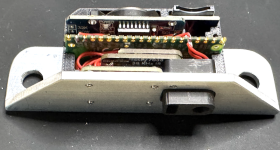
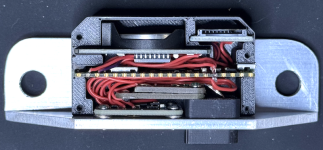
I'm sure I'll hate myself later for making this so tight and not leaving much room to run wires.
I was not wrong about that statement. I did expand the package some to make more room, but it was still a pain. It definitely did not help out that the only suitable wire I had was red!
Screenshot 2026-03-25 at 9.33.47 PM.pngScreenshot 2026-03-25 at 9.33.20 PM.png
For size reference, the wire is 30 AWG and the screws are M2.

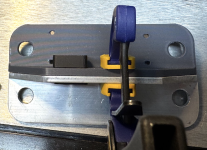
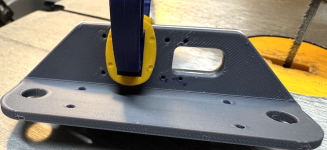
For fabricating the aluminum angle I used a technique I hadn't used before. I started by 3d printing a model of the angle. However, instead of printing it normally, in the slicer I mirrored the part. That allowed me to clamp the 3d print to the aluminum and mark the outline. I was also able to use the holes in the 3d print as a guide to ensure I was starting the holes in the correct places. Seemed to work quite well.
Screenshot 2026-03-24 at 10.33.48 PM.pngScreenshot 2026-03-24 at 10.32.56 PM.png
 
I was not wrong about that statement. I did expand the package some to make more room, but it was still a pain. It definitely did not help out that the only suitable wire I had was red!

For size reference, the wire is 30 AWG and the screws are M2.

For fabricating the aluminum angle I used a technique I hadn't used before. I started by 3d printing a model of the angle. However, instead of printing it normally, in the slicer I mirrored the part. That allowed me to clamp the 3d print to the aluminum and mark the outline. I was also able to use the holes in the 3d print as a guide to ensure I was starting the holes in the correct places. Seemed to work quite well.
Wirewrap wire comes to mind. Solid but could work.
 
Last edited:
Thanks. I was thinking a considerably lower bandwidth for just prop balancing. Let's say max 2,700 RPM or 45 Hz. If your formula is correct and I did the math right that's 0.0037 ips. That is still a far cry from the 0.001 ips resolution I was hoping for. Don't know if oversampling (averaging) can improve results by a factor 4 (or 8, in your BW case).

Of course would also be nice to be able to display a broader spectrum, as in Walt's plot.

Out of curiosity I looked at the ADX345 datasheet. About 1 LSB noise level.

Keep in mind the noise quoted in the spec sheet is one standard deviation (sigma), so you will see a 3.0 sigma covers 99.7% of all peaks. One standard deviation is implied because the integrated noise is calculated as rms, and the standard deviation is also calculated as rms.
 
Last edited:
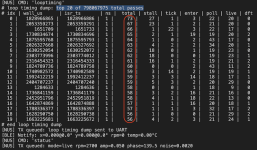
I've been working my way through some firmware bugs. The latest was a BTStack interrupt was causing delays in my main sensor loop. This would result in the occasional missed sample from the accelerometer, if we were logging raw data to the SD card while a bluetooth connection was active. With this problem fixed, my latest analytics show a maximum time of 73 microseconds to get through the sensor loop.
Screenshot 2026-03-28 at 11.26.52 AM.png

It's currently sampling at a rate of 800 samples per second (once every 1250 uS). So this leaves plenty of overhead, and could crank up the sample rate significantly if we wanted.

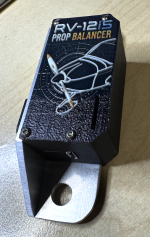
But now for the fun part. Hardware has been assembled, and I'm kind of proud how this turned out.
Screenshot 2026-03-28 at 9.48.09 AM.png

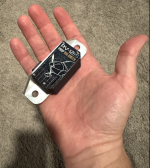
Picture in hand for size reference.
Screenshot 2026-03-28 at 9.46.34 AM.png

I'm hoping to make it out to the hangar and collect some actual vibration data next week. I'm sure I'll run into a few more issues as I transition from bench to on airplane testing. But hopefully I'll be able to work through those and get some good data logged to the SD card. With luck, later analysis of that data will yield some usable results. -Like I've said before, I'm confident of my ability to put the electronics together. I'm less sure of my ability to do anything meaningful with the resulting sensor data.

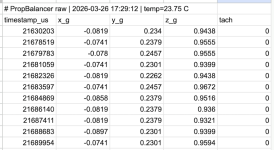
As for the logged data itself, this is what it currently looks like:
Screenshot 2026-03-28 at 12.19.17 PM.png
The timestamp_us field is the time (in microseconds since startup) at which the microcontroller registered the interrupt from the adxl indicating a sample was ready. The X, Y, and Z fields are the readings in g's from the accelerometer. Then the tach field is the time (in microseconds since startup) that the last tach pulse was registered. Can anyone think of other data I should also include?
 
Can anyone think of other data I should also include?
RPM would make your life a lot easier later on vs tach pulse offset. it's fairly easy to compute RPM on the fly with ~10 buckets to average (or however many you need to smooth the raw data) but it's going to be annoying to recompute it later. Plus you should be computing it anyways for display so it should be free to record. And if you have RPM and tach offset mind as well record crank angle if you have the compute power left.
 
Keep in mind the noise quoted in the spec sheet is one standard deviation (sigma), so you will see a 6.6 sigma covers 99.9% of all peaks. One standard deviation is implied because the integrated noise is calculated as rms, and the standard deviation is also calculated as rms.
Never studied Statistics so no clue what you're talking about.
What are the practical implications of this?
 
Never studied Statistics so no clue what you're talking about.
What are the practical implications of this?

The noise is random across both frequency and amplitude (the bell shaped curve): noise at any frequency with a peak of 1*0.00866g will happen in 68% of the samples, a peak of 2*0.00866g will happen in 17% of the samples, a peak of 3*0.00866g will happen in 4.7% of the samples, and a peak of 4*0.00866g will happen in 0.29% (11 samples out of 4k samples). It will be difficult to discriminate the noise from the real physical g's, at low g levels, without oversampling on the order of 16x nyquist. The 16x oversample factor comes from reducing the 4 sigma peak to a 1 sigma equivalent. If you are interested, there is an easy explanation how over sampling works.
 
Last edited:
RPM would make your life a lot easier later on vs tach pulse offset. it's fairly easy to compute RPM on the fly with ~10 buckets to average (or however many you need to smooth the raw data) but it's going to be annoying to recompute it later. Plus you should be computing it anyways for display so it should be free to record. And if you have RPM and tach offset mind as well record crank angle if you have the compute power left.
Thanks for these suggestions. I don't think any of these would be too hard to recalculate later. But you're right, I already have all of them and it would be trivial to add to the log.

Once I have actual vibration data logged, I may end up wanting to tweak how the firmware is calculating these additional values. Having them in the log will make it much easier to evaluate my initial assumptions on how these calculations should be performed.

For example: RPMs are averaged over 64 revolutions. This won't be very responsive. However RPMs get provided along with other vibration data, and that gets averaged together over 64 revolutions. On the other hand, you have prop angle. Currently I'm calculating that based on the amount of time it took to perform only the last prop rotation. Would more or less be "better". Until I get actual data to evaluate, it's hard to say. There's trade-offs to both.
 
Thanks for these suggestions. I don't think any of these would be too hard to recalculate later. But you're right, I already have all of them and it would be trivial to add to the log.

Once I have actual vibration data logged, I may end up wanting to tweak how the firmware is calculating these additional values. Having them in the log will make it much easier to evaluate my initial assumptions on how these calculations should be performed.

For example: RPMs are averaged over 64 revolutions. This won't be very responsive. However RPMs get provided along with other vibration data, and that gets averaged together over 64 revolutions. On the other hand, you have prop angle. Currently I'm calculating that based on the amount of time it took to perform only the last prop rotation. Would more or less be "better". Until I get actual data to evaluate, it's hard to say. There's trade-offs to both.
More data is better right now IMO. You can always remove fields later. Or keep them and hide them behind a setting to record extended calcs.

64 rpm sample average is indeed a bit slow - around 2s of data. But that RPM is more for the user than the calcs. The crank angle is far more useful to have and using the last calculated rpm (or perhaps a smaller window of average rpms; 4-8 to denoise) makes it more sensitive and accurate.

Does the sensor you use have any sort of delay compensation? If not, recording the offset angle(s) from the vibration sensor itself would be helpful.
 
More data is better right now IMO. You can always remove fields later. Or keep them and hide them behind a setting to record extended calcs.
I agree. I didn't mention this in my previous post, but there is also a separate session log file that can be generated. It includes: timestamp, X amplitude/phase, Y amplitude/phase, vector amplitude/phase, RPM, and temperature.

64 rpm sample average is indeed a bit slow - around 2s of data. But that RPM is more for the user than the calcs. The crank angle is far more useful to have and using the last calculated rpm (or perhaps a smaller window of average rpms; 4-8 to denoise) makes it more sensitive and accurate.
The 64 revolution RPM wasn't intended for the user. It's a part of the Discrete Fourier Transform calculations. Averaging multiple revolutions together improves the signal.

Based of your comments, I've added an additional RPM calculation that's more suitable for user display. It's using an exponential moving average filter with an adjustable filter coefficient. This weights the most recent RPM data more than older data. How much can be adjusted by setting the filter coefficient using the 'RPM FILTER' command. This allows me to tweak the responsiveness of the filtered RPM data without having to stop and recompile. I also created a dedicated Bluetooth characteristic just for this RPM data. This will allow me to update the RPM value in the app much more frequently.

I also implemented similar filtering on the revolution period used to calculate prop angle. This one also has it's own adjustable filter coefficient. I'll likely start with a slightly more aggressive coefficient here. Then tweak it as needed after collecting some engine data.

Does the sensor you use have any sort of delay compensation? If not, recording the offset angle(s) from the vibration sensor itself would be helpful.
I'm not quite sure what you mean here. Are you referring to the delay between when the accelerometer sample was taken and when the sensor generates the interrupt signal indicating a result is ready? If so, I wasn't able to find this specified in the datasheet. As I think you're suggesting, if I could measure this delay, I could compensate for it in firmware.
 
I'm not quite sure what you mean here. Are you referring to the delay between when the accelerometer sample was taken and when the sensor generates the interrupt signal indicating a result is ready? If so, I wasn't able to find this specified in the datasheet. As I think you're suggesting, if I could measure this delay, I could compensate for it in firmware.
It's from the codebase posted earlier. (https://github.com/peterashwoodsmith/vcheck). The author found quite a bit of delay between the readings and the actual data. He's got 70° at 3600 RPM and 5° at 1700 which means it's not a simple time delay for some reason. You'll have to measure a known imbalance to find the delay most likely.
 
Back
Top