Van's Air Force

The definitive Van's Aircraft support community! Buying, building or flying an RV? Join our exclusive family of mentors and enthusiasts!

Trouble updating charts in afs

RNB

Well Known Member
Sponsor
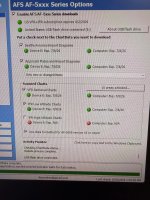
I’m searching for some help and understanding why I can’t get my chart to upload. I have an advanced flight systems screen. I will attach images showing that I’ve got charts uploaded on my USB. When I plug this in my plane and turn the power on the new data was not recognized. I was unable to force an update because the screen prompt thinks that things are up-to-date.

Can anyone help me with this?

I’m going to send them an email to see if they know I forget Rob’s handle here if anyone knows it and can tag him to the post

IMG_9754.jpeg
 
First thing I would do is reformat the flash drive and reload, more likely I'd just pitch it and reformat/reload a new one. I've had those things get corrupted
 
OK, forgive any thing that comes across strangely as I’m voice dictating this I’ll try and fix things later

So I’ve done a lot of troubleshooting on this and I’ve been back-and-forth to Home several times I purchased brand new 32 GB USB 3.2 drives and formatted and uploaded charts on those and then reformatted my old drives a fresh and neither the new or old were recognized

I then tried plugging the USB directly in the back of the monitor, but this did not work

I noted that the map cycle remained the same whether I had a USB plugged in or not.

All of this suggested to me that the USB drive was not being read and the map that it said was available is likely what came from advanced Flight when I upgraded the system a few months ago

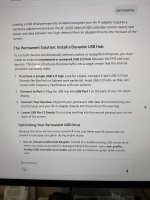
When trying to ask about this online, I saw something an old post from 2018 where someone had a failed power supply to a dino USB port when only one of their two ports was being red. They had an expensive repair sending the unit in the dine on and getting the USB power supply changed out, and there was also some mention of only one of the two USB ports being read as if there’s a conflict between the USB chart, data, and the USB Wi-Fi adapter

So I unplugged the Wi-Fi adapter and move the map to the Wi-Fi adapter USB port and everything worked well

So I guess now I need to better understand what the impact of not having a Wi-Fi adapter is I’m not sure if I get weather and traffic over Wi-Fi or Hardwire

I’ll send another email to Jonathan

 
Last edited:
It appears the charts that are out of date are the AdvFlt's, show as ver 2601. Your Seattle Avionics subscription should load a new file on the USB drive every cycle with a name format that is "AF2MAPUS_V16_2606_MAP.afz" which is from 6/12 of this year. This is the file that needs to be in the root directory of your USB stick. Late May I believe - Seattle Avionics had an issue with the AdvFlt file & it was corrupt... not many people knew about it but the fix was to go to the AdvFlt website & download the maps directly onto your USB stick and load that into your screens. From the screenshot of the Seattle Avionics downloader - appears the SA is up to date & on the USB sticks. Hope this helps.
 
It appears the charts that are out of date are the AdvFlt's, show as ver 2601. Your Seattle Avionics subscription should load a new file on the USB drive every cycle with a name format that is "AF2MAPUS_V16_2606_MAP.afz" which is from 6/12 of this year. This is the file that needs to be in the root directory of your USB stick. Late May I believe - Seattle Avionics had an issue with the AdvFlt file & it was corrupt... not many people knew about it but the fix was to go to the AdvFlt website & download the maps directly onto your USB stick and load that into your screens. From the screenshot of the Seattle Avionics downloader - appears the SA is up to date & on the USB sticks. Hope this helps.

Correctomundo, and I confirmed that the 2606 and other charts were on each USB

As best I can tell, there was never a problem with my USB or my Seattle Avionics subscription. Their data manager tells you what is on the USB and what needs updating, I followed this process the same as I have done for two years.

The USB data was not being read from the normal port of my fairly new 6600 screens (two of them)

When I removed the wifi adapter from one of the USB ports and plugged the chart USB in that port, the charts were recognized.

I think there is a problem with the USB stuff on the 6600s.
 
Back
Top