

Van's Air Force

The definitive Van's Aircraft support community! Buying, building or flying an RV? Join our exclusive family of mentors and enthusiasts!

Ray Allen trim motor failure at altitude

Draker

Well Known Member
Sponsor
Looking for any ideas to try, as I attempt to diagnose.

System Setup:

Garmin system.
Pilot and copilot pitch trim buttons on each control stick.
Buttons connect to Garmin GAD27 control unit.
GAD27 connects to a GSA28 pitch servo.
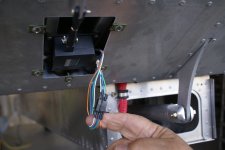
GSA28 pitch servo connects to the standard Vans-provided Ray Allen trim servo.

Scenario:

I was flying along at around 7500ft a few weekends ago, with the autopilot on, and noticed a G3X message asking me to trim nose down. That was pretty unusual, since the system is hooked into my electric elevator trim, and generally does small trim corrections by itself while cruising on AP. So I disconnected the autopilot and observed that the elevator trim was not functional. I could see that the G3X received my trim-up and trim-down commands from the stick (as it turns the trim display a different color when you press a trim button), but the control surface was not moving. Aileron trim was working fine. I didn't sense I was in any immediate danger, as it was stuck only slightly out of trim, and it wasn't running away in either direction, so I continued my flight and descended to my destination. Once I got to pattern altitude and started my pre-landing checklist, I noticed that the elevator trim was working normally again. Once on the ground I verified that it worked exactly as expected and the trim tab had correct and full range of motion.

A couple of things I ruled out:

Trim mechanism frozen? No. OAT never dropped below freezing temps.
Ground or power connection loose? No. Pitch trim power and grounds to the GAD27 unit are secure and have continuity.
Control stick trim button failure? No. The G3X display confirmed my buttons were working. Plus, the AP itself was unable to adjust the trim, regardless of button input.

Next step for me: The trim +/- signal comes from the GAD27, passes through the GSA28 servo, through two Deutsch connectors, then to the trim motor itself. I will be checking every connection for a bad crimp or other failure.

Another step, later: My pre-takeoff checklist has me verifying I am trimmed for takeoff, but it does not include testing trim function on the ground in the case that the plane is already trimmed for takeoff. I'll be adding that to the checklist.

Anything else you'd suggest trying? Preferably on the ground, as I don't intend to fly with unreliable trim control.
 
Looking for any ideas to try, as I attempt to diagnose.

System Setup:

Garmin system.
Pilot and copilot pitch trim buttons on each control stick.
Buttons connect to Garmin GAD27 control unit.
GAD27 connects to a GSA28 pitch servo.
GSA28 pitch servo connects to the standard Vans-provided Ray Allen trim servo.

Scenario:

I was flying along at around 7500ft a few weekends ago, with the autopilot on, and noticed a G3X message asking me to trim nose down. That was pretty unusual, since the system is hooked into my electric elevator trim, and generally does small trim corrections by itself while cruising on AP. So I disconnected the autopilot and observed that the elevator trim was not functional. I could see that the G3X received my trim-up and trim-down commands from the stick (as it turns the trim display a different color when you press a trim button), but the control surface was not moving. Aileron trim was working fine. I didn't sense I was in any immediate danger, as it was stuck only slightly out of trim, and it wasn't running away in either direction, so I continued my flight and descended to my destination. Once I got to pattern altitude and started my pre-landing checklist, I noticed that the elevator trim was working normally again. Once on the ground I verified that it worked exactly as expected and the trim tab had correct and full range of motion.

A couple of things I ruled out:

Trim mechanism frozen? No. OAT never dropped below freezing temps.
Ground or power connection loose? No. Pitch trim power and grounds to the GAD27 unit are secure and have continuity.
Control stick trim button failure? No. The G3X display confirmed my buttons were working. Plus, the AP itself was unable to adjust the trim, regardless of button input.

Next step for me: The trim +/- signal comes from the GAD27, passes through the GSA28 servo, through two Deutsch connectors, then to the trim motor itself. I will be checking every connection for a bad crimp or other failure.

Another step, later: My pre-takeoff checklist has me verifying I am trimmed for takeoff, but it does not include testing trim function on the ground in the case that the plane is already trimmed for takeoff. I'll be adding that to the checklist.

Anything else you'd suggest trying? Preferably on the ground, as I don't intend to fly with unreliable trim control.
Man, intermittent electrical issues are the worst. Hard to track down.
 
It's not uncommon for Ray Allen trim motors to stall at low input voltages, and this characteristic seems to sometimes change as the unit ages. Temperature may also play a role.

What does the configuration of your pitch trim airspeed schedule look like? During cruise you may have been sending it insufficient voltage (via PWM from the GSA 28) for it to actually move, since your airspeed was presumably higher than when you were in the pattern, and the requested trim motor voltage consequently lower. The air loads also differ at different airspeeds, which can make this kind of thing harder to reproduce on the ground.

If you have the ability, you could simply remove power to your GSA 28 autopilot servos, which should send a full 12V to your trim motor when you activate the inputs. If it fixes itself then you probably have a low-voltage problem that can be fixed with a configuration change.
 
Last edited:
Looking for any ideas to try, as I attempt to diagnose.
Do you happen to have a Ray Allen REL-1 relay in line with the trim servo? They can fail over time. Mine resulted in intermittent operation when commanding nose down trim -- applying a pulse or two of nose up trim would temporarily free up the stuck relay. Ended up replacing it with a newer REL-2 relay from Ray Allen.
 
On my -10, g3x and vpx, the exact same symptoms when the speed trim was set below about 80%.

The vpx reduces the voltage to slow the trim speed and the RAC servo doesn’t have sufficient strength at reduced voltage.
 
Last edited:
It's not uncommon for Ray Allen trim motors to stall at low input voltages, and this characteristic seems to sometimes change as the unit ages. Temperature may also play a role.

What does the configuration of your pitch trim airspeed schedule look like? During cruise you may have been sending it insufficient voltage (via PWM from the GSA 28) for it to actually move, since your airspeed was presumably higher than when you were in the pattern, and the requested trim motor voltage consequently lower. The air loads also differ at different airspeeds, which can make this kind of thing harder to reproduce on the ground.
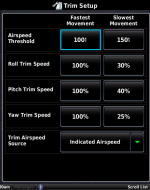
Thanks for the suggestions, Matt. I wonder if Garmin's logging outputs the actual voltage being sent to the trim motor. I could only find the current trim command ("Autopilot State" and "AP Pitch Trim Motor" columns) and the resulting elevator trim position ("Elevator Trim").

My pitch trim speed is set as 100% at or below 100kt, and 40% at and above 150kt. My cruise airspeed during the failure was 137kt indicated. So assuming a linear relationship, Garmin was driving my trim motor at ~56%.

If you have the ability, you could simply remove power to your GSA 28 autopilot servos, which should send a full 12V to your trim motor when you activate the inputs. If it fixes itself then you probably have a low-voltage problem that can be fixed with a configuration change.
I actually have a physical switch on the panel that removes power to the GSA's. I should have thought of trying that. I put the darn thing in my panel just for this kind of problem!

Do you happen to have a Ray Allen REL-1 relay in line with the trim servo? They can fail over time. Mine resulted in intermittent operation when commanding nose down trim -- applying a pulse or two of nose up trim would temporarily free up the stuck relay. Ended up replacing it with a newer REL-2 relay from Ray Allen.
I do not have this relay. I believe the GAD27 performs this function in my setup.
 

Attachments

  • trim_airspeed.png
    trim_airspeed.png
    66.5 KB · Views: 21
I wonder if Garmin's logging outputs the actual voltage being sent to the trim motor. I could only find the current trim command ("Autopilot State" and "AP Pitch Trim Motor" columns) and the resulting elevator trim position ("Elevator Trim").

It does not, but you can easily calculate it, since it's linear - as you guessed: (edit: for manual trim inputs, that is)

My pitch trim speed is set as 100% at or below 100kt, and 40% at and above 150kt. My cruise airspeed during the failure was 137kt indicated. So assuming a linear relationship, Garmin was driving my trim motor at ~56%.
 
Last edited:
Similar issue a few weeks ago in my 14A...Dynon A/P with Tostin grips. After checking elevator servo, wiring from A/P control head to servo and connections from A/P control head to Dynon HDX we didn't really see anything revealing. The elevator trim worked perfectly on the ground but after just a few mins in flight would only trim nose up and would not trim nose down. Last we could think to do was call Tostin so we did and explained the issue as described and asked if they thought it possible the stick trim was failed. They said highly unlikely since that failure percent is tiny. But rather the operator instead of always pushing forward for nose down and rearward for nose up could be pressing straight down by accident causing it to stick. Told us to very carefully use a small flat head screwdriver and slip it under the hat switch and barely lift the hat switch but not too hard since it's spring loaded. When we did that it felt like the tiniest bit of movement but noticed a little more spacing between the hat switch and control stick. That did the trick and no issues since. Have paid more attention when trimming so that it's going forward or rearward and not straight down. Maybe not the exact issue you're having but thought I'd share in case someone else experiences the same thing.
 
I’ve had Garmin auto trim for a long time and never had any problems, my >120k setting is 20%.
But I’ve noticed some folks trim tab deflection is quite a bit more compared to mine which is < about 20 degrees or so.
So I wonder if excess tab deflection causes higher loads on the tab leading to stalled motors?
 
Next step for me: The trim +/- signal comes from the GAD27, passes through the GSA28 servo, through two Deutsch connectors, then to the trim motor itself. I will be checking every connection for a bad crimp or other failure.
I too have experienced a similar issue, sporadic trim operation, and found that it was in fact related to a high resistance crimp at the servo; this resistance can vary with temperature, movement or vibration - very difficult to diagnose; I empathize.

Noting that the RAC servos have a sensitivity of 0-12V, any resistance causing a drop in voltage over the long runs required to connect the controller to servo will affect operation. Redoing the connector at the trim servo solved the issue for me.

I recommend using gold d-sub pins for servo connections. Stein has a very good video showing this method.
 
Last edited:
Noting that the RAC servos have a sensitivity of 0-12V, any resistance causing a drop in voltage over the long runs required to connect the controller to servo will affect operation. Redoing the connector at the trim servo solved the issue for me.

The wires on the trim servo are tiny, too. 26 gauge maybe? I had a look at the Deutsch DTM connecter I have hanging off mine and a few of the crimps were loose (not the motor +/- ones though). The wires are so small and wimpy though that I'm worried that re-crimped pins will just fail again. Is there a better connector for tiny wires?
 
The wires on the trim servo are tiny, too. 26 gauge maybe? I had a look at the Deutsch DTM connecter I have hanging off mine and a few of the crimps were loose (not the motor +/- ones though). The wires are so small and wimpy though that I'm worried that re-crimped pins will just fail again. Is there a better connector for tiny wires?
I sometimes stripped the wire twice as long, then doubled the stripped end over, making its diameter twice as large. This is just a work-around for not having the correct ID pin to start with.
 
I have been using Deans Micro Plugs for years, perfect size to use with the RA servo and LED position indicators.

Variety of pin counts, and polarized too.

Here is my installation on the current plane, look close and you can see the lacing cord used to safety the two halves together also.

1738441524028.jpeg

 
Last edited:
The wires on the trim servo are tiny, too. 26 gauge maybe? I had a look at the Deutsch DTM connecter I have hanging off mine and a few of the crimps were loose (not the motor +/- ones though). The wires are so small and wimpy though that I'm worried that re-crimped pins will just fail again. Is there a better connector for tiny wires?
I have used D-Sub pins covered by shrink tube with success and relative ease.
 
The wires on the trim servo are tiny, too. 26 gauge maybe? I had a look at the Deutsch DTM connecter I have hanging off mine and a few of the crimps were loose (not the motor +/- ones though). The wires are so small and wimpy though that I'm worried that re-crimped pins will just fail again. Is there a better connector for tiny wires
Ray Allen Company servos come with 24GA wires.

Depending on your crimper, a d-sub crimper provides between 4 and 8 pointed "crimps" on a wire, which is a much more substantial, intrusive, crimp than what a Deutsch or Molex style crimper provides on 22 and smaller, such as 26 gauge, wires; when properly crimped - this is a strong connection.

I'm not familiar with the Deans Micro plugs, but I take Mike S's word for it that they work well. However, gold plated D-Sub pins do not require any special plug and have the highest level of continuity for a slide-in connector, with only soldering having a higher joint efficiency. It's likely the lowest cost, highest value connection you can get.
 
Last edited:
I'm having a similar issue on my RV6. G3X with Garmin autopilot. The plane was originally constructed with manual trim, and was converted to electric trim when the G3X and Garmin AP were installed.

I always test the trim during my runup and it works fine on the ground, but when flying, it seems to occasionally stop working at higher airspeeds. I don't think it's a temperature related problem because I'm in SoCal and I've seen it stop as low as 3,000 ft MSL.

When it fails, actuating the trim in any direction (pitch or roll) shows no color change on the G3X trim indicator. I try the copilot stick trim and it doesn't work in any direction either.

It always starts working again once my airspeed slows sufficiently.

I didn't build the plane, so I'm not sure where to start troubleshooting this issue. Any ideas?

--Ron
 
When it fails, actuating the trim in any direction (pitch or roll) shows no color change on the G3X trim indicator.

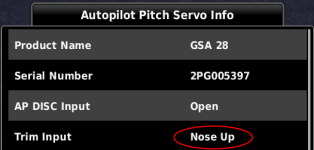
Since you mentioned the trim position indicator not changing color, I'm assuming that you have your trim switches connected in such a way that under normal circumstances you do see this effect. This information comes from the GSA 28 autopilot servos, which feed data back to the GDU display to tell it "I see a manual trim input". If you are activating the trim switch with the autopilot disengaged, and sometimes you see the position gauge change color and sometimes you don't, that most likely suggests a wiring problem upstream of the autopilot servo.

The next time this happens, go to the System Information page and look at the detailed information for the relevant autopilot servo: if it doesn't indicate that it sees a manual trim input, then you most likely have a wiring issue:

1769708679179.png
 
I'm having a similar issue on my RV6. G3X with Garmin autopilot. The plane was originally constructed with manual trim, and was converted to electric trim when the G3X and Garmin AP were installed.

I always test the trim during my runup and it works fine on the ground, but when flying, it seems to occasionally stop working at higher airspeeds. I don't think it's a temperature related problem because I'm in SoCal and I've seen it stop as low as 3,000 ft MSL.

When it fails, actuating the trim in any direction (pitch or roll) shows no color change on the G3X trim indicator. I try the copilot stick trim and it doesn't work in any direction either.

It always starts working again once my airspeed slows sufficiently.

I didn't build the plane, so I'm not sure where to start troubleshooting this issue. Any ideas?

--Ron
Ron -
See Mike Burch's post #3. It'd be the best place to start to diagnose your issue.

Since you didn't build the plane you may not know that the Ray Allen trim servo gets it's power supplied thru typically either a REL-1 or REL-2 Ray Allen relay, but the power output is routed thru the Garmin GSA28 AP servo. The Auto Pilot servo "adjusts" the voltage output to have the ability to reduce the Ray Allen travel SPEED at higher airspeeds. You can set these parameters in the G3X config screen (Ryan's post #7). But reduced voltage limits the Ray Allen servo's torque, as well as travel speed, where it may cause the servo to stall at higher airspeeds and return to normal once at a slower airspeed. I'm NO expert but I'm just now wiring all this up in my RV-7A build and it took me a bit to get my head around this arrangement.

Both my Garmin AP servos are on their own breakers. Pulling both breakers shuts down the AP and returns full voltage to the Ray Allen trim servo. It also disables any G3X "adjustments" to the Ray Allen servos - like travel speed and if there's an anti-runaway timeout set.

A few years back Garmin issued a SB for the GSA28 servos. One of mine was affected. The failure mode seems to be different but maybe something to consider as well.

-Mike
 
Since you mentioned the trim position indicator not changing color, I'm assuming that you have your trim switches connected in such a way that under normal circumstances you do see this effect. This information comes from the GSA 28 autopilot servos, which feed data back to the GDU display to tell it "I see a manual trim input". If you are activating the trim switch with the autopilot disengaged, and sometimes you see the position gauge change color and sometimes you don't, that most likely suggests a wiring problem upstream of the autopilot servo.

The next time this happens, go to the System Information page and look at the detailed information for the relevant autopilot servo: if it doesn't indicate that it sees a manual trim input, then you most likely have a wiring issue:

View attachment 108510

Thanks for the info, Matt. You're correct, I normally do see the trim position indicator turn blue when the trim is manually commanded.

I'll look for a wiring issue upstream of the servo, as you suggest. And thanks for the point-out on the AP pitch servo information page. Great stuff!

It's weird, because when this problem happens, I'll engage the autopilot to see if it can trim, and it always seems to do just fine. The trim position indicator on the G3X doesn't turn blue when the AP trims, but that's normal.

--Ron
 
Ron -
See Mike Burch's post #3. It'd be the best place to start to diagnose your issue.

Since you didn't build the plane you may not know that the Ray Allen trim servo gets it's power supplied thru typically either a REL-1 or REL-2 Ray Allen relay, but the power output is routed thru the Garmin GSA28 AP servo. The Auto Pilot servo "adjusts" the voltage output to have the ability to reduce the Ray Allen travel SPEED at higher airspeeds. You can set these parameters in the G3X config screen (Ryan's post #7). But reduced voltage limits the Ray Allen servo's torque, as well as travel speed, where it may cause the servo to stall at higher airspeeds and return to normal once at a slower airspeed. I'm NO expert but I'm just now wiring all this up in my RV-7A build and it took me a bit to get my head around this arrangement.

Both my Garmin AP servos are on their own breakers. Pulling both breakers shuts down the AP and returns full voltage to the Ray Allen trim servo. It also disables any G3X "adjustments" to the Ray Allen servos - like travel speed and if there's an anti-runaway timeout set.

A few years back Garmin issued a SB for the GSA28 servos. One of mine was affected. The failure mode seems to be different but maybe something to consider as well.


-Mike

Hi Mike,

Changing configuration to a higher trim percentage/speed seems like a quick and easy way to figure out whether this might be the problem. I don't think my servos are on their own breakers, but I'll have to confirm that. I've got a combination of Klixon CBs and fuses in my panel.

Re: the Garmin service bulletin, I assume you're referring to SB 23038? According to my AD and SB compliance tracking spreadsheet, I have affected servos as well, but I've got until Mar of 2028 to swap them under this program so I haven't pulled the trigger on that yet.

--Ron
 
Back
Top