

Van's Air Force
You are using an out of date browser. It may not display this or other websites correctly.
You should upgrade or use an alternative browser.
You should upgrade or use an alternative browser.
Garmin AXIS, Next Generation Integrated Flight Display
- Thread starter g3xpert
- Start date


Question for @g3xpert-
I am trying to understand the fail safe audio in A.1.5.13 of the install manual and the interconnect diagrams. Just want to confirm that in the unlikely event that the internal audio panel fails, the pilot's left headset, mic, and PTT are connected to whatever is wired as AUX1 (whether it is another Axis device or an external COM). Can you confirm? Is there an interconnect diagram I'm missing?
I am trying to understand the fail safe audio in A.1.5.13 of the install manual and the interconnect diagrams. Just want to confirm that in the unlikely event that the internal audio panel fails, the pilot's left headset, mic, and PTT are connected to whatever is wired as AUX1 (whether it is another Axis device or an external COM). Can you confirm? Is there an interconnect diagram I'm missing?
Please pass on that I’d like the option of the GTN 750Xi user interface to be modded where it can be such as adding the radial pop-up menu on the GTN so it’s as similar as possible to operate as the map interface is when Map is used on a Axis display for consistency.
The available tube videos for upgrading from G3x to Axis seemed a lot more involved than my easy swap expectations. It looked like there might have been 4-5 owner/shop personnel working on the planes along with 2-3 Garmin staff for install and it took 3-4 days. Even just calling it 40 hours of labor @ $125 per hour would be 5K to pay someone to upgrade. They also seemed to put in dual IFR GPS units without discussing reasons for such.
The upgrade for my other brand PFD was quite simple. Download everything to USB. Unscrew and unplug, replug and re screw, turn on and download all files. Maybe 30 minutes.
Why spend the money for two IFR GPS when it could be so easy to pull out a phone/tablet and run FF or GP as back up?
How little time might it take for a G3x to Axis upgrade?
Why the Axis name and is it related to the Axis boating products used by that one brand of boats?
G3x has been a great product. Ignoring the widgets, is there a way to compare the compute power or processing speed of the two? Perhaps a chart comparing them? What makes this a huge step change as opposed an apple iPhone 16 to 17 upgrade situation? ( I looked at phones yesterday)
Can this be configured to show flap position?
Trim position?
Door not latched annunciator?
The upgrade for my other brand PFD was quite simple. Download everything to USB. Unscrew and unplug, replug and re screw, turn on and download all files. Maybe 30 minutes.
Why spend the money for two IFR GPS when it could be so easy to pull out a phone/tablet and run FF or GP as back up?
How little time might it take for a G3x to Axis upgrade?
Why the Axis name and is it related to the Axis boating products used by that one brand of boats?
G3x has been a great product. Ignoring the widgets, is there a way to compare the compute power or processing speed of the two? Perhaps a chart comparing them? What makes this a huge step change as opposed an apple iPhone 16 to 17 upgrade situation? ( I looked at phones yesterday)
Can this be configured to show flap position?
Trim position?
Door not latched annunciator?

tnelson
Well Known Member
According to my panel builder who already ran the required network cables in my harness, I just pin out the connectors and replace the config module. Otherwise the existing connections and mount holes are reused.The available tube videos for upgrading from G3x to Axis seemed a lot more involved than my easy swap expectations. It looked like there might have been 4-5 owner/shop personnel working on the planes along with 2-3 Garmin staff for install and it took 3-4 days. Even just calling it 40 hours of labor @ $125 per hour would be 5K to pay someone to upgrade. They also seemed to put in dual IFR GPS units without discussing reasons for such.
The upgrade for my other brand PFD was quite simple. Download everything to USB. Unscrew and unplug, replug and re screw, turn on and download all files. Maybe 30 minutes.
Why spend the money for two IFR GPS when it could be so easy to pull out a phone/tablet and run FF or GP as back up?
How little time might it take for a G3x to Axis upgrade?
Why the Axis name and is it related to the Axis boating products used by that one brand of boats?
G3x has been a great product. Ignoring the widgets, is there a way to compare the compute power or processing speed of the two? Perhaps a chart comparing them? What makes this a huge step change as opposed an apple iPhone 16 to 17 upgrade situation? ( I looked at phones yesterday)
Can this be configured to show flap position?
Trim position?
Door not latched annunciator?

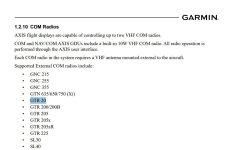
I have been informed the GTR20 is compatible even though I do not see it in the LRU list. Good News.Does AXIS work with a GTR20? That is my current Comm 2.

if you are talkinng about midwest panel videos, they did a complete panel, harnesses an accessories REPLACEMENT. I wouldn't call that an upgrade.The available tube videos for upgrading from G3x to Axis seemed a lot more involved than my easy swap expectations. It looked like there might have been 4-5 owner/shop personnel working on the planes along with 2-3 Garmin staff for install and it took 3-4 days. Even just calling it 40 hours of labor @ $125 per hour would be 5K to pay someone to upgrade. They also seemed to put in dual IFR GPS units without discussing reasons for such.
The upgrade for my other brand PFD was quite simple. Download everything to USB. Unscrew and unplug, replug and re screw, turn on and download all files. Maybe 30 minutes.
Why spend the money for two IFR GPS when it could be so easy to pull out a phone/tablet and run FF or GP as back up?
How little time might it take for a G3x to Axis upgrade?
Why the Axis name and is it related to the Axis boating products used by that one brand of boats?
G3x has been a great product. Ignoring the widgets, is there a way to compare the compute power or processing speed of the two? Perhaps a chart comparing them? What makes this a huge step change as opposed an apple iPhone 16 to 17 upgrade situation? ( I looked at phones yesterday)
Can this be configured to show flap position?
Trim position?
Door not latched annunciator?
they completly removed components like ifr gps, audio panel and com/nav and installed GDU116NCs
If you reuse existing harness and devices, seems like it would be pretty straight forward. In my case I will have to add 3 ethernet connections and repurpose the GDU connector. maybe a 3-4 day work by myself. not bad
Seems like but not what available evidence shows.if you are talkinng about midwest panel videos, they did a complete panel, harnesses an accessories REPLACEMENT. I wouldn't call that an upgrade.
they completly removed components like ifr gps, audio panel and com/nav and installed GDU116NCs
If you reuse existing harness and devices, seems like it would be pretty straight forward. In my case I will have to add 3 ethernet connections and repurpose the GDU connector. maybe a 3-4 day work by myself. not bad

If you are referring to the Aviation 101 and Midwest Panel builders, they decided to replace the entire harnesses and remove their radio stacks completely because they put dual IFR GPS/NAV/Com units in and ditched the original gear.. That was a ton of extra work that most will not have to do.The available tube videos for upgrading from G3x to Axis seemed a lot more involved than my easy swap expectations. It looked like there might have been 4-5 owner/shop personnel working on the planes along with 2-3 Garmin staff for install and it took 3-4 days. Even just calling it 40 hours of labor @ $125 per hour would be 5K to pay someone to upgrade. They also seemed to put in dual IFR GPS units without discussing reasons for such.
The upgrade for my other brand PFD was quite simple. Download everything to USB. Unscrew and unplug, replug and re screw, turn on and download all files. Maybe 30 minutes.
Why spend the money for two IFR GPS when it could be so easy to pull out a phone/tablet and run FF or GP as back up?
How little time might it take for a G3x to Axis upgrade?
Why the Axis name and is it related to the Axis boating products used by that one brand of boats?
G3x has been a great product. Ignoring the widgets, is there a way to compare the compute power or processing speed of the two? Perhaps a chart comparing them? What makes this a huge step change as opposed an apple iPhone 16 to 17 upgrade situation? ( I looked at phones yesterday)
Can this be configured to show flap position?
Trim position?
Door not latched annunciator?
adamrjansen
I'm New Here
If Claude is correct (and it's not always), then even the minor dimension changes between AXIS and G3X are going to mean that some of the pre-built panels will need redesign. Here's a mockup of Aerosport's 310 panel for RV-10, for example. Good to consider for those building now.
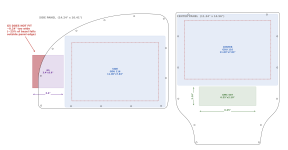

It depends on what your definition of “upgrade” is.The available tube videos for upgrading from G3x to Axis seemed a lot more involved than my easy swap expectations. It looked like there might have been 4-5 owner/shop personnel working on the planes along with 2-3 Garmin staff for install and it took 3-4 days. Even just calling it 40 hours of labor @ $125 per hour would be 5K to pay someone to upgrade. They also seemed to put in dual IFR GPS units without discussing reasons for such.
The upgrade for my other brand PFD was quite simple. Download everything to USB. Unscrew and unplug, replug and re screw, turn on and download all files. Maybe 30 minutes.
Why spend the money for two IFR GPS when it could be so easy to pull out a phone/tablet and run FF or GP as back up?
How little time might it take for a G3x to Axis upgrade?
Why the Axis name and is it related to the Axis boating products used by that one brand of boats?
G3x has been a great product. Ignoring the widgets, is there a way to compare the compute power or processing speed of the two? Perhaps a chart comparing them? What makes this a huge step change as opposed an apple iPhone 16 to 17 upgrade situation? ( I looked at phones yesterday)
Can this be configured to show flap position?
Trim position?
Door not latched annunciator?
I have 2 GDUs, a GTN and a GNC.
Upgrading my displays will be trivial. 3 x HSDB and some minor repinning.
Those MWPB videos IMHO are not representative of what most upgraders will do. They were practically new installs - which is not so trivial.
It depends on what your definition of “upgrade” is.
I have 2 GDUs, a GTN and a GNC.
Upgrading my displays will be trivial. 3 x HSDB and some minor repinning.
Those MWPB videos IMHO are not representative of what most upgraders will do. They were practically new installs - which is not so trivial.
Midwest Panel Builders install
Midwest Panel Builders RNAV approach
Aviation 101 new panel

The G5 will enable the autopilot to continue operating in all available modes in the case of the failure of the Primary AXIS display. A GAD 29 would not be relevant to your installation, you have no external IFR Navigator.@g3xpert Mostly from scratch panel upgrade planned for an RV6, looking at redundancy if the AXIS screen goes dark.
Planned equipment:
Single GDU116C w/LRU kit - IFR gps, comm, audio panel
Gtr205x - second comm
G5 for standby ADAHRS
GTX45r -adsb in/out txpdr
GMC507 - a/p ctrl
6ah standby battery
Engine monitoring will stay on existing CGR30
Are these assumptions correct if the GDU116C goes belly up in IMC:
G5 will be fully functional for aircraft control and will still be able to drive A/P? Is Gad29 required/beneficial?
Will gtr205x be available for comms with ATC for step down instructions to VFR wx/declaring an emergency and using iPad GPS functionality to get below min vectoring altitude if fuel is a concern?
Will GTX45r still provide txpdr info to ATC and fail to 7700 in this case? And is there any connectivity from GTX45R to display ads-b traffic and wx on an iPad if the GDU116C has failed?
*also, if I set altimeter on G5 will it crossfill to axis? Gad29 needed for this?
The GTR 205X, whether panel mounted or remote mounted, is not dependent on the Primary AXIS display to operate. Although if remote mounted, it will drop into fail safe mode and tune 121.5, since you would no longer have a control head for the radio.
The loss of PFD1 would not fail your transponder, it also has a failsafe mode, if a remote mounted model. The GTX 45R can be connected to your iPad via Bluetooth and is not dependent on the primary AXIS display for this purpose.
Yes, you can connect the GTR 205 via HSDB and eliminate the CAN connection. The Transponder does not support CAN connections so there is no issue there.In addition to two of the 11" AXIS screens, I plan to have the following HSDB devices: GTN750Xi, GTR205, and GTX45R.
1) Can I eliminate the CAN connection to the radio and transponder? Would there be any benefit to retaining the CAN Bus connections?
2) I was already planning on an HSDB connection between the GTN750Xi and GTX45R. Instead do I now connect all three devices each to two screens, and the two screens to each other? Can the screens handle that many HSDB connections?
We cover HSDB architecture in detail in the installation manual. Generally, each AXIS display is connected to each other AXIS display. The GTN Xi should be connected to PFD1, and any other AXIS GDU in the instrument panel, as applicable.
The GAD 29 can be used for a backup path to an external IFR Navigator.G3Xpert or anyone that might be in the know. . .
I am already in contact with my shop. I just want to clarify, the Gad29 does not need to be removed? Will act as a redundancy to AXIS. My panel thankfully has probably just the amount of space to slide right in to the 460 cut out. My main concern after that, is the set up. Is there a method for transferring all of the data, set up and features on my current 460 directly to the AXIS or should we expect to start from scratch? Are there any major changes required to harness? If this goes as seamlessly as it sounds like it might, then for those of us fully immersed in the Garmin ecosystem, they seem to have gone above and beyond to make it an easy upgrade.
Anybody want to buy a 460?
View attachment 122631
AXIS configuration is extensive, to address the role of an EFIS, IFR GPS, VHF NAV, and VHF COM. The installation manual provides detailed instructions for most of your questions, but in general you must set the new system up from scratch, using the configuration you recorded from your G3X Touch as an important reference.
In our upgrades we have been performing on our own aircraft, this has been one of the more time consuming steps of the process. That being said, AXIS configuration mode is very powerful and customizable, so it is time well spent.
The changes to the wiring harness vary from very limited , to multiple modifications of system datapaths. In all, the system was designed to be an easy upgrade from G3X Touch, but the hardware and software generational shift requires that some of the datapaths be changed. An example panel we provided earlier, a G3X Touch equipped RV-8 with a GNX 375, was flipped to AXIS in a leisurely weekend. More complex systems, would of course take some more time. Still, other systems will take less.
AXIS cannot act as the control head for a GX Pilot.My RV8 still has a Tru Trak GX Pilot controlled by a non-touch G3x (including GMC305 MCP). Will Axis support this interface?
-Greg
This is exported as a helpful record of configuration of your G3X Touch system that you can send to our support team, should you need assistance from us during any part of the process.Question regarding the upgrade process. The instructions state that one should export the configuration to a file from the G3x Touch before removal, but does not give instructions to import into the new AXIS screen. Is an import an options or will one have to manually reconfigure for example all sensor and other data?
Not at this time.Does AXIS support DME-DME navigation with the GDM450R?
There are database plans formed around the AXIS system, specific to experimental installations, intended to serve the various iterations of the system specifically.On the Garmin mapping page a single price is given for the experimental AXIS mapping bundle.
Can you please confirm that the mapping bundle pricing is the same for the GDU116Bx, GDU116C and GDU116NC ?
With 2 x G3X Touch there is a config module in the PFD connector allowing the System ID to be used by both GDU460.
This allows a single mapping bundle to be purchased and used on both GDU460.
Can you confirm a single mapping bundle is all that is required to be purchased for 2 x AXIS units ?
With a GDU116C (PFD) and GDU116Bx (MFD) I believe you can add a GTR205 remote radio.
If the PFD fails is the remote GTR205 usable ?
Does AXIS support the GCO14 carbon monoxide detector ?
The GTR 205 would still be functional in the case of a Primary AXIS display failure. There is no dependency of a GTR 205 on a functioning PFD, they simply integrate with one another for ease of use.
Yes GCO 14 is supported by AXIS.
We agree. Each system should be designed with redundancy for critical information in mind.After a quick scanning of all 140 posts, I have not read that anyone is concerned about having all functions needed for flight in one box. I would be very concerned about the lack of redundancy in the system unless I knew more about how it may fail and if it does so gracefully. If you want the redundancy then you can always buy two or buy some individual boxes/instruments.
Just me as a conservative engineer but think it needs to be considered.
While of course not required in EAB, we strongly encourage the installation of standby instruments if the system will be flown in IMC, for attitude and air data. This is true for any system we build and sell.
System redundancy for IFR NAV can be achieved in numerous different ways with this system. There are different datapaths and architectures involved than systems of the past. Each installation should be evaluated on an individual basis to determine the best path forward.
To expand on the display itself, the COM/NAV/Audio Panel functions are a separate board within the display, with its own dedicated power input, separate from the IFR GPS board.
HDMIWhat type of video input does the new display support? I'm hoping this was also updated to a new type.
GDU 80Px fits in the same panel cutout as the GDU 470. The installation kit is available now, it is the same kit you would use for a GDU 116Bx.Will the GDU 80Px fit into the same panel cutout as the existing 470? Is the connector kit be available now if the unit itself is not?
With two GDU116C, would I need to buy two DB update plans or just one will work on both?
There are database plans formed around the AXIS system, specific to experimental installations, intended to serve the various iterations of the system specifically. We will respond here with more information on the various plans available to EAB.
It is likely that the AXIS system will result in a weight reduction. If you want to send your parts list to us we can help you determine exactly how much. Reach out to us at [email protected].All of this is quite exciting but so far, I haven't seen anything posted discussing the potential change (reduction?) in weight. I know that, for many, weight can be an afterthought when putting together a dream panel but it's something I care deeply about and even a few pounds can make quite a difference in overall decision making. Presumably, all this integration and reduction in overall part count should reduce the system weight, right? But by how much?
A remote controller is an option the team has been investigating.@g3xpert
I know it's early to be starting a wish list, however...
Has there been any thought to adding a keyboard like the GCU 479?
This would be your external COM. If the audio panel fails, it closes a relay that connects to the external COM in the system, assuming it is less likely to have a problem than the COM on the same board as the audio panel which has failed.Question for @g3xpert-
I am trying to understand the fail safe audio in A.1.5.13 of the install manual and the interconnect diagrams. Just want to confirm that in the unlikely event that the internal audio panel fails, the pilot's left headset, mic, and PTT are connected to whatever is wired as AUX1 (whether it is another Axis device or an external COM). Can you confirm? Is there an interconnect diagram I'm missing?
YesDoes AXIS work with a GTR20? That is my current Comm 2.
The available tube videos for upgrading from G3x to Axis seemed a lot more involved than my easy swap expectations. It looked like there might have been 4-5 owner/shop personnel working on the planes along with 2-3 Garmin staff for install and it took 3-4 days. Even just calling it 40 hours of labor @ $125 per hour would be 5K to pay someone to upgrade. They also seemed to put in dual IFR GPS units without discussing reasons for such.
The upgrade for my other brand PFD was quite simple. Download everything to USB. Unscrew and unplug, replug and re screw, turn on and download all files. Maybe 30 minutes.
Why spend the money for two IFR GPS when it could be so easy to pull out a phone/tablet and run FF or GP as back up?
How little time might it take for a G3x to Axis upgrade?
Why the Axis name and is it related to the Axis boating products used by that one brand of boats?
G3x has been a great product. Ignoring the widgets, is there a way to compare the compute power or processing speed of the two? Perhaps a chart comparing them? What makes this a huge step change as opposed an apple iPhone 16 to 17 upgrade situation? ( I looked at phones yesterday)
Can this be configured to show flap position?
Trim position?
Door not latched annunciator?
The video I think you have in mind may not be the best representation of the typical upgrade process. The update time for G3X Touch to AXIS varies widely, from changing a few pins, to adding HSDB to 4 or 5 LRU's.
As mentioned above we updated a G3X Touch and GNX 375 equipped RV8 in our hangar in a leisurely weekend. Some will be more involved, some less.
You can display Trim and Flap position as well as door latch alerting. This system has a very powerful logic signal editor, which we are currently expanding even further which enables airframe integration like never before.
Thanks,
Justin
Last edited:

I have been informed the GTR20 is compatible even though I do not see it in the LRU list. Good News.
I asked;
On the Garmin mapping page a single price is given for the experimental AXIS mapping bundle.
Can you please confirm that the mapping bundle pricing is the same for the GDU116Bx, GDU116C and GDU116NC ?
With 2 x G3X Touch there is a config module in the PFD connector allowing the System ID to be used by both GDU460.
This allows a single mapping bundle to be purchased and used on both GDU460.
Can you confirm a single mapping bundle is all that is required to be purchased for 2 x AXIS units (say a GDU116C and a GDU116Bx) ?
g3xpert replied;
There are database plans formed around the AXIS system, specific to experimental installations, intended to serve the various iterations of the system specifically.
Ongoing mapping costs are a significant part of a purchasing decision.
Can you please provide the information requested ?
Not providing this information makes it appear that as you go up in unit features the mapping subscription price also goes up.
It could also be interpreted that Garmin intends to charge mapping bundles per unit rather than the G3X Touch model of per aircraft (up to 6 display units).
On the Garmin mapping page a single price is given for the experimental AXIS mapping bundle.
Can you please confirm that the mapping bundle pricing is the same for the GDU116Bx, GDU116C and GDU116NC ?
With 2 x G3X Touch there is a config module in the PFD connector allowing the System ID to be used by both GDU460.
This allows a single mapping bundle to be purchased and used on both GDU460.
Can you confirm a single mapping bundle is all that is required to be purchased for 2 x AXIS units (say a GDU116C and a GDU116Bx) ?
g3xpert replied;
There are database plans formed around the AXIS system, specific to experimental installations, intended to serve the various iterations of the system specifically.
Ongoing mapping costs are a significant part of a purchasing decision.
Can you please provide the information requested ?
Not providing this information makes it appear that as you go up in unit features the mapping subscription price also goes up.
It could also be interpreted that Garmin intends to charge mapping bundles per unit rather than the G3X Touch model of per aircraft (up to 6 display units).
Last edited:
Why would they do this? It makes no sense and they have not done that before.I asked;
On the Garmin mapping page a single price is given for the experimental AXIS mapping bundle.
Can you please confirm that the mapping bundle pricing is the same for the GDU116Bx, GDU116C and GDU116NC ?
With 2 x G3X Touch there is a config module in the PFD connector allowing the System ID to be used by both GDU460.
This allows a single mapping bundle to be purchased and used on both GDU460.
Can you confirm a single mapping bundle is all that is required to be purchased for 2 x AXIS units (say a GDU116C and a GDU116Bx) ?
g3xpert replied;
There are database plans formed around the AXIS system, specific to experimental installations, intended to serve the various iterations of the system specifically.
Ongoing mapping costs are a significant part of a purchasing decision.
Can you please provide the information requested ?
Not providing this information makes it appear that as you go up in unit features the mapping subscription price also goes up.
It could also be interpreted that Garmin intends to charge mapping bundles per unit rather than the G3X Touch model of per aircraft (up to 6 display units).
My money is on one subscription per aircraft.

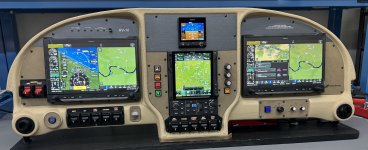
Or this:If Claude is correct (and it's not always), then even the minor dimension changes between AXIS and G3X are going to mean that some of the pre-built panels will need redesign. Here's a mockup of Aerosport's 310 panel for RV-10, for example. Good to consider for those building now.
View attachment 122690
No intention of being cryptic. Someone from our sales team will put together an overview of this topic for the group here. I mentioned that in a different response. Apologies.I asked;
On the Garmin mapping page a single price is given for the experimental AXIS mapping bundle.
Can you please confirm that the mapping bundle pricing is the same for the GDU116Bx, GDU116C and GDU116NC ?
With 2 x G3X Touch there is a config module in the PFD connector allowing the System ID to be used by both GDU460.
This allows a single mapping bundle to be purchased and used on both GDU460.
Can you confirm a single mapping bundle is all that is required to be purchased for 2 x AXIS units (say a GDU116C and a GDU116Bx) ?
g3xpert replied;
There are database plans formed around the AXIS system, specific to experimental installations, intended to serve the various iterations of the system specifically.
Ongoing mapping costs are a significant part of a purchasing decision.
Can you please provide the information requested ?
Not providing this information makes it appear that as you go up in unit features the mapping subscription price also goes up.
It could also be interpreted that Garmin intends to charge mapping bundles per unit rather than the G3X Touch model of per aircraft (up to 6 display units).
As mentioned in again another post, database package pricing will be similar to a G3X Touch system with an IFR navigator.

No need to apologize and thank you for taking the time to respond to all of our questions here. It's very much appreciated!No intention of being cryptic. Someone from our sales team will put together an overview of this topic for the group here. I mentioned that in a different response. Apologies.
Yes this will work the same way it does for a G3X Touch and external IFR navigator.Do I understand the manual correctly that the function of TO/GO still exist with the 116NC in the absence of a GMC 507. Would the A/P still follow the commands from the internal navigator for the missed approach?
The difference is there are fewer wires to run in most cases. Only one inout to the sysem is required. That could be the TOGA input on a GMC 507, or a configurable discrete input on a GEA 24, or a GDU 116C/NC, etc. You used to have run a switch to both the G3X Touch system, and the external navigator. GMC 507 is one of many options, but not required.
As a point of reference, it’s not a hard upgrade from an existing panel.
In a system with dual G3’s, 750xi, gtx45, gdl69a, we installed two 116Bx displays. Original install HSDB was just GTN—>GTX45R and GTN—>GDL69A.
New HSDB is PFD—>GTN750—>GTX45–>MFD—>PFD, with a single leg from GTN—>GDL69A.
Alternatively you could leave the GTX45R as a branch from GTN—>GTX45R as well, and just add HSDB from PFD–>GTN—>MFD—>PFD. Really quite simple.
Add 3 power and ground wires to each GDU connector, replace the configuration module in the PFD and add a config module in the MFD, and start configuring.
We left all other systems in place as we used base units and kept the GTN.
As stated, an easy weekend for first time, much less for second time probably.
In a system with dual G3’s, 750xi, gtx45, gdl69a, we installed two 116Bx displays. Original install HSDB was just GTN—>GTX45R and GTN—>GDL69A.
New HSDB is PFD—>GTN750—>GTX45–>MFD—>PFD, with a single leg from GTN—>GDL69A.
Alternatively you could leave the GTX45R as a branch from GTN—>GTX45R as well, and just add HSDB from PFD–>GTN—>MFD—>PFD. Really quite simple.
Add 3 power and ground wires to each GDU connector, replace the configuration module in the PFD and add a config module in the MFD, and start configuring.
We left all other systems in place as we used base units and kept the GTN.
As stated, an easy weekend for first time, much less for second time probably.
I wonder if the same thing happens with the GI 275 ?If Claude is correct (and it's not always), then even the minor dimension changes between AXIS and G3X are going to mean that some of the pre-built panels will need redesign. Here's a mockup of Aerosport's 310 panel for RV-10, for example. Good to consider for those building now.
View attachment 122690

To expand on the display itself, the COM/NAV/Audio Panel functions are a separate board within the display, with its own dedicated power input, separate from the IFR GPS board.
Which raises an interesting question wrt upgrade paths:
Is there an intention to supply COM/NAV boards to enable field upgrades of GDU 116 to GDU 116NC?
(it's not unusual in the E/AB world to cost-control by starting with a VFR build and progressively upgrading it to IFR later)
- mark
LOL, check the classifieds here.@g3xpert (or anyone)
If the only Garmin component I have in my panel is a GPS175, if I were to connect a G3X 8" portrait to it, how functional would the G3X be?
Thinking that once the AXIS 8" units are available, there will be a lot of G3X units on the market.
No intention of being cryptic. Someone from our sales team will put together an overview of this topic for the group here. I mentioned that in a different response. Apologies.
As mentioned in again another post, database package pricing will be similar to a G3X Touch system with an IFR navigator.
You understand how with the extensive documents and videos Garmin marketing has put out to have this omission is weird ?
In my professional life pretty much every omission like this I have seen has been negative for the customer.
I used the example of a GDU116C and a GDU116Bx in the same aircraft.
If the mapping bundle price for a GDU116C/NC was a little higher than a GDU116Bx I would understand.
If I also had to purchase a mapping bundle for the GDU116Bx at a little cheaper price I would still be annoyed (Why is the second bundle required?).
If I had to purchase a mapping bundle for the GDU116Bx at the GDU116C price to use the IFR functions from the MFD I would be very annoyed.
When you went to one configuration module per display these questions were always going to be asked.
I am suggesting that it would be to Garmins advantage to light a fire under the Sales Manager writing that response.
Last edited:
Legacy Setup:
2x G3X Touch 10" (GDU 460) : 4.60 lbs x 2 = 9.20 lbs
1x GTN 650 : 7.00 lbs
1x GMA 245 Audio Panel : 1.78 lbs
--------------------------------------------------
Total Legacy Weight : 17.98 lbs
AXIS Setup:
1x AXIS GDU 1160NC (Smart) : 6.80 lbs
1x AXIS 11" Base Display : 5.00 lbs
--------------------------------------------------
Total AXIS Weight : 11.80 lbs (5.35 kg)
Looks like a 6lb weight saving for same capability.
2x G3X Touch 10" (GDU 460) : 4.60 lbs x 2 = 9.20 lbs
1x GTN 650 : 7.00 lbs
1x GMA 245 Audio Panel : 1.78 lbs
--------------------------------------------------
Total Legacy Weight : 17.98 lbs
AXIS Setup:
1x AXIS GDU 1160NC (Smart) : 6.80 lbs
1x AXIS 11" Base Display : 5.00 lbs
--------------------------------------------------
Total AXIS Weight : 11.80 lbs (5.35 kg)
Looks like a 6lb weight saving for same capability.

So, I'm just wrapping up a new panel and installed the following HSDB connections for two 116bx displays:As a point of reference, it’s not a hard upgrade from an existing panel.
In a system with dual G3’s, 750xi, gtx45, gdl69a, we installed two 116Bx displays. Original install HSDB was just GTN—>GTX45R and GTN—>GDL69A.
New HSDB is PFD—>GTN750—>GTX45–>MFD—>PFD, with a single leg from GTN—>GDL69A.
Alternatively you could leave the GTX45R as a branch from GTN—>GTX45R as well, and just add HSDB from PFD–>GTN—>MFD—>PFD. Really quite simple.
Add 3 power and ground wires to each GDU connector, replace the configuration module in the PFD and add a config module in the MFD, and start configuring.
We left all other systems in place as we used base units and kept the GTN.
As stated, an easy weekend for first time, much less for second time probably.
From my understanding this is what is called out.
GTX45R - GTN
GTX45R - PFD
GTR205R-MFD
PFD-GTN
MFD-GTN
PFD-MFD
Last edited:
Yup looks good. We didn’t bother doing our GTR as we already had existing CAN BUS run to everything, but the HSDB is recommended as the best connection.So, I'm just wrapping up a new panel and installed the following HSDB connections for two 116bx displays:
From my understanding this is what is called out.
GTX45R - GTN
GTX45R - PFD
GTR205R-MFD
PFD-GTN
MFD-GTN
PFD-MFD
On a side note it is recommended to install power to J1011 P3.
That’s interesting power in on J1011, not really sure what that would be used for? Some type of keep alive?Yup looks good. We didn’t bother doing our GTR as we already had existing CAN BUS run to everything, but the HSDB is recommended as the best connection.
On a side note it is recommended to install power to J1011 P3.
I think I saw something referring to update on GTR will require the HSDB (I had the CAN already hooked up but adding HSDB in case it’s needed).
It’s for future updates in connectivity but for now just add power to help maintain some memory. Just tie it in with the other power.That’s interesting power in on J1011, not really sure what that would be used for?
I think I saw something referring to update on GTR will require the HSDB (I had the CAN already hooked up but adding HSDB in case it’s needed).
The case does not have provisions to change internals, there’s only plugs for what’s needed. You also can’t buy a F350XL and then upgrade it to a Lariat.Which raises an interesting question wrt upgrade paths:
Is there an intention to supply COM/NAV boards to enable field upgrades of GDU 116 to GDU 116NC?
(it's not unusual in the E/AB world to cost-control by starting with a VFR build and progressively upgrading it to IFR later)
- mark
Well, can you answer my question? My intent would be to acquire a used 8 inch G3X when the similar size of AXIS is available. And I understand that will not be until 2027. Unless I missed something the current offerings of pre owned G3X are only the full size version. Perhaps I should have been more clear.LOL, check the classifieds here.
Last edited:
g3xpert,
Where I really like the new AXIS display, the two things I really like, is the 3D SafeTaxi and Runway Occupancy Awareness displays. Will this capability be available in the next G3X software update?
Thanks, and more questions to follow as this all sinks in.
Brian
Where I really like the new AXIS display, the two things I really like, is the 3D SafeTaxi and Runway Occupancy Awareness displays. Will this capability be available in the next G3X software update?
Thanks, and more questions to follow as this all sinks in.
Brian
Thank you, this is great. I would love to have a GMC507 on my panel but unfortunately there is no room for it since I am putting a 8" Portrait in the center stack.Yes this will work the same way it does for a G3X Touch and external IFR navigator.
The difference is there are fewer wires to run in most cases. Only one inout to the sysem is required. That could be the TOGA input on a GMC 507, or a configurable discrete input on a GEA 24, or a GDU 116C/NC, etc. You used to have run a switch to both the G3X Touch system, and the external navigator. GMC 507 is one of many options, but not required.

akschu
Well Known Member
From https://vansairforce.net/threads/g3x-and-tfr’s-not-showing.237378/page-2#post-1915737
I think it’s great there is a new platform, but the fact that there has a been a significant safety issue that has been known for nearly a year while all attention is on this is pretty frustrating. Please fix this bug!
Greetings VAF community,
We apologize that this fix has been slow in coming. We have the problem identified and addressed. At this point, we are working to ensure that we have enough testing on these and the other features we have been hard at work to bring you! While many of you are experiencing this on a regular basis, we have to ensure that our testing is representative of all environments. As usual, we are working to balance the inevitable complications and priorities.
While we do not have a specific release date to offer, we will keep you posted as things progress. Thank you again for your continued patience.
Thanks,
Justin
I think it’s great there is a new platform, but the fact that there has a been a significant safety issue that has been known for nearly a year while all attention is on this is pretty frustrating. Please fix this bug!

Glad we’ve avoided the sad trombone sound for our 305/307s, the Betamaxes of autopilot controllers.Justin -
Thank you for the quick replies. One more question - the GMC507 is listed in the install manual as an AXIS LRU. Does this imply that those of us with GMC307s would have to change to the 507 to be AXIS compatible?
Dave

G3xpert
Can we expect 3D CAD files of the new displays at some point?
Can we expect 3D CAD files of the new displays at some point?
I'm configuring differently and will have room, but to your point I would love if there was another format of GMC 507 available (like portrait vs landscape). It would let those of us with tight panel real estate like 8s fit more in there.I would love to have a GMC507 on my panel but unfortunately there is no room for it since I am putting a 8" Portrait in the center stack.
The 3D SafeTaxi is really, really cool. A much better way to visualize what’s going on. Kudos to the Garmin folks who dreamed that up.Where I really like the new AXIS display, the two things I really like, is the 3D SafeTaxi and Runway Occupancy Awareness displays. Will this capability be available in the next G3X software update?

The 3D SafeTaxi is really, really cool. A much better way to visualize what’s going on. Kudos to the Garmin folks who dreamed that up.
I think it was Colin who came up with it first. Or perhaps Mr H Well.
(we had it in the global vision avionics from Collins a couple of years ago. I heard that Gulfstream (Honeywell) is working on a taxi clearance function - you somehow input your clearance and it gives you turn by turn guidance). Having said that, for a 5k screen to have that is amazing, plus this has hundreds of functions we can only dream of in the Collins machine.

Does Axis support importing flight plans from ForeFlight? I saw in the user manual that it will import flight plans from Garmin Pilot but no reference to ForeFlight.
I use my G3X to import and send flight plans to the GTN.
Yes, this feature is functional with ForeFlight.

Now that's funny right there, I don't care who you are!Glad we’ve avoided the sad trombone sound for our 305/307s, the Betamaxes of autopilot controllers.
Just glad that a potential future upgrade won't be that much more expensive. I must say that I was fearing the worst, like having no possible upgrade path from my GDU-465 and non-Xi 650 without a completely new harness. An upgrade won't happen anytime soon, but you never know.
ds
Couple question for a potential new build/install. IFR NAV/COM setup.
What advantages would a third screen give me? Thinking without a center stack I could fit two large screens with the smaller one in the center. Overkill, or would that have value?
Also, for backup, better to go with a G5, or add a second ADAHAR, or something else?
Thanks,
-Dan
What advantages would a third screen give me? Thinking without a center stack I could fit two large screens with the smaller one in the center. Overkill, or would that have value?
Also, for backup, better to go with a G5, or add a second ADAHAR, or something else?
Thanks,
-Dan
@g3xpert
In addition to two of the 11" AXIS screens, I plan to have the following HSDB devices: GTN750Xi, GTR205, and GTX45R.
1) Can I eliminate the CAN connection to the radio and transponder? Would there be any benefit to retaining the CAN Bus connections?
2) I was already planning on an HSDB connection between the GTN750Xi and GTX45R. Instead do I now connect all three devices each to two screens, and the two screens to each other?
It looks like each screen can only handle two HSDB connections so I'm wondering how to wire all of this? Do I stick with CAN Bus for one of the devices even though it supports HSDB?
In addition to two of the 11" AXIS screens, I plan to have the following HSDB devices: GTN750Xi, GTR205, and GTX45R.
1) Can I eliminate the CAN connection to the radio and transponder? Would there be any benefit to retaining the CAN Bus connections?
2) I was already planning on an HSDB connection between the GTN750Xi and GTX45R. Instead do I now connect all three devices each to two screens, and the two screens to each other?
It looks like each screen can only handle two HSDB connections so I'm wondering how to wire all of this? Do I stick with CAN Bus for one of the devices even though it supports HSDB?
A.1.5 Functional Descriptions@g3xpert
In addition to two of the 11" AXIS screens, I plan to have the following HSDB devices: GTN750Xi, GTR205, and GTX45R.
1) Can I eliminate the CAN connection to the radio and transponder? Would there be any benefit to retaining the CAN Bus connections?
2) I was already planning on an HSDB connection between the GTN750Xi and GTX45R. Instead do I now connect all three devices each to two screens, and the two screens to each other?
It looks like each screen can only handle two HSDB connections so I'm wondering how to wire all of this? Do I stick with CAN Bus for one of the devices even though it supports HSDB?
A.1.5.1 HSDB (Ethernet)
All displays include three HSDB ports on connector J1012.
GDU 116C and GDU 116NC include an additional HSDB port on connector J1013.
So if I buy two basic screens with only three HSDB connections each, I'm short one connection per screen. How can/should I wire that?A.1.5 Functional Descriptions
A.1.5.1 HSDB (Ethernet)
All displays include three HSDB ports on connector J1012.
GDU 116C and GDU 116NC include an additional HSDB port on connector J1013.
