Van's Air Force

The definitive Van's Aircraft support community! Buying, building or flying an RV? Join our exclusive family of mentors and enthusiasts!

Starlink mini

They are all on a race. Verizon will launch next year cellular data directly from AST SpaceMobile satellites to standard phones. This whole market will change a lot pretty soon. We might even see. GDL60 connecting directly to satellite and opening hotspot WiFi in cockpit. I think SiriusXM is dead horse:)
I agree but it will take some time to catch up with Starlink. I downgraded my plan to the $5.00 standby plan to see how that works. It should be all I really need for what I use it for. Internet weather, texting and phone calls. I will report back after a flight next weekend.
 
They are all on a race. Verizon will launch next year cellular data directly from AST SpaceMobile satellites to standard phones. This whole market will change a lot pretty soon. We might even see. GDL60 connecting directly to satellite and opening hotspot WiFi in cockpit. I think SiriusXM is dead horse:)
Completely agree on the market changing, and SiriusXM will definitely lose a lot of their advantages. But they still have a pretty robust weather data solution in terms of antenna size, content and installed user base so I don't think they'll go away anytime soon.

In my fantasy avionics world, there would be a wifi-to-PFD box with open weather data standards that would give us options for satellite broadband *and* weather content providers. SiriusXM Wx products are good and would play well over broadband (like their phone apps do), but competition in this space would be a good thing. I'd hate to see an avionics vendor lock up the entire stack in a proprietary solution.

</end fantasy> :sneaky:

ds
 
Starlink just lowered the mini price to $299, so I'm in. My use is:
- in the plane, since I do long trips everywhere
- camping (remote) and glamping (think Johnson Creek)
- US, Canada and Mexico
Looking at the Roam $50/mo plan.
I plan on getting a 200W cigarette adapter to run the USB-C in my plane, with a shorter cord.
Both of these I'll purchase through the gorilla store.

Some questions (I have an RV7a, tip-up):
- Wanted to see what mount folks were using in a 7a? Prefer the back window (needs to be removable), but throwing it on the glare shield is fine too.
- For camping, what size battery bank do folks use to power the Starlink? Looking for something good and portable and I'd re-charge with solar.

Thanks,
P
 
Starlink just lowered the mini price to $299, so I'm in. My use is:
- in the plane, since I do long trips everywhere
- camping (remote) and glamping (think Johnson Creek)
- US, Canada and Mexico
Looking at the Roam $50/mo plan.
I plan on getting a 200W cigarette adapter to run the USB-C in my plane, with a shorter cord.
Both of these I'll purchase through the gorilla store.

Some questions (I have an RV7a, tip-up):
- Wanted to see what mount folks were using in a 7a? Prefer the back window (needs to be removable), but throwing it on the glare shield is fine too.
- For camping, what size battery bank do folks use to power the Starlink? Looking for something good and portable and I'd re-charge with solar.

Thanks,
P
Sporty's sells a kit including a mount, battery bank, and cable, for $159: https://www.sportys.com/starlink-mini-aviation-kit.html. That battery is supposed to be good about 3 hours of Starlink power. Any bigger is not allowed on the airlines. I hear the larger Anker units are good as well if you want even more power.

Or there is the articulating mygoflight mount: https://www.sportys.com/mygoflight-starlink-mini-mount.html
 
Can confirm that Ecoflow units are solid for this purpose.

I have a 500 watt-hour EcoFlow River 2 Max the size of a lunchbox that I plug into the cigarette lighter of my RV-12, with the max DC charging current turned down to 4A in their app. This allows it to act as a buffer in case the Starlink decides to pull excess power, and ensuring I land with a fully-charged battery for any adventures. If you want something smaller, their Trail DC series paired with a 12v cigarette lighter USB-C charger is what I'd recommend.

I will note that many power banks with multiple ports that claim to support simultaneous charging + device usage can't actually do that, and will just pass through the charging current to whatever is plugged in. I have an Anker 100Wh brick that will charge at 100 watts, but if you plug something into the USB-A port the current meter will drop down to 5 watts since it can't handle the voltage conversion to more than one level simultaneously.
 
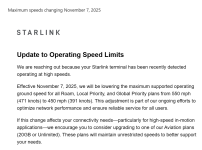
I need to apologize to the forum but seems Starlink has caught me flying outside their speed limitations: (Had a heck of a tailwind on my flight home from Northern Alabama.

Screenshot 2025-10-27 190600.png

Obviously kidding, the previous 550 mph max let many business jets operate at $ 50/hr. Hopefully they do not decide to lower further. 🤫
 
I agree but it will take some time to catch up with Starlink. I downgraded my plan to the $5.00 standby plan to see how that works. It should be all I really need for what I use it for. Internet weather, texting and phone calls. I will report back after a flight next weekend.
Promised report?
 
I agree but it will take some time to catch up with Starlink. I downgraded my plan to the $5.00 standby plan to see how that works. It should be all I really need for what I use it for. Internet weather, texting and phone calls. I will report back after a flight next weekend.
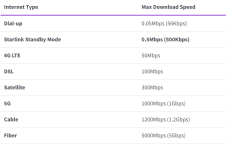
Also looking forward to the PIREP. From what I can tell for 5 bucks a month one gets texting and not much more. Even Foreflight the bandwidth is not enough but looking to hear what's possible?
 
I got an email from Starlink Monday offering a free Mini for certain residential customers; we've had a residential plan at our off grid cabin for several years, so I guess that qualified. It defaults to the standby plan, and the offer includes the option to turn on/off the roam plan at 50% off. Looks like I will be testing it in the -10...
 
I don’t suppose there’s a way to see ADSB traffic using internet? I’m out only equipped but I use starlink for travel, it would be nothing to throw it in the baggage shelf of the 8 for cross country work!

Edit- Garmin pilot supports it. Will try next week!
 
Last edited:
I don’t suppose there’s a way to see ADSB traffic using internet? I’m out only equipped but I use starlink for travel, it would be nothing to throw it in the baggage shelf of the 8 for cross country work!

Edit- Garmin pilot supports it. Will try next week!
Foreflight also works for the mini.
 
Crazy IT geek thought….

Bear with me here…I have dual Dynon HDX panel. Those two units are connected together via an ETHERNET cable, for auto-failover I’m assuming. I also have Dynon wifi adapters in both displays that drop connection to my iPad (ForeFlight) than I care to tolerate. I now have a Starlink Mini in the baggage area that now provides a very stable WiFi/internet connection to the ForeFlight-iPad for traffic, weather, etc via ForeFlight. Thinking of removing the Dynon WiFi since I now only push/pull Flightplans to my Garmin 175 for IFR. Otherwise the Dynon WiFi is very distracting when a drop occurs after final approach fix.

So here is crazy geek mode thought….. using something like a 4 port Ethernet switch and connect Starlink with both Dynon HDX via a physical Ethernet link. The Starlink would be the WiFi "hub" and provide reliable network connectivity to the dual Dynons and in turn to ForeFlight/ipad.

Dynon, you picking up what I’m laying down here? 🤣🤣
 
I don’t suppose there’s a way to see ADSB traffic using internet? I’m out only equipped but I use starlink for travel, it would be nothing to throw it in the baggage shelf of the 8 for cross country work!

Edit- Garmin pilot supports it. Will try next week!
Just remember there's a little bit of delay in what you see because of the time required for ADS-B Out positions to be received by, and migrate through, the traffic service provider's ground infrastructure, and then be sent out to you over the interwebs. The faster the traffic, the larger the distance is likely to be between reported position and what you see outside.

HTH

Dave
 
Last edited:
Just remember there's a little bit of delay for the time required for ADS-B Out positions to migrate through the FAA's ground infrastructure and back out to the service provider. :)

Dave
I am surprised how little delay there is. I can see my plane on Garmin Pilot app almost completely ghosting my actual one. Of course with the internet traffic, you get all the traffic and unlike ADSB in, you get no annunciations pertaining to where the traffic is relative to you. Also no warnings.
 
I am surprised how little delay there is.
I also see very little delay in ADS-B traffic. I guess we should stay wary via the Mark I eyeball, however, as I don’t know what traffic update speed (if any) is “guaranteed.”

Radar depictions of weather can be very noticeably delayed of course. On many occasions I’ve observed discrete rain areas that had already moved quite a bit compared to the depiction from ADS-B. Yet another reason to remain visual in the vicinity of foul weather!
 
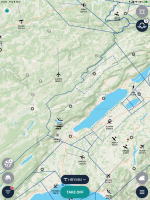
This works over the internet - and seems to work globally. Below is the view I have from my home. It will also provide data to your EFB, and will pull in data from a device like a skyecho, so you get both what's seen on the ground and what you can see in the air.


IMG_0006.PNG
 
I also see very little delay in ADS-B traffic. I guess we should stay wary via the Mark I eyeball, however, as I don’t know what traffic update speed (if any) is “guaranteed.”

Radar depictions of weather can be very noticeably delayed of course. On many occasions I’ve observed discrete rain areas that had already moved quite a bit compared to the depiction from ADS-B. Yet another reason to remain visual in the vicinity of foul weather!
Yes, the internet weather has had less of a delay than my ADSB weather. It’s nice to have both.
 
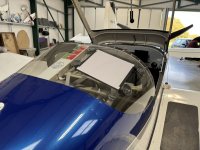
I’ve not tested it yet, still deciding on exactly how I’ll power the thing but it mounts nicely in the rear window.

View attachment 101369
This might work fine but I was a little concerned with turbulence causing stress on the window and possibly creating a crack so mounted mine on a tripod supported from the base with pool noodles around the edge to ensure movement didn't hit the window. Again, this might work just fine.
 
I have a magnetometer in one wing and a VOR antenna in the other and am thinking of installing in the wingtip with the VOR antenna. If they are in the wingtip together, will the antenna/hot spot interfere with VOR operation? No, I don't use the VOR much....but I put it in there for a reason.

I don't really want this thing in the cabin with suction cups, wires, or shelves. My preference would be to get in the airplane and have no idea it is there.

RV-14

Thanks,

Fred
 
I have a magnetometer in one wing and a VOR antenna in the other and am thinking of installing in the wingtip with the VOR antenna. If they are in the wingtip together, will the antenna/hot spot interfere with VOR operation? No, I don't use the VOR much....but I put it in there for a reason.

I don't really want this thing in the cabin with suction cups, wires, or shelves. My preference would be to get in the airplane and have no idea it is there.

RV-14

Thanks,

Fred
I would temporary put it in the wingtip and go fly. I just used some packing foam and carpet tape to hold it in place.
 
I also see very little delay in ADS-B traffic. I guess we should stay wary via the Mark I eyeball, however, as I don’t know what traffic update speed (if any) is “guaranteed.”
<thread drift>

If my memory is correct, the FAA has an internal requirement to get ADS-B Out data to its ATC facilities in less than a second. If your app's data provider gets its information from the FAA, the time required for data to flow from the FAA's service delivery point to your app is the unknown. If you're using ADS-B Exchange or another provider with its own collection network, all bets are off.

Anybody with a Starlink Mini wanna do some data collection? Go to an airport with ADS-B coverage on the ground, cycle your transponder, and see how long it takes for your track to reappear over your Starlink connection.

</thread drift>

ds
 
I got my free dish a few days ago.
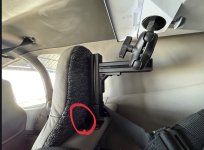
Mounted it to the bar behind the seats in the -10 using RAM mounts.
I have this charger in the back:


65W USB-C PD; the starlink mini would not boot using this. The min per the spec sheet is 100W, but I thought I would give it a shot as most report it uses much less than that in operation. (I did turn off snow melt).

I have ordered this as a replacement and will report back on how it works:


On another note, I have my COM1 antenna mounted to the tailcone on top just aft of the baggage wall. It is a combo NAV/COM/XM antenna. While starlink was trying to boot COM1 was receiving continuous static. I did have the starlink antenna angled aft.

Have any others had issues with antenna interference? This might be a deal breaker for this mounting location.
 
Some interesting info on Starlink Mini in this Avionics News article, although nothing conclusive.
Topics discussed:
- Any radiation hazards?
- Interference w radios?
- Mounting location
 

Attachments

On another note, I have my COM1 antenna mounted to the tailcone on top just aft of the baggage wall. It is a combo NAV/COM/XM antenna. While starlink was trying to boot COM1 was receiving continuous static. I did have the starlink antenna angled aft.

Have any others had issues with antenna interference? This might be a deal breaker for this mounting location.

My Starlink Mini is in the wing so I'm not a great comparison.

That said, I think I'd be suspicious of the USB adapter too. I've had a few really noisy ones.

To that end the Starlink runs well as long as I can get close'ish to 12 volts onto my Amazon special 14ga plug (https://a.co/d/3Vaa9YG). I ran 12ga wire from the CB to the wing which was likely overkill but it does the job even with the engine off from my EarthX batteries. If you have non-USB power readily available in the back it may be the cheap and good solution.

Running when the engine is on, anything fatter and/or shorter than the standard Starlink cable should work without a step up converter based on this sample size of one.

Derek

 
My Starlink Mini is in the wing so I'm not a great comparison.

That said, I think I'd be suspicious of the USB adapter too. I've had a few really noisy ones.

To that end the Starlink runs well as long as I can get close'ish to 12 volts onto my Amazon special 14ga plug (https://a.co/d/3Vaa9YG). I ran 12ga wire from the CB to the wing which was likely overkill but it does the job even with the engine off from my EarthX batteries. If you have non-USB power readily available in the back it may be the cheap and good solution.

Running when the engine is on, anything fatter and/or shorter than the standard Starlink cable should work without a step up converter based on this sample size of one.

Derek

Thanks for the input. I've already ordered that 100W version, will report back. If not I may swap to the amazon special...

As far as noise, I am pretty certain it was the starlink dish; I have charged phones and iPads from that USB charger for 60+ hours (since I upgraded it to USB-C) with no issues.
 
Back
Top