

Van's Air Force
You are using an out of date browser. It may not display this or other websites correctly.
You should upgrade or use an alternative browser.
You should upgrade or use an alternative browser.
garmin pilot
- Thread starter bobnoffs
- Start date


Auburntsts
Well Known Member
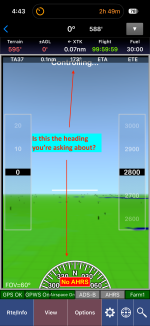
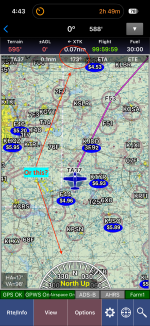
Not sure what you’re asking for reference heading. Can you clarify exactly what you’re looking for?
if my compass says east i would expect the unit to show somewhere around 90.Not sure what you’re asking for reference heading. Can you clarify exactly what you’re looking for?


On the MAP page, tap on oneof the black ones up top. You can then select what it shows.i have been out in my car with it. nowhere on the screen can i see a display of what my heading is. can this be because i am trying it out and havent paid for the subscription yet? the literature from garmin says this is not the case.

Deffinitions:
Heading = The magnetic direction the nose is pointed as depicted on a whiskey compass, DG or HSI or EFIS with a magnetometer.
Track = actual track the aircraft is traveling in across the ground.
Two different things.
Garmin Pilot does not use a magnetic compass nor a remote magnetometer. So it only shows a "track" (which is what we ultimately want to navigate with to get to grandma's house). However, ATC always assigns a "heading" (i.e. magnetic). So when flying if you are assigned a heading, also referred to as a vector, make sure to fly the compass heading or adjusted DG heading and not the GPS track. It really makes a difference if there is wind. ATC doesn't expect you to fly track because they are assigning heading to you and every other aircraft which means everyone is on the same page regardless of winds. Only time there is an exception would be if ATC assigns "direct to" or "resume own navigation". But neither of those instructions will have a heading attached.
Heading = The magnetic direction the nose is pointed as depicted on a whiskey compass, DG or HSI or EFIS with a magnetometer.
Track = actual track the aircraft is traveling in across the ground.
Two different things.
Garmin Pilot does not use a magnetic compass nor a remote magnetometer. So it only shows a "track" (which is what we ultimately want to navigate with to get to grandma's house). However, ATC always assigns a "heading" (i.e. magnetic). So when flying if you are assigned a heading, also referred to as a vector, make sure to fly the compass heading or adjusted DG heading and not the GPS track. It really makes a difference if there is wind. ATC doesn't expect you to fly track because they are assigning heading to you and every other aircraft which means everyone is on the same page regardless of winds. Only time there is an exception would be if ATC assigns "direct to" or "resume own navigation". But neither of those instructions will have a heading attached.
i have been out in my car with it. nowhere on the screen can i see a display of what my heading is. can this be because i am trying it out and havent paid for the subscription yet? the literature from garmin says this is not the case.
i have used 1/2 dozen gps units/programs in the past 10-15 yrs. always the info bearing,heading,location identifier,groundspeed,altitude,eta have always been available on the screen. i have spent at least 5 hrs with this program in the car and on the coffee table and i have never had a heading .
i have been concerned my tablet wasn't running the program right or the tryout period intentionally left heading out. this morning i have gotten a couple notices from garmin in my e mail. one that my trial period was running out[i only have used 3 of 30] and another that i have a temporary subscription. then i posted on this forum and i just turned my tablet on and there was '' heading'', just like it should have been, right next to bearing. i dunno but now i know is working as i expected.thanks for the confirmations of where it was supposed to show up.
i have been concerned my tablet wasn't running the program right or the tryout period intentionally left heading out. this morning i have gotten a couple notices from garmin in my e mail. one that my trial period was running out[i only have used 3 of 30] and another that i have a temporary subscription. then i posted on this forum and i just turned my tablet on and there was '' heading'', just like it should have been, right next to bearing. i dunno but now i know is working as i expected.thanks for the confirmations of where it was supposed to show up.

Auburntsts
Well Known Member
There is no heading display per se. If you are navigating to a fix you’ll get track and bearing info. If in syn vis mode you’ll get an HSI. But it’s not a compass so if not navigating there’s nothing to display a numerical value of your current heading. All you you can do is roughly deduce it by the way the little airplane on the map is pointing. Enabling the track vector line and range rings can help with the visualization.
Last edited:
What GPS units fundamentally display for navigation are Bearing and Track. Not Heading and Track. If Garmin decided to call Track "GPS Heading" that was a faux paux on their end as the word "Heading" is very specifically defined as magnetic and putting the acronym GPS in front of it only makes things ambiguous. The Pilot screen should show TRK. They should stick to Bearing and Track except in the case when everything is integrated into a glass flight deck like G3X or EFIS with a magnetometer.i have used 1/2 dozen gps units/programs in the past 10-15 yrs. always the info bearing,heading,location identifier,groundspeed,altitude,eta have always been available on the screen. i have spent at least 5 hrs with this program in the car and on the coffee table and i have never had a heading .
i have been concerned my tablet wasn't running the program right or the tryout period intentionally left heading out. this morning i have gotten a couple notices from garmin in my e mail. one that my trial period was running out[i only have used 3 of 30] and another that i have a temporary subscription. then i posted on this forum and i just turned my tablet on and there was '' heading'', just like it should have been, right next to bearing. i dunno but now i know is working as i expected.thanks for the confirmations of where it was supposed to show up.

Assuming you are using an IPad. Do you have the cellular capable IPad? If not, it won’t have a GPS.i have been out in my car with it. nowhere on the screen can i see a display of what my heading is. can this be because i am trying it out and havent paid for the subscription yet? the literature from garmin says this is not the case.
Have no clue if Android devices work the same way.

sibriggs
Well Known Member
These are results for setting north up in garmin pilot
Search instead for setting north up in gaemin pilot
AI Overview
To set "North Up" as your map orientation in Garmin Pilot, you can easily switch the setting from the main Map tab.
Here is how to do it in a few quick steps:
For a visual walkthrough of the map orientations and layout within Garmin Pilot:
How to Use the Garmin Pilot App | Tutorial for Beginners
Search instead for setting north up in gaemin pilot
AI Overview
To set "North Up" as your map orientation in Garmin Pilot, you can easily switch the setting from the main Map tab.
Here is how to do it in a few quick steps:
- Open the Garmin Pilot app and navigate to the Map page.
- Tap the Settings gear icon (or the map option/menu icon) located in the upper or lower corner of the screen.
- Look for the Orientation or map display setting.
- Select North Up.
For a visual walkthrough of the map orientations and layout within Garmin Pilot:
How to Use the Garmin Pilot App | Tutorial for Beginners
what they usually display is track and bearing. track shows the path you are taking across the ground and bearing is the degrees you are from the waypoint.What GPS units fundamentally display for navigation are Bearing and Track. Not Heading and Track. If Garmin decided to call Track "GPS Heading" that was a faux paux on their end as the word "Heading" is very specifically defined as magnetic and putting the acronym GPS in front of it only makes things ambiguous. The Pilot screen should show TRK. They should stick to Bearing and Track except in the case when everything is integrated into a glass flight deck like G3X or EFIS with a magnetometer.
anyway, track isnt shown on garmin pilot. i am trying ifly now and i like the way a ''heading'' tape is across the top of the page. going anywhere specific or not it shows in degrees your track across the ground. i guess i am used to having that info.
sibriggs
Well Known Member
There are a number of excellent iPad/iPhone apps for navigation. Garmin Pilot is often preferred if the user's panel is a full Garmin panel because the lock and feel buttonology is very similar. The payback happens when sitting at home using the Garmin Pilot for flight planning and then when using the installed Garmin avionics panel in flight.

True, but, without some sort of external feed, the iPad won’t show headings, at all. I’m inflight right now with GP running on a ‘droid tablet; when I select either MH or TH in the display, there’s no data… and how could there be since I have no compass attached. A GPS enabled tablet will not show headings; all it knows is GPS track.You can display Magnetic Heading and/or True Heading if you change one of the black boxes along the top of the map screen. Touch a black box, then pick what you want from the drop down window.
Are you connected to a "device" that would have the magnetic heading info supplied?True, but, without some sort of external feed, the iPad won’t show headings, at all. I’m inflight right now with GP running on a ‘droid tablet; when I select either MH or TH in the display, there’s no data… and how could there be since I have no compass attached. A GPS enabled tablet will not show headings; all it knows is GPS track.
If not, the only thing that you are going to get from a GPS only setup is "track" (including its variants).

Pilot135pd
Well Known Member
And here you thought that Siri wasn't listening...... this morning i have gotten a couple notices from garmin in my e mail. one that my trial period was running out[i only have used 3 of 30] and another that i have a temporary subscription. then i posted on this forum and i just turned my tablet on and there was '' heading'', just like it should have been, right next to bearing.
I just want to know what "device" it would be to show Heading. A whiskey compass can't talk to the iPad. However, if a remote magnetometer like the GMU 11 is hardwired to and talks to a G3X flight deck then Pilot on the iPad can very well show the G3X's Heading along with attitude (pitch/roll), GPS position, and flight plan data. G3X being an assembly of "devices" and then sharing it's data is the only way I know how to get Heading on Pilot.Are you connected to a "device" that would have the magnetic heading info supplied?
If not, the only thing that you are going to get from a GPS only setup is "track" (including its variants).
I just want to know what "device" it would be to show Heading. A whiskey compass can't talk to the iPad. However, if a remote magnetometer like the GMU 11 is hardwired to and talks to a G3X flight deck then Pilot on the iPad can very well show the G3X's Heading along with attitude (pitch/roll), GPS position, and flight plan data. G3X being an assembly of "devices" and then sharing it's data is the only way I know how to get Heading on Pilot.
Pretty sure you just used a whole lot more words to basically duplicate the intent of Chatterbox’s post.
Exactly.Pretty sure you just used a whole lot more words to basically duplicate the intent of Chatterbox’s post.
Auburntsts
Well Known Member
on the map screen, at the top of the map is a line of black boxes that display user selected data. Tap on one and a list of what you can select that box to display comes up. Scroll down and select track.
Bob,i started this thing using ''heading'' and i should have said ''track''.i guess i use these words interchangeably knowing that track is heading corrected for wind and whatever but they are 2 different animals.
track is what i cant find on garmin pilot.
IOS or Android?
I struggled with deciding between sticking with Foreflight or going to Garmin Pilot - as I have a full Garmin panel. What does GP do in terms of integrating to the Panel that FF doesn't?? Like now - I can send flight plans from FF to the panel or vice versa - from the panel to FF on my iPad or iPhone all very seamlessly and easy. What other functionality does GP give you??There are a number of excellent iPad/iPhone apps for navigation. Garmin Pilot is often preferred if the user's panel is a full Garmin panel because the lock and feel buttonology is very similar. The payback happens when sitting at home using the Garmin Pilot for flight planning and then when using the installed Garmin avionics panel in flight.
anderoidBob,
IOS or Android?
sibriggs
Well Known Member
Confidence that the corporation that owns the product is less likely to sell it or stop supporting it.I struggled with deciding between sticking with Foreflight or going to Garmin Pilot - as I have a full Garmin panel. What does GP do in terms of integrating to the Panel that FF doesn't?? Like now - I can send flight plans from FF to the panel or vice versa - from the panel to FF on my iPad or iPhone all very seamlessly and easy. What other functionality does GP give you??
Hasn't FF changed owners couple of times in the past few years?
Pilot135pd
Well Known Member
So.... nothing functionality wise then.Confidence that the corporation that owns the product is less likely to sell it or stop supporting it.
Hasn't FF changed owners couple of times in the past few years?
As far as panel interaction goes, I believe Garmin Pilot allows you to do some software updates for multiple products and can also record engine data from a GI 275. There might be more, but likely depends on what is in your panel.So.... nothing functionality wise then.
