



I discovered that my intercom was not working at all. Blissfully unaware of my issue during phase 1 testing of my -6A because I had no passengers.
Tried to trouble shoot, and adjust knobs of my Garmin 345 intercom and my Garmin 255A, as well as my secondary Dynon radio.
Removed my panel (thanks to the clever design -Carl Froelick), examined the pin connectors and all connections.
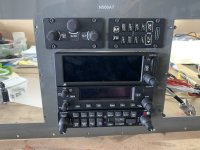
It was then that I noticed the side of the intercom had dinky switches (DIP) and labeled 1-5 on the top.
From the install manual:
Note that two buttons (AUX1 and AUX 2) are used to select/deselect the 3 AUX inputs. Pressing the AUX 1 button selects/deselects the AUX 1 and AUX 3 receivers. Pressing the AUX2 button selects/deselects the AUX 2 receiver.
**Note that one button (AUX) is used to select/deselect all 3 AUX inputs. When AUX is selected, audio from all three AUX inputs is merged and heard together.
2.8.5 DIP Switch Configuration
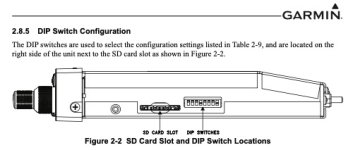
The DIP switches are used to select the configuration settings listed in Table 2-9, and are located on the right side of the unit
Confession:
I had no idea that I was to properly set these during install.
Duh.
Once set properly, all well.
In summary, don't do what I do, do what I re-do.
Daddyman
Tried to trouble shoot, and adjust knobs of my Garmin 345 intercom and my Garmin 255A, as well as my secondary Dynon radio.
Removed my panel (thanks to the clever design -Carl Froelick), examined the pin connectors and all connections.
It was then that I noticed the side of the intercom had dinky switches (DIP) and labeled 1-5 on the top.
From the install manual:
Note that two buttons (AUX1 and AUX 2) are used to select/deselect the 3 AUX inputs. Pressing the AUX 1 button selects/deselects the AUX 1 and AUX 3 receivers. Pressing the AUX2 button selects/deselects the AUX 2 receiver.
**Note that one button (AUX) is used to select/deselect all 3 AUX inputs. When AUX is selected, audio from all three AUX inputs is merged and heard together.
| Switch | Function | Description |
| 1 | ENABLED KEYED ICS | When set to ON, the intercom system (ICS) will only allow intercom MIC audio to be heard when the corresponding ICS KEY for the MIC position is pressed. When set to ON, auto squelch will NOT be active. |
| 2 | PILOT IN RIGHT SEAT | This setting is for intercom 3D audio. Normally the Pilot will be positioned to the left in the Copilot’s headset, and the Copilot will be positioned to the right in the Pilot’s headset. When set to ON, this setting reverses that so the Pilot is positioned to the right in the Copilot’s headset, and the Copilot is positioned to the left in the Pilot’s headset. For the GMA 345 3-COM unit, this also sets which knobs control Pilot volumes vs. Copilot/Passenger volumes. |
| 3 | MUTE ON COM TX | When set to ON, the monitored COM radio is muted during mic- selected COM transmission (mic-selected COM is still heard, but not the monitored COM radio). |
| 4 | PASSENGERS ALWAYS GET MUSIC 2 | When set to ON, regardless of what the music source is set to (1, 2, Bluetooth transceiver on GMA 345, or 1, 2, Jack on GMA 342), regardless of what state of the MUSIC button is set to (ON or OFF), the passengers will always get MUSIC 2. |
| 5 | RESERVED | LEAVE SWITCH IN OFF POSTION |
| 6 | RESERVED | LEAVE SWITCH IN OFF POSTION |
| 7 | RESERVED | LEAVE SWITCH IN OFF POSTION |
2.8.5 DIP Switch Configuration
The DIP switches are used to select the configuration settings listed in Table 2-9, and are located on the right side of the unit
Confession:
I had no idea that I was to properly set these during install.
Duh.
Once set properly, all well.
In summary, don't do what I do, do what I re-do.
Daddyman
