

Van's Air Force

The definitive Van's Aircraft support community! Buying, building or flying an RV? Join our exclusive family of mentors and enthusiasts!

Poll (kinda'). Your Top Discretes preferences for Stick Grip.

Freemasm

Well Known Member
Patron
Would probably be better as a Poll but I have no such privileges.

What are your top (three) preferred discretes to have on your stick grip and why?

TO/GA
CWS/AP disc
Com swap
Com step
ident
Smart Glide
LVL (maybe in the future)
etc.

Start and Flaps don't really qualify but it's an open forum. My apologies if this has been asked before. Could not find it and enhanced web searches target switch type.
 
Last edited:
SMOKE ! That's all I have on my throttle,..but I have a very simple Comm,no A/P or any other goodies, so stick has electric trims, flaps and PTT.
 
"The stuff you need and not all the stuff you want..."

Throttle -
Smoke
TO/GA

Stick -
PTT
AP/CWS
Trim(s)

edit: Added "all" to the quote. You could add a switch for everything, but unless you are trained like an F-16 pilot, they'll cause more problems than solve.
 
Last edited:
1) CWS/AP disc. used all the time
2) Ident used all the time
3) Start - added safety for a tail dragger (Use a start disconnect on the panel when not needed)

Favorite discrete used. (If you assume trim and flaps not a discrete.

Not sure when someone asks a direct question on a particular feature they get "don't need it". Not what they asked.
 
Last edited:
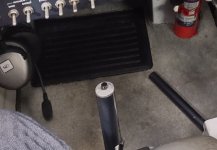
Would probably be better as a Poll but I have no such privileges.

What are your top (three) preferred discretes to have on your throttle grip and why?

TO/GA
CWS/AP disc
Com swap
Com step
ident
Smart Glide
LVL (maybe in the future)
etc.

Start and Flaps don't really qualify but it's an open forum. My apologies if this has been asked before. Could not find it and enhanced web searches target switch type.
there's another you should consider. a dedicated com 2 ptt. quite useful for formation flying where lead might want to have atc or airboss or something on one freq and keep the flight on another. regular ptt uses whatever your audio panel is set to, the com2 ptt always xmits on com2

I don't really have the ability to put anything on my throttle grip right now, but my to/ga is near as dammit. when I advance the throttle I can press it with my finger.
 
I have two airplanes with PTT on the throttle (as well as one the stick) and find that I never use them…honestly sort of forget they are there. The truth is that I am rarely gripping the throttle “grip” - I generally am hanging on to the lever itself, below the grip, so that my hand is anchored for fine movements. Even (or especially) in formation flying, I don’t use the grip much - the lever is more precise. Now I also often grip the stick below the actual “Grip” - but am more likely to use the grip during high-gain activities. And if the autopilot is flying, I just naturally tend towards the stick PTT when I need to communicate - probably just decades of habit.

Just personal experience - yours maybe be different.
 
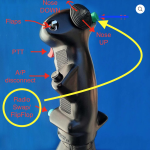
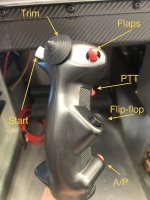
This is what I did. The radio flip flop (abilty to swap Freqs between active and standby) was moved to the upper button. The bottom pinky button I am going to change to swapping between Comm1 and Comm 2 on my Garmin Audio panel since I have two radios. I just haven't done it yet.

Hope this helps.

BTW - the flap switch on the stick is my fav feature other than PTT and Trim.

EDIT to add: The AP disconnect/CWS button on the stick has "Saved" me a few times when the AP did something abruptly I didn't expect. I was nice to have it right there to click off quickly.
 

Attachments

  • 1780943649708.png
    1780943649708.png
    1.3 MB · Views: 57
Ray Allen old school G205
#1 PTT on front, #2/#3 Nose Up down trim, left button comm swap, right button AP/Dscnt - Kept stick long to see if I like it. Can always shorten.

Passenger PTT on Panel. Also have trim on a rocker and AP/dscnt on panel in case I decide to abandon stick buttons
 
Last edited:
@Toobuilder Thanks for pointing out my case of the dumba$$, yet again. Was supposed to be stuck grip. Last thing I was working on was the throttle.

It’s been corrected. Sorry and thanks
 
Ok, in that case my top 3 is Pitch trim, PTT, and AP enable. I also have freq flip/flop, smoke, and flaps.
 
Last edited:
Tosten Military. Crazy number of options and very comfortable. Pilot is below.
Hat center top
CWS top left
Flap up/dn top right
Flip/Flop mid right thumb
PTT trigger
Unused front recessed button

Funny, Dynon has so many ways to do things, I find myself pressing the flip/flop on the com panel. I do use the CWS often because it's convenient but sometimes I use the AP panel or the EFIS AP menu.
 
Last edited:
Start and Flaps don't really qualify but it's an open forum.
Why doesn’t Start qualify?
On the Rocket I love the ability to hold the stick all the way back and hit the start button on my stick grip. The left hand is free to manipulate the mixture and throttle.
As for the flaps: I must have at least FOUR on the stick: Flaps, Start, PTT, and Pitch trim.
FWIW, my stick also sports no. 1 radio flip-flop, comm swap, ident, and AP disconnect/CWS.
If I ever add smoke it will have to be on the throttle.
 
I have two airplanes with PTT on the throttle (as well as one the stick) and find that I never use them…honestly sort of forget they are there. The truth is that I am rarely gripping the throttle “grip” - I generally am hanging on to the lever itself, below the grip, so that my hand is anchored for fine movements. Even (or especially) in formation flying, I don’t use the grip much - the lever is more precise. Now I also often grip the stick below the actual “Grip” - but am more likely to use the grip during high-gain activities. And if the autopilot is flying, I just naturally tend towards the stick PTT when I need to communicate - probably just decades of habit.

Just personal experience - yours maybe be different.
Having PTT on the throttle famously caused 5 USAF T-38s to follow their lead right into to the ground. In a practice flight of the Thunderbirds, the lead aircraft had a control malfunction where something (a wrench, IIRC) interfered with getting getting enough up-elevator to complete a loop. The lead pilot knew something was wrong when he missed the cross-check speed and altitude over the top of the loop. He moved his hand from the throttle and put both hands on the stick. As the maneuver continued, he pulled as hard as he could, bent some stuff, but could not finish the loop above the ground. Had the PTT been on the stick, he could have given a 'knock it off' call to the other five aircraft. But because the PTT was on the throttle, and he had committed both hands to pulling on the stick, he could not talk to them. They all followed the lead right into the ground.
 
Why doesn’t Start qualify?
On the Rocket I love the ability to hold the stick all the way back and hit the start button on my stick grip. The left hand is free to manipulate the mixture and throttle.
As for the flaps: I must have at least FOUR on the stick: Flaps, Start, PTT, and Pitch trim.
FWIW, my stick also sports no. 1 radio flip-flop, comm swap, ident, and AP disconnect/CWS.
If I ever add smoke it will have to be on the throttle.

Closed a circuit isn’t really discrete I/O; though, the way flaps trim are controlled through other Garmin equipment (GAD) kinda is. Technical Semantics and sh!t; not important. PTT and trim and almost automatics. Was looking for the “second tier” options that people chose and why.

My flaps and start will be on grip or throttle or vice versa.

Thx.
 
Why doesn’t Start qualify?
On the Rocket I love the ability to hold the stick all the way back and hit the start button on my stick grip. The left hand is free to manipulate the mixture and throttle.
As for the flaps: I must have at least FOUR on the stick: Flaps, Start, PTT, and Pitch trim.
FWIW, my stick also sports no. 1 radio flip-flop, comm swap, ident, and AP disconnect/CWS.
If I ever add smoke it will have to be on the throttle.
See post 6.
 
My setup was partially driven by 30+ years of flying military aircraft, so your mileage may vary.

Stick:
Trim
Autopilot/CWS
Comm Swap (1 / 2) for formation flying
Start

Throttle:
PTT
Smoke On/Off
 
Pilot side I have only PTT and AP disc/CWS. Passenger side only PTT.

Funny thing is when I'm flying I manage to push the wrong one more often than I care to admit.

But I keep on trying.
 
I’m (taking a break right now!) in the process of reworking my RV10 pilot side stick buttons after about 400h.

It used to have
PTT
Pitch trim
CWS/Disconnect
Ident
PTC for the GTN.

When I’ve finished it will have
PTT
Pitch and Roll trim
CWS/disconnect.

The PTC is ordinary so never gets used.

I think I’ve Idented twice in this plane.
It just dosent seem to get used much here. Maybe the airspace just isn’t that busy. Or ADSB. Dunno. YMMV.
Besides it’s right in the middle of the top row of the MFD anyway.

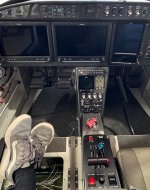
I stupidly put the roll trim on the sub panel because I never really used it on my 7. The 10 with the ER tanks I just have to fiddle with roll more. So back on the stick.
 

Attachments

  • IMG_6209.jpeg
    IMG_6209.jpeg
    704.8 KB · Views: 19
RV-10

Infinity Stick:
Pitch / Roll TRIM
COM SWAP 1/2
PTT
TIMER (G3X TOUCH)
AP DISC / CWS
TRAFFIC ACKNOWLEDGE (Europe specific)

Throttle (planned, not yet installed)
TO/GA
 
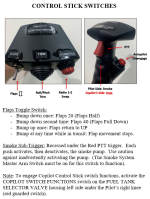
On side by side I add a “PILOT/COPILOT” DPDT toggle switch on the panel. This selects who has Trim and Flap control. It does two things:
- Prevents a non-pilot in the copilot seat from messing with trim or putting flaps out at speed.
- Provides an installed backup incase the pilot stick switches fail.

The switch simply provides or does not provide the ground for the trim top hat and flap switches.

Side note. The first build had the start button on the stick for exactly two flights. Never again. If you must have it on the stick I recommend a “Starter Enable” toggle switch on the panel to prevent inadvertently engaging the starter after engine start.

Carl
 
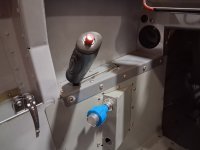
This is a pic of the Pilot's stick in my RV-10, so left hand. It's kind of overkill as I don't use the pinky button comm flip-flop (just never got in the habit as I use the button on the radio itself) adn I no longer have a VP-200 so the thumb buttom is dead and I have nothing else for it to do but it's availble if soemthing crops up in the future. Everything else I'd do again exaclty as I have it laid out.


Stick (2).jpg
 
there's another you should consider. a dedicated com 2 ptt. quite useful for formation flying where lead might want to have atc or airboss or something on one freq and keep the flight on another. regular ptt uses whatever your audio panel is set to, the com2 ptt always xmits on com2

I don't really have the ability to put anything on my throttle grip right now, but my to/ga is near as dammit. when I advance the throttle I can press it with my finger.
***Thread drift Warning***

Do you have a COM2 PTT? I’m asking AFS/Dynon to build me a “BYO Panel” setup, and today I was told that two separate PTTs are not possible with any “intercom or audio panel on the market today”.
I want 2 x PTTs on my stick grip (one for each radio), and 1 (or 2 if possible) PTTs on the back seat stick grip. (If only one PTT in back, maybe a toggle switch to select which radio it transmits on).
Has anyone done this? If so, what hardware did you use?
 
***Thread drift Warning***

Do you have a COM2 PTT? I’m asking AFS/Dynon to build me a “BYO Panel” setup, and today I was told that two separate PTTs are not possible with any “intercom or audio panel on the market today”.
I want 2 x PTTs on my stick grip (one for each radio), and 1 (or 2 if possible) PTTs on the back seat stick grip. (If only one PTT in back, maybe a toggle switch to select which radio it transmits on).
Has anyone done this? If so, what hardware did you use?
My knowledge is dated but hopefully still accurate. The PTT (and mic key for that matter through the tip of the jack) ground related the related circuit down through the audio panel. Anything can be done but my ME brain can’t conceive of any other way except two parallel, independent audio/com combos for a setup that incorporates an audio panel. Basically it lines up with what Dynon has stated. The newer Garmin coms don’t require audio panels so if your cockpit doesn’t use/need one, I’m guessing your approach wouldn’t be overly complicated albeit possibly complex with that equipment.

Curious now. Will look at the 205 manual if I get a chance. Zero clue on the Dynon stuff but there’s a lot of people on here that do.

Good luck and let us know.
 
My knowledge is dated but hopefully still accurate. The PTT (and mic key for that matter through the tip of the jack) ground related the related circuit down through the audio panel. Anything can be done but my ME brain can’t conceive of any other way except two parallel, independent audio/com combos for a setup that incorporates an audio panel. Basically it lines up with what Dynon has stated. The newer Garmin coms don’t require audio panels so if your cockpit doesn’t use/need one, I’m guessing your approach wouldn’t be overly complicated albeit possibly complex with that equipment.

Curious now. Will look at the 205 manual if I get a chance. Zero clue on the Dynon stuff but there’s a lot of people on here that do.

Good luck and let us know.
Thanks, Fremasm-
I wasn’t planning to use an audio panel, just a Dynon intercom. I was imagining that by using “split volumes” on the two radios, I wouldn’t need a comm panel.
I just want an intercom to be able to talk to my backseater, and a PTT for each radio.
I’m not strong on EE (my undergrad was in Aero Engr), but it doesn’t seem like it would be that hard…
It works that way in every fighter aircraft I’ve ever been in.
 
So by saying PTT for com2 do you mean split com? By your description you want to have 2 frequencies tuned and transmittable without touching the Audio panel right?
Split com will do this.

As far as I can tell heaps of Garmin audio panels support this.

I have a GMA350 and it def has 2 PTT inputs and therefore split com capability.
In my 7 I had a GMA347 which also had it.

I have a pilot PTT (PTT1) and a copilot PTT (PTT2) In normal audio panel mode, both PTTs will xmit on whichever com the audio panel is selected for xmit. In split com mode pilot PTT1 drives com1 and PTT2 com2.
So yes you could have PTT1 and PTT2 on the stick and leave the audio panel in split com mode all the time.
It also dosent matter how many PTT buttons you actually have to PTT 1 or 2 either. They are just grounds. They don’t have to have anything to do with the mic circuit. I have 2xPTT1. On the stick and on the glareshield.

Edit I see you aren’t planning an audio panel. Disregard cheers
 
Thanks, Fremasm-
I wasn’t planning to use an audio panel, just a Dynon intercom. I was imagining that by using “split volumes” on the two radios, I wouldn’t need a comm panel.
I just want an intercom to be able to talk to my backseater, and a PTT for each radio.
I’m not strong on EE (my undergrad was in Aero Engr), but it doesn’t seem like it would be that hard…
It works that way in every fighter aircraft I’ve ever been in.
How are you planning on activating this; a "two stage" trigger switch like on many helicopter cyclic grips?
 
“I was told that two separate PTTs are not possible with any “intercom or audio panel on the market today”
This is actually possible because I’ve done it. I have a Garmin GMA 245 bluetooth audio panel that can record real time audio onto videos or listen to music. On the audio panel I can select Mic 1 for radio 1 (GTN 650) or Mic 2 for the SL-30 and it will transmit whichever Mic button is selected with the Stick grip (Tosten Military grip) PTT Trigger switch. Normally it’s Comm 1, Comm 2 and Mic 1 that are highlighted ON. This is what I normally use for Comm 1 which is always on ATC. The SL-30 is pretty much dedicated to air to air formation frequencies and I have a secondary PTT on the throttle grip just below the smoke system rocker switch. A relay is installed that is wired from the throttle PTT through the SL-30 and basically bypasses the audio panel settings. The SL-30 has its own dedicated antenna in the wingtip. The secondary throttle PTT transmits on the #2 SL-30 Comm anytime I push the throttle PTT regardless of what is set on the audio panel. So I transmit to ATC, Airboss etc on Comm 1 with the stick grip PTT trigger while simultaneously talking to the formation on the S-30 with the throttle PTT.

Please don’t ask me exactly how it’s done because as you see in my signature block, “It sure is nice to have smart friends”. I have a buddy that is an avionics wizard that wired this feature. So it can be done, you just have to find a wizard. I also have a secondary PTT button on the left side of the panel I use when XC with the autopilot ON. This is set up to transmit on whatever is selected on the audio panel. Again- wired by my wizard.

The back seat PTT is also wired through the audio panel and works with whatever is selected on the audio panel. I have flaps, trim and PTT available for the back seater but I have one switch up front that disables all these features for flights with non pilots in the back.
 
Last edited:
So by saying PTT for com2 do you mean split com? By your description you want to have 2 frequencies tuned and transmittable without touching the Audio panel right?
Split com will do this.

As far as I can tell heaps of Garmin audio panels support this.

I have a GMA350 and it def has 2 PTT inputs and therefore split com capability.
In my 7 I had a GMA347 which also had it.

I have a pilot PTT (PTT1) and a copilot PTT (PTT2) In normal audio panel mode, both PTTs will xmit on whichever com the audio panel is selected for xmit. In split com mode pilot PTT1 drives com1 and PTT2 com2.
So yes you could have PTT1 and PTT2 on the stick and leave the audio panel in split com mode all the time.
It also dosent matter how many PTT buttons you actually have to PTT 1 or 2 either. They are just grounds. They don’t have to have anything to do with the mic circuit. I have 2xPTT1. On the stick and on the glareshield.

Edit I see you aren’t planning an audio panel. Disregard cheers
Richard-
Thank you for the explanation. Apparently I want “split comm” - I just didn’t know what to call it.
If I need an audio panel to get that, I’ll consider it - I just didn’t want to give up panel space for an audio panel.
 
This is actually possible because I’ve done it. I have a Garmin GMA 245 bluetooth audio panel that can record real time audio onto videos or listen to music. On the audio panel I can select Mic 1 for radio 1 (GTN 650) or Mic 2 for the SL-30 and it will transmit whichever Mic button is selected with the Stick grip (Tosten Military grip) PTT Trigger switch. Normally it’s Comm 1, Comm 2 and Mic 1 that are highlighted ON. This is what I normally use for Comm 1 which is always on ATC. The SL-30 is pretty much dedicated to air to air formation frequencies and I have a secondary PTT on the throttle grip just below the smoke system rocker switch. A relay is installed that is wired from the throttle PTT through the SL-30 and basically bypasses the audio panel settings. The SL-30 has its own dedicated antenna in the wingtip. The secondary throttle PTT transmits on the #2 SL-30 Comm anytime I push the throttle PTT regardless of what is set on the audio panel. So I transmit to ATC, Airboss etc on Comm 1 with the stick grip PTT trigger while simultaneously talking to the formation on the S-30 with the throttle PTT.

Please don’t ask me exactly how it’s done because as you see in my signature block, “It sure is nice to have smart friends”. I have a buddy that is an avionics wizard that wired this feature. So it can be done, you just have to find a wizard. I also have a secondary PTT button on the left side of the panel I use when XC with the autopilot ON. This is set up to transmit on whatever is selected on the audio panel. Again- wired by my wizard.

The back seat PTT is also wired through the audio panel and works with whatever is selected on the audio panel. I have flaps, trim and PTT available for the back seater but I have one switch up front that disables all these features for flights with non pilots in the back.
That’s a great explanation. Thank you!
 
***Thread drift Warning***

Do you have a COM2 PTT? I’m asking AFS/Dynon to build me a “BYO Panel” setup, and today I was told that two separate PTTs are not possible with any “intercom or audio panel on the market today”.
I want 2 x PTTs on my stick grip (one for each radio), and 1 (or 2 if possible) PTTs on the back seat stick grip. (If only one PTT in back, maybe a toggle switch to select which radio it transmits on).
Has anyone done this? If so, what hardware did you use?
it's entirely possible, without using a feature of an audio panel my gma240 doesn't have that for ex. you'll need a 4pdt relay to do it. I found the diagram on here somewhere, however I've got a project once I retire (6 months!) to build it all solid state. pm me if you can't find the diag and I'll see if I can dig it out.
 
The trouble with modern grips is that you have an almost unlimited configuration and a huge quantity of stuff you can put on there, so the temptation is to do all of it just because you can. My Tosten military grip has the following:

Engine start
4 way trim
CWS/AP disc.
TOGA
PTT
Event Marker (this one was recommended by my avionics guy. and hey, I had an extra button. Push it with your pinky and it does nothing except note an event on the data cards so that if you push it after a momentary engine hiccup or whatever its easy to find what your looking for in the data after).

The engine start was a cool idea as an option for flooded start procedure on a big fuel injected engine on a tailwheel airplane, but I find that decades of flying fuel injected Cessnas has ingrained a start procedure where I don't really ever flood it and have never yet run out of hands to do the required starting stuff while holding the stick back between my knees. I'd likely not do that one again.
 
The engine start was a cool idea as an option for flooded start procedure on a big fuel injected engine on a tailwheel airplane, but I find that decades of flying fuel injected Cessnas has ingrained a start procedure where I don't really ever flood it and have never yet run out of hands to do the required starting stuff while holding the stick back between my knees. I'd likely not do that one again.
Thank you! I've been reading this thread wondering if I missed out on something by not having start on my stick grip. I have a fuel injected IO-360 and on Hot Starts - I have to start with Throttle Full FWD/Mixture cut off. I"ve wondered if having a start button on the stick would help. But I've had no issues so far, so not planning on changing anything. The main techique is to just let off the brakes if it momentarily surges forward.
 
Thank you! I've been reading this thread wondering if I missed out on something by not having start on my stick grip. I have a fuel injected IO-360 and on Hot Starts - I have to start with Throttle Full FWD/Mixture cut off. I"ve wondered if having a start button on the stick would help. But I've had no issues so far, so not planning on changing anything. The main techique is to just let off the brakes if it momentarily surges forward.
Notso,

If you use the full throttle mixture cutoff technique then I think you would benefit by having a start button on the stick grip. If you do then make sure to have it wired through a “start consent” switch of some kind somewhere so you don’t inadvertently engage the starter at an inopportune time. Another hot start technique you can try is before you shutdown set the throttle at 1,000 rpm and let it stabilize. Then leave the throttle alone and shutdown with the mixture. When back in the plane and ready to start don’t touch the throttle- switches ON, no prime and engage the starter and mixture fwd when it fires. Each engine is different so this is just another technique.

If you decide to change stick grips I recommend the Tosten Military grip. You can have it professionally engraved with all the functions before you get it. Some guys like the Infinity but it’s a real pain to install. The Tosten grip is dirt simple to install and you can easily clock it it the way your hand naturally rests. And if you want to change the orientation it’s so super simple to do even a caveman like me can do it!
 

Attachments

  • IMG_9076.png
    IMG_9076.png
    1.3 MB · Views: 9
Last edited:
[insert my story of almost being decapitated due to a stick mounted start button]

Let’s keep heads on necks! If you’re going to put a start button on your stick, please add a disconnect (“start consent”) switch somewhere else. 🤣
 
  • Like
Reactions: Mel
don't respo[insert my story of almost being decapitated due to a stick mounted start button]

Let’s keep heads on necks! If you’re going to put a start button on your stick, please add a disconnect (“start consent”) switch somewhere else. 🤣
Not to mention accidentilly hitting the start button in turbulence. starters don't respond well to being engaged with a flywheel spinning 2500 rpm.
 
I also thought it would be cool to have these buttons for convenience and had a comm flip flop there. Flying along on flight following and eventually wonder why I haven't been handed off in a while and no one is talkking. Call in, but no one answers. Look down and was on the previous freq; Must have accidently hit the button without knowing it. If I was on an IFR clearance bad things could have happened.

When making these decisions, please consider the consequences of inadvertant application. I have accidentilly hit these buttons many times in heavy turbulence and no longer put anything there that is either mission critical, will do damage or won't warn me when it happens.
 
The biggies for me are:

Starter engage (of course with some sort of disable function once the engine is running [duh])
Elevator & Rudder trim
A/P disconnect
PTT

Beyond this, it’d be mission specific stuff… smoke, #2 PTT, whatever is important to you. Personally, I don’t mind having the flap lever somewhere else.

One of my planes has aileron trim on the stick and the other has a rocker switch near the throttle. I really don’t mind either solution. I find that aileron trim is something I use to fine tune cruise flight so I don’t mind not having it on the stick.

One other buttonology opinion I’ll share is that I really like having a secondary PTT somewhere other than the stick. Neither of my RV/Rocket planes have it now, but my in-progress Glasair panel will. Some of the turbine planes I fly for work have a secondary PTT and I really appreciate it when the autopilot is on and I’m sitting back and monitoring the progress of the flight. Put it someplace where your hand will naturally rest when you’re NOT actively manipulating the controls. One hand presses the button and the other tunes the radio while you’re reading back a frequency change.

My $0.02
 
I was told that two separate PTTs are not possible with any “intercom or audio panel on the market today”.
I want 2 x PTTs on my stick grip (one for each radio), and 1 (or 2 if possible) PTTs on the back seat stick grip. (If only one PTT in back, maybe a toggle switch to select which radio it transmits on).
Has anyone done this? If so, what hardware did you use?

From the GMA 245 audio panel pilot's guide:

DEDICATED PTT MODE

With Separate PTT operation, both pilot and copilot have two dedicated PTT keys. One PTT key is for COM1, and the other for COM2.

In Dedicated PTT Mode, the pilot and copilot select which COM to transmit on using their dedicated COM1 PTT or COM2 PTT keys.

The COM1 MIC and COM2 MIC keys remain lit and perform no action when pressed. Transmitting on a COM automatically enables monitoring of the associated radio.
 
Back
Top