I just wish the G3X would display a digital CPU number rather than the convoluted bar graph of fast and slow. I could fly to that digital number like we had in the Eagle. But I'm struggling to understand what you guys want me to actually fly using the AOA display. Or even tones.@Notso
@glider_rider gave us a radius vs sink graph, which is nice for a glider trying to stay inside a thermal, but we really want to see turn rate v sink here. The other graphs show bank vs altitude loss through 360 degrees total turn, which show consequence of the rate turn v VVI, though if you have your data to pull, perhaps you could make your own turn rate v sink aka turn rate v VVI plots?
Such would be at altitude work with repeat points doing a set amount of turn noting time to turn and altitude loss in the turn. Probably good to start at thirty AOB increasing each repeat 30, 35, 40, 45, 50, 55, 60 and as you’re not likely refueling between, go backwards 60 down to thirty and then afterward hopscotch 30, 60, 40, 50, 5, 55, 35. Dealer’s choice full 360s, 180s, or 90s. But look for calm air so as to avoid external factors skewing. You’ll want to do these constant AOA. Same AOA for all AOBs. Onspeed AOA would be good as it becomes useful to you though for purposes of turn rate v sink, any AOA choice will do.

Van's Air Force
You are using an out of date browser. It may not display this or other websites correctly.
You should upgrade or use an alternative browser.
You should upgrade or use an alternative browser.
The Impossible Turn...
- Thread starter Vac
- Start date


Great discussion for sure, but mechanical issues continue to plague the EAB fleet for numerous reason.
So perhaps folks should seek more help in that area before throwing caution to the wind.
What’s that old saying; use better judgment to avoid having to use superior skills.
So perhaps folks should seek more help in that area before throwing caution to the wind.
What’s that old saying; use better judgment to avoid having to use superior skills.
VAC - OK I apologize - but please talk to me like I'm a 5 year old and you're trying to teach me to tie my shoes. What exactly should I be seeing on my G3X AOA display and/or what should the tones sound like as I'm executing that turn back at to 45-60 deg bank and then rolling out to point at the runway??NOTSO, that's correct--just fly everything on speed. I know I'm preaching to the choir, but here's the "long answer" on why for others that are following along:
The debate over “best glide speed” versus “best turn speed” largely misses the point during a turnback. The maneuver is short, dynamic, and workload is high. What matters is proper energy management with adequate stall margin, not chasing multiple target airspeeds. That condition exists at on-speed angle of attack, or—when AOA is not available—at a Vref-style speed for the current configuration. In normal operations, Vref is tied to a predictable margin above stall for a given flap setting; after takeoff, that same concept applies with the airplane clean or with takeoff flaps set. Practically, this means flying a steady reference speed that preserves a consistent stall margin in the flaps-up/takeoff flaps configuration (often close to about 1.3 times stall speed, but airplane-specific as Flats points out). On speed AOA corresponds to a constant percentage of available lift, so it automatically accounts for changes in weight and density altitude and helps keep the airplane at a predictable margin above stall. In a 45-degree banked glide, that Vref-style reference provides enough margin (about 1.5 to 2 degrees actual body angle [AOA]) to maneuver without sacrificing turn performance. It is not the speed that maximizes glide distance. It is the speed that minimizes workload and preserves control. A single, stable reference improves precision and survivability when time and altitude are limited.
I certainly can't refute a pedal-shaker turn (dating myself there, but maximum instantaneous--right at the stall warning/buffet [if there is one]), followed by a well-executed "extension" (think BFM "hooks and lines") at L/Dmax, followed by a smooth transition to touchdown speed with landing flaps applied just before landing. I'm just not that good a pilot to do that when I'm sucking up the seat cushion. I think of the scenario as more time/fear constrained than distance constrained if that makes any sense, and I like a simple game plan: do whatever it takes, maintain on speed. Technique only!
Cheers,
Vac

Fffflats
Well Known Member
VAC - OK I apologize - but please talk to me like I'm a 5 year old and you're trying to teach me to tie my shoes. What exactly should I be seeing on my G3X AOA display and/or what should the tones sound like as I'm executing that turn back at to 45-60 deg bank and then rolling out to point at the runway??
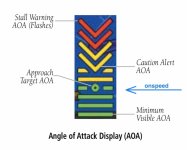
Does your G3X account for flap setting to its AOA? Assuming you have it wired to tell flap setting and calibrated a clean wing as well as your normal landing configuration, then the top green bar which has a “donut” in the middle of the bar is the onspeed bar.
If, however, your system is not flap aware or only calibrated to landing configuration, then you’ll need to do a check flying a no flap Vref adjusted for current weight to see which bar is illuminated. You can use an ROT of minus 1 kt for every 100 lbs below gross, as your gauge is likely mph, minus one per 100 lbs of that is close enough too. Or, you can real-time no flap unaccelerated full stall, note the speed, multiply this by 1.3, fly this speed and note the AOA indication.
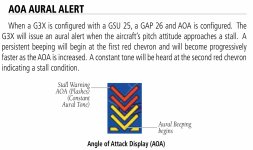
Tones won’t help with this setup, if you hear tone, ease the nose letting it down. They’re using tones strictly as stall warning. Though, suppose, if you lose the display, you could ride the edge of tone presence pulling just into it and easing out of it given that it starts not far slower than onspeed. Think of it as riding the top of the E-bracket or staple instead of its middle.
For bank, I’d recommend 45 to 50 not 60 AOB.
Attachments
Last edited:

Fffflats
Well Known Member
Does anyone have a playbook for exactly how to test a turnback at altitude, something even an idiot like me could understand and repeat?
- Flying along at 175 KTAS at 4000 ft AGL...
- Slow to 80 KTAS while maintaining level flight...
- Now, ....
- ....
Without Vac’s app, here is a starting worksheet. This is not the number, it gives you an initial number from which you can practice and work down. Wherever the sheet gives speeds, use onspeed AOA if you have it. Otherwise best glide is good enough a starting point. Once you have this number, use it above your field on simulated takeoff and see, start iterating. If you had to add power or busted your floor of simulated runway height, add height to the number. More likely, if you had to slip a lot, reduce the number. Having to do a little slip is ok if you don’t have the app and you’re not optimizing the number accepting a touch extra height to your trip wire. Now take it to actual takeoff and iterate some more.
Do consider your field, does it have cross runways? Parallel runways? Are these located in a usable fashion? You may be able to get a smaller number for a particular runway turning for another runway. Iterate these starting with your normal turn back number once you’ve found it working it down to your specific circumstances.
Note: It is cold out. You’re getting better performance. This is good in more quickly getting altitude. But it can be bad in that for particularly short runways, in the cold and especially if stiff headwinds, you might actually be too close. Point here is you’ll want “winter” numbers, “summer” numbers, and normal numbers. This means you’ll need to iterate each season. And you’ll need to consider if wind be too stiff and you need to add height to account for extra displacement. For shorter runways in stiff headwind, an alternative is to climb a little faster forward speed slower VVI. Counterintuitive, I know. Note stiff headwinds might add a land ahead option, then again they could remove one. But they also improve survivability of straight ahead options while reducing that of turn back.

As usual, Flats beat me to it. Green dot on the Garmin indexer (assuming it's calibrated IAW the TO). The way to confirm that is to fly three stalls in smooth air, average the IAS, multiply by 1.3, then stabilize at that airspeed, all trimmed up and verify the indexer is correct (all green chevrons lit, including the doughnut, no yellow). That indication is the equivalent of 20-22 CPU's on the Eagle HUD. McD "non-dimensional cockpit units" rule of thumb was to subtract 10 for actual body angle, so that was about 10-12 degrees alpha in the Eagle. It's damn near the same in the RV-8 (10-13 degrees). Both wings (Eagle and RV-8) are working at 60% capacity on speed. The way the Garmin tone is mech'd is that you get a chirp when you get slow, so "green doughnut lit, unload for the chirp" if that makes sense. On speed is quiet with the Garmin indexer. The chirp tone is nice back-up when you've got your head over your shoulder or if your AOA is on the PFD and not up on the canopy bow or glare shield. I don't get emotional about bank angle. Optimum is 45, but data show that it's gonna' effectively vary between about 35-60ish; so it's really just a matter of looking outside. We did a simulator study a couple of years ago where we had 100 pilots fly a turn-back and then analyzed the results. The statistical takeaway from that was >35 degrees works. If I've got an extra energy, I slip or just intentionally overshoot the runway a bit and g it up a little bit to bleed. You'll instinctively know when to unload if you need to close to the ground, but that's a result of your training. That's something I like to teach as a CFI, because in civilian (powered) flying, most folks haven't had a windscreen full of trees or desert at low altitude--they are going to want to pull back when the right answer is to push. Not true for the glider folks, they're good at this stuff. Bottom line: measure with a micrometer, cut with an axeVAC - OK I apologize - but please talk to me like I'm a 5 year old and you're trying to teach me to tie my shoes. What exactly should I be seeing on my G3X AOA display and/or what should the tones sound like as I'm executing that turn back at to 45-60 deg bank and then rolling out to point at the runway??
 .
.Report back with test results!
Cheers,
Vac
Oh yeah. Check out the expert version TLAR app (if you're an iPhone guy). Share an email with me, and we'll set you up with the beta version. We've got an RV-8 aero model in it, and there is a way to tweak it to match your prop's specific drag profile. The TO is a PIA, but worth a read.
Last edited:
Fffflats
Well Known Member
Optimum is 45, but data show that it's gonna' effectively vary between about 35-60ish; so it's really just a matter of looking outside. We did a simulator study a couple of years ago where we had 100 pilots fly a turn-back and then analyzed the results. The statistical takeaway from that was >35 degrees works. If I've got an extra energy, I slip or just intentionally overshoot the runway a bit and g it up a little bit to bleed. You'll instinctively know when to unload if you need to close to the ground, but that's a result of your training. That's something I like to teach as a CFI, because in civilian flying, most folks haven't had a windscreen full of trees or desert at low altitude--they are going to want to pull back when the right answer is to push. Bottom line: measure with a micrometer, cut with an axe
You could also help the angle by putting 45 degree reference lines from top of panel dash along canopy in the “Lindbergh” portion of the canopy such that they’re horizontal if you’re in your 45 turn. Now you’re cutting with a machete.
Mickey, drop me a PM with an email and I'll send you a draft pub that spells everything out. Always happy to get help editingDoes anyone have a playbook for exactly how to test a turnback at altitude, something even an idiot like me could understand and repeat?
- Flying along at 175 KTAS at 4000 ft AGL...
- Slow to 80 KTAS while maintaining level flight...
- Now, ....
- ....

Cheers,
Vac
I currently do not have a flap position sensor, although I have the new PH flap motor with it. I just haven't installed it yet.Does your G3X account for flap setting to its AOA? Assuming you have it wired to tell flap setting and calibrated a clean wing as well as your normal landing configuration, then the top green bar which has a “donut” in the middle of the bar is the onspeed bar.
If, however, your system is not flap aware or only calibrated to landing configuration, then you’ll need to do a check flying a no flap Vref adjusted for current weight to see which bar is illuminated. You can use an ROT of minus 1 kt for every 100 lbs below gross, as your gauge is likely mph, minus one per 100 lbs of that is close enough too. Or, you can real-time no flap unaccelerated full stall, note the speed, multiply this by 1.3, fly this speed and note the AOA indication.
Tones won’t help with this setup, if you hear tone, ease the nose letting it down. They’re using tones strictly as stall warning. Though, suppose, if you lose the display, you could ride the edge of tone presence pulling just into it and easing out of it given that it starts not far slower than onspeed. Think of it as riding the top of the E-bracket or staple instead of its middle.
For bank, I’d recommend 45 to 50 not 60 AOB.
The system is currently calibrated to a Full flap stall speed, with the 1.3x Stall number input per the instructions. My G3x is in kts, not mph.
Tones won’t help with this setup, if you hear tone, ease the nose letting it down. They’re using tones strictly as stall warning. Though, suppose, if you lose the display, you could ride the edge of tone presence pulling just into it and easing out of it given that it starts not far slower than onspeed. Think of it as riding the top of the E-bracket or staple instead of its middle.
And see, this ^^ is precisely my hesitation with the advice to just fly this maneuver using AOA. You can't really use the tones, and trying to look in a interpret a specific line on that busy (and somewhat unusable imho) AOA gauge is going to take a lot more attention to correctly interpret than glancing down at the airspeed. Again, if I had a digital AOA number to use like the Eagle has- that that would be a piece of cake. Just fly "5-8 degs or units of AOA" (I'm making the number up for discussion purposes) and you're golden. But the lack of that info and a super busy bunch of green and red lines - imho, make the Garmin AOA gauge a lot harder to fly in this specific situation. OTOH, its a piece of cake to fly the target speed.
Last edited:
Ok THAT makes a LOT more sense. Unless I misread @Fffflats, he was not saying to fly the green donut ON speed but some other line.As usual, Flats beat me to it. Green dot on the Garmin indexer (assuming it's calibrated IAW the TO). The way to confirm that is to fly three stalls in smooth air, average the IAS, multiply by 1.3, then stabilize at that airspeed, all trimmed up and verify the indexer is correct (all green chevrons lit, including the doughnut, no yellow). That indication is the equivalent of 20-22 CPU's on the Eagle HUD. McD "non-dimensional cockpit units" rule of thumb was to subtract 10 for actual body angle, so that was about 10-12 degrees alpha in the Eagle. It's damn near the same in the RV-8 (10-13 degrees). Both wings (Eagle and RV-8) are working at 60% capacity on speed. The way the Garmin tone is mech'd is that you get a chirp when you get slow, so "green doughnut lit, unload for the chirp" if that makes sense. On speed is quiet with the Garmin indexer. The chirp tone is nice back-up when you've got your head over your shoulder or if your AOA is on the PFD and not up on the canopy bow or glare shield. I don't get emotional about bank angle. Optimum is 45, but data show that it's gonna' effectively vary between about 35-60ish; so it's really just a matter of looking outside. We did a simulator study a couple of years ago where we had 100 pilots fly a turn-back and then analyzed the results. The statistical takeaway from that was >35 degrees works. If I've got an extra energy, I slip or just intentionally overshoot the runway a bit and g it up a little bit to bleed. You'll instinctively know when to unload if you need to close to the ground, but that's a result of your training. That's something I like to teach as a CFI, because in civilian (powered) flying, most folks haven't had a windscreen full of trees or desert at low altitude--they are going to want to pull back when the right answer is to push. Not true for the glider folks, they're good at this stuff. Bottom line: measure with a micrometer, cut with an axe
Report back with test results!
Cheers,
Vac
Oh yeah. Check out the expert version TLAR app (if you're an iPhone guy). Share an email with me, and we'll set you up with the beta version. We've got an RV-8 aero model in it, and there is a way to tweak it to match your prop's specific drag profile. The TO is a PIA, but worth a read.
I'll have to go back and double check the calibration the next time I fly - but iirc, my RV stalls clean roughy about 50kts. So 1.3x that is about 65kts. So just to be sure, you're telling me that I should be flying this maneuver roughly around 65kts wings level and something higher (still green donut) when in the > 35 deg AOB turn??
If you go back to my original post here, I outline what I did. https://vansairforce.net/threads/the-impossible-turn.221622/post-1906686Does anyone have a playbook for exactly how to test a turnback at altitude, something even an idiot like me could understand and repeat?
- Flying along at 175 KTAS at 4000 ft AGL...
- Slow to 80 KTAS while maintaining level flight...
- Now, ....
- ....
If you want to replicate the turn back, you need to simulate like you've just taken off and be at those climb out speeds. You won't be at 175 KTAS at 500 AGL.
In short, the way I did it was:
- Line up with a runway or straight road (actual runway is better) at your starting altitude - 4000 AGL in your example. My technique was to do it in increments of 1000 AGL over the actual runway elevation. So in my case, the practice runway was 2780, so I just rounded up to 2800 on the clock as my "ground" and then add the starting AGL to it. So in this case - you would start at 6800 MSL (2800+4000) for the test.
- I would start at "ground" level (6800 ft), at whatever your planned climb out speed is (110kts in my case) and fly above the runway/road and try to hold a precise runway heading. Because if you angle off one way or the other - it will add errors to the test.
- At about halfway down the runway, begin a stabilized climb at your desired airspeed. Once the AGL number you want to simulate the engine failing is (ex 1000 AGL), then when you reach 7800 MSL, pull the engine to Idle, keeping the nose up until approach your glide speed/On speed AOA, count "1 thousand one, 1 thousand two, 1 thousand Three" and then begin your turn back to the runway.
- Do this at 1000 AGL + your safety pad, then 500, then 300, 200, 100 and see if you actually can fly over the runway before reaching your "Ground Level" on your altimeter. 2800 ft MSL in the example we're using.
Once you get comfortable with this at altitude, I think the only real true test short of actually cutting the engine off (which I do NOT recommend!!) is to then fly it to the real runway like I did in my videos. The procedure is exactly the same. Takeoff from your runway, begin a climb out at your desired climb speed that you usually fly every day and then add the AGL sim engine out points to your field elevation and begin the turn back after the 3 sec "Startle factor".
That's just how I did it, there are many ways to skin that cat.
Quick question. I have the non touch G3X. I get tones when I get pretty slow, but don't get a chirp as I cross below the green dot (1.3). Did I misunderstand your post that I should be getting a chirp as I drop below the onspeed target/green dot? Is this a config setting that I maybe missed?The way the Garmin tone is mech'd is that you get a chirp when you get slow, so "green doughnut lit, unload for the chirp" if that makes sense. On speed is quiet with the Garmin indexer. The chirp tone is nice back-up when you've got your head over your shoulder or if your AOA is on the PFD and not up on the canopy bow or glare shield.
Thanks!
Fffflats
Well Known Member
Quick question. I have the non touch G3X. I get tones when I get pretty slow, but don't get a chirp as I cross below the green dot (1.3). Did I misunderstand your post that I should be getting a chirp as I drop below the onspeed target/green dot? Is this a config setting that I maybe missed?
Thanks!
According to the pilot manual, chirp begins when you reach the first “push your nose down” chevron so slower than onspeed
Thanks. Thats consistent with what I seeAccording to the pilot manual, chirp begins when you reach the first “push your nose down” chevron so slower than onspeed
NOTSO,Ok THAT makes a LOT more sense. Unless I misread @Fffflats, he was not saying to fly the green donut ON speed but some other line.
I'll have to go back and double check the calibration the next time I fly - but iirc, my RV stalls clean roughy about 50kts. So 1.3x that is about 65kts. So just to be sure, you're telling me that I should be flying this maneuver roughly around 65kts wings level and something higher (still green donut) when in the > 35 deg AOB turn??
Correct. Here is my buddy Jeff (who is the TLAR developer) doing a test run. He's got a Garmin indexer in plain view:
Vac
Last edited:
Interesting.... If I'm interpreting the TLAR screen correctly, I see the following observations:NOTSO,
Correct. Here is my buddy Jeff (who is the TLAR developer) doing a test run. He's got a Garmin indexer in plain view:
Vac
- He's climbing at ~ 74 kts. It says KTAS, but at that altitude True is close enough to KIAS. So he's climbing at roughly Vx.
- He makes his turn back at about 500 ft AGL
- During the turn, he is maintaining 80-82 KTAS through the turn and actually arrives over the runway at 80 kts as he begins his turn to line up.
- It appears he's going to touch down around 65kts with like 1200-1000 feet of runway left and should be able to stop pretty easily.
I didn't see a display showing his actual AOB though. That would have been good to see to compare.
My big question is how many of us climb out at Vx?? That is certainly going to keep you very close to the runway per 100 ft of altitude gained. Anything faster is going to put you further down the runway per 100 ft of altitude gained.... BUT it will give you a bit of excess energy to convert to altitude as you turn back. IOW - you won't need to get the nose down immediately to get to your target AOA/speed.
Last edited:
Fffflats
Well Known Member
- He's climbing at ~ 74 kts. It says KTAS, but at that altitude True is close enough to KIAS. So he's climbing at roughly Vx.
- He makes his turn back at about 500 ft AGL
- During the turn, he is maintaining 80-82 KTAS through the turn and actually arrives over the runway at 80 kts as he begins his turn to line up.
- It appears he's going to touch down around 65kts with like 1200-1000 feet of runway left and should be able to stop pretty easily.
It is a phone app. Says KTAS / kt GS, but I’m guessing it only has GPS. TAS would have to be calculated by taking the winds out of ground speed while winds are likely wrong as it is the phone pulling them likely from METAR or other online source, which either way is aged and if other than METAR may be interpolated from other reporting stations. So I’m highly suspect of that KTAS which seems to me to be rather fine print. I can appreciate it being there despite being suspect as gives an extra means for pitot-static failure for those planes lacking AOA. But it may be too fine a print as well as being white, a color lost in the clutter for readability to such a use.
As he is turning into the wind we should expect him to lose speed first then gain it, but any such observation also gets hidden as he also slows for onspeed while turning into the wind. I think your observations showed errors in the TAS calculation due to vulnerability to wind sourcing. Just before the turn, the difference matches headwind component for a 050 at 12 wind from runway 12 while turning through roughly heading 050 the difference groundspeed to TAS is twelve. Landing has the delta from takeoff double subtracted. These are matching 12 COS 70 and 12 COS 110. The phone has GPS, groundspeed is probably correct. Wind data hence TAS likely are not. Watch the AOA and watch the groundspeed. I bet his wind was more easterly than reported.
But it is beta and another point. Compass in the upper right didn’t swing. @Vac, look into the compass and winds with knock-on effects both independently and joined together.
Or maybe the compass is supposed to be a map orientation arrow? If so, can it be an arrow instead of compass?
I doubt he was climbing at Vx, especially given he was mippling the bottom of his AOA indicator in the climb. Though such can actually make things harder for you as you said the startle causes you to really be at energy deficit at the get go while also being close can be too close especially if short runway and strong takeoff headwinds.
He did go for green donut on the top green bar as he turned through most his execution.
Note also, pressure diff system, that AOA came on a little slower than onspeed but he essentially took off onspeed, the AOA is usable as a cue to rotate.
You'll instinctively know when to unload if you need to close to the ground, but that's a result of your training. That's something I like to teach as a CFI, because in civilian (powered) flying, most folks haven't had a windscreen full of trees or desert at low altitude--they are going to want to pull back when the right answer is to push. Not true for the glider folks, they're good at this stuff.
Thanks for this specific point. Unload to stretch!
The rest of this comment is really for everyone else, your couple sentences made me ask why here and this why needs an answer. It should be specifically addressed for all. And this may be considered @rv8ch “how you ride a bicycle.”
This is because we don’t understand the backside and we don’t understand true backside techniques. What we consider backside is really power technique and it is valid across the whole spectrum, but we ain’t got power in this particular situation… on the backside, power is reverse demand not reverse command. True backside technique is reverse command via the stick. Additionally, where is the backside? Slower than L/Dmax? If your engine is out, yes. If you’re producing power then no, which means sometimes our slow flight training is misleading. But if you’re back to a jet, then yes, back to L/Dmax. Push to stretch the glide is backside flying. It is also in Langeweiche’s book. And in Hurt’s.

Stick and Rudder: An Explanation of the Art of Flying
"Stick and Rudder" is the first exact analysis of the a…
Another gliding gait is the mushing glide. It is simply descending flight at very low airspeed and very high angle of attack. This gait is sometimes used by a skilled pilot, during an approach to a landing, to steepen the descent and at the same time make sure that the airplane will not pick up excess speed, as it would if the descent were steepened by diving. An unskilled pilot sometimes gets into this flight condition inadvertently, and with exactly the opposite intention: while in a normal glide he tries to “stretch” his glide (make it more shallow so it will reach further) by pointing his airplane’s nose less steeply down than the normal glide requires. He then gets exactly what he does not want, for the airplane slows up and goes instead into a mushing glide the larger angle of attack means that its descent actually steepens!
The glider pilot (or flameout enthusiast) has no recourse but to control airspeed by angle of attack and accept whatever rate of descent is incurred at the various airspeeds.
If the pilot interprets that his airplane is below the desired glide path, his first reaction must not be to just ease the nose up. An increase in angle of attack without an increase in power will lower the airspeed and greatly increase the induced drag. Such a reaction could create a high rate of descent and lead to very undesirable consequences.
If, during the landing approach, it is realized that the airplane is below the desired glide path, an increase in nose up attitude will not insure that the airplane will climb to the desired glide path. In fact, an increase in nose-up attitude may produce a greater race of descent and cause the airplane co sink more below the desired glide path. At a given airspeed, only an increase in power setting can cause a rate of climb (or lower rate of descent) and an increase in nose up attitude without the appropriate power change only controls the airplane to a lower speed.
If the airplane angle of attack is increased above the value for (L/D)max a transient reduction in rate of descent will take place but this process must be reserved for the landing phase. Eventually, the steady-state conditions would be achieved and the increased angle of attack would incur a lower airspeed and a reduction in (L/D) and glide ratio.
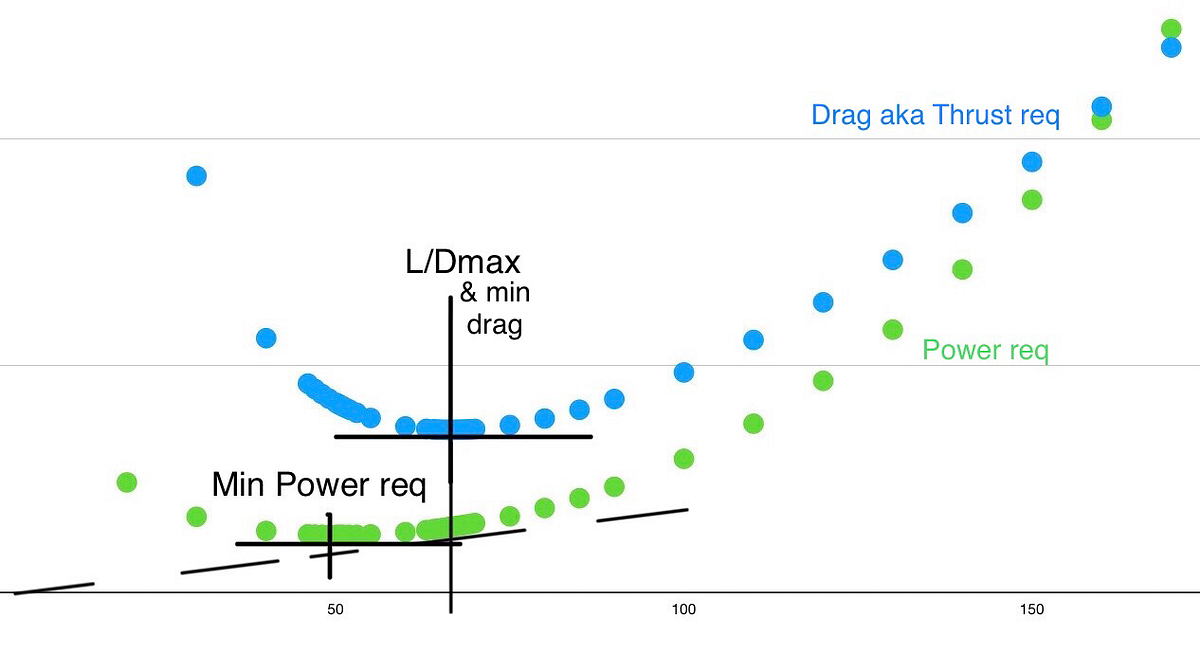
Back side of the Power Curve vs Drag Curve
Power curves vs Drag curves — More similar concepts talked about interchangeably creating confusion and conflict in understanding while…
https://medium.com/@jamesmcclaranallen/improve-your-landings-with-aoa-power-techniques-04601584fb3a
excerpted below (though you should still go see about “the thirteenth monkey” through the link).
Front Side v. “Back Side” v. Back Side
We should note our “Fundamental Maneuvers” of Straight and Level, Climb/Descend, Accelerate/Decelerate, and Turn are an incomplete list. We also have Zoom and Dive. To Climb or Descend, we change Power thus giving excess to Climb or letting Drag dominate to Descend. To Accel/Decel, we change Pitch typically while also changing Power so as to stay Level or stay on a Constant Glide Path. Turning isn’t relevant to this discussion. Zooming and Diving, however, are Trades between Kinetic and Potential Energy.Zoom and Dive differ from Climb and Descend in this as Climbs and Descents involve trades in Chemical Energy for Potential Energy while Accelerations and Decelerations are really Chemical for Kinetic. When we Climb or Descend, we maintain our Trim Setting maintaining a Constant AOA. Our fixes for those Distributive Errors are really miniature Zooms or Dives. Shallowing or steepening VVI at constant AOA (or speed) are miniature Climbs and Descents.
For the Front Side, we use Pitch to Control Glide Path and Power to Manage Speed. These are Zooms or Dives connected with Accelerations or Decelerations.
For a moment, imagine flying Front Side but at zero Power. If we’re High, we can Nose Down as we will Accelerate per this Dive trading Potential Energy for Kinetic Energy and this adds Drag as we move up the Parasitic side of the curve. Added drag helps against the over-energy state of being High. There’re limits to this as we cannot Dive through the Ground and we have a Vne. If we’re Low, we can Nose Up reducing Parasitic Drag to stretch. There’s a limit to this as we’ll eventually bleed through L/Dmax to the Back Side and thus as we’d continue to bleed adding Drag from the Induced side of curve.
Use Pitch (trim) to control AOA (or speed as proxy) and Power for Glide Path in what some mistakenly consider Back Side though what are really Power Techniques. These work on any plane in any position of the curve. To prove this, consider Cruise flying obviously Front Side. What happens if you add Power with no other changes (and no autopilot engaged)?
Note: Gliders use “Power Techniques” too though by simultaneously adding Drag and reducing Lift through Spoilers. Spoilers are mechanized to act with the same effect as a Throttle or Power Lever with more Spoiler Control Lever Back less Spoiler Control Lever Forward. Nominal Spoiler is midrange allowing for adjustments in both directions. Trim for AOA (or speed), Spoiler in lieu of Power for Glide Path. If excessively high beyond means of maximum spoiler, use both spoiler and forward slip.
Speaking of gliders, we should make a caveat regarding “If Low and Slow, Fix the Low then the Slow.” As you can imagine, such won’t work well for a glider and is a recipe to end up significantly shorter out of energy perhaps unintentionally stalling while near the ground. But we’re not going to fix the slow first either, rather instead we’ll fix both simultaneously. Step one — Spoilers In. The immediate effect will be to shallow out starting to fix the low though such also better enables “acceleration” via mini-dive. Now push for L/Dmax. AOA is ideal though most gliders only have airspeed indicators, this is ok. You’re simultaneously fixing both speed and as best you can altitude as you’ll be moving forward from the back side of the drag (thrust required) curve to its low point. (Glider drag polars typically are expressed as sink rate vs speed hence L/Dmax is the tangent from origin as you’d see on the power required curve. Here we’re thinking forces of drag vs speed.) Note for headwind you’ll want to push a knot or two faster than L/Dmax (maybe even five knots in strong headwinds) while for tail winds, you can subtract similarly but no slower than maximum endurance glide time.
So, with gliders, you fix both simultaneously, but it will probably feel like fixing the slow then the low and unlike with powered flight, you should probably think of it this way. This feeling of fixing the slow then the low in gliders (or airplanes with lost power) is especially true as you’ll finish fixing the slow before you finish fixing the low even as the act of fixing the slow also fixes what low may be fixed. Maybe this is why the FAA answers the low and slow differently than the Navy? In the glider or without power, you’re better thinking fix the slow first if slow and low. Fixing the slow helps resolve the low but better to think it sequentially.
What is true Back Side? Consider again flying with zero Power though this time on the Back Side. If you’re High, Pull Up thus Slowing and Increasing Induced Drag thus Sinking then Dump the Nose to Accelerate reducing Drag and Catch desired Glide Path. If Low, Push the Nose gaining Speed Reducing Drag to Float further. Obviously, these are uncomfortable, hence we prefer the Power Techniques. They’re also more susceptible to mistakes, hence again, we prefer Power Techniques. Note with the back side power unavailable case, the FAA’s answer to Low and Slow is the only viable answer though it is a case of least bad not best. Use Power techniques and with them use the Navy’s LSO Rules. If you’re pulling or pushing while low to stretch a glide you may want to consider a spot with less buildings and trees short of the desired runway. If you were on best glide, push and pull both fall short.
Where is the Back Side? For jets, gliders, and (all) engine(s) out propellers, it is the left portion of the drag curve aka thrust required curve where induced drag is dominant. For propellers with operating propulsion, it is the left side of the power required curve hence the expression “back side of the power curve.” This means propellers fly on the front side for significantly more of their landing conditions than do other fixed wing aircraft except for power out. Yet piston (and electric) propellers handle much better with power techniques! See further below and think response time. For both jets and propellers, these transition points are coincident with maximum endurance flight time.
Note: I like to think of these transitions as “Reverse Demand” not ‘reverse command.’ To me, “Reverse Command” is the difference between front side and back side techniques with regards to what results when you pull or push. Reverse Demand is the increased need for throttle be it thrust or power to fly slower. See the difference? Reverse Command tells you how to pitch should you need to control altitude by speed. Reverse Demand tells you what is required to control altitude with power, thrust, or spoilers.

The day my glider checkride almost went bad : Air Facts Journal
Based on past checkrides, it had become the expectation that the rope break would occur on the second flight. But as we turned crosswind on the last flight, he still hadn’t released the rope. I started thinking he must be going easy on me and maybe I started to relax a little—when WHAM he...
 airfactsjournal.com
At some point the only comment I heard from the examiner was something to the affect of, “Keep your nose down!” Or maybe, “Keep your speed up!”
Last edited:
Fffflats
Well Known Member
I bet his wind was more easterly than reported.
Two screenshots for you. The first is shortly after liftoff while accelerating to the AOA pegged low mippling into and out of AOA displaying. It is one bar faster than onspeed. The second is onspeed in the landing. Note the ground speeds have a twenty-five knot difference. More easterly winds indeed. Perhaps even ESE wind. I’m seeing about twelve in the face on takeoff.
With a headwind component of twelve, now what are your speeds around this pattern?
Interesting.... If I'm interpreting the TLAR screen correctly, I see the following observations:
- He's climbing at ~ 74 kts. It says KTAS, but at that altitude True is close enough to KIAS. So he's climbing at roughly Vx.
- He makes his turn back at about 500 ft AGL
- During the turn, he is maintaining 80-82 KTAS through the turn and actually arrives over the runway at 80 kts as he begins his turn to line up.
- It appears he's going to touch down around 65kts with like 1200-1000 feet of runway left and should be able to stop pretty easily.
Inaccurate winds gave a headwind component of 4 and tailwind component of 4 while we’re seeing real of 12. Have to take out the errant headwind then add the real and add back the errant tail then subtract the real, so swings of eight to all observed numbers.
74 goes to 82; he is climbing closer to 82
80-82 goes to 72-74, back half of turn is closer to 72-74 though at points I saw 90 ground so 78 true (or more aligned with tail wind and little less than 78), but slowest was observed ground was 61 at about twenty to thirty degrees left of runway heading (so straight E wind not ESE nor 050 at maybe fourteen kts) just after initiating turn having slowed to onspeed and turned fully into the wind; as we now think wind from the east, a hair east of northerly heading, trying to cancel out wind, through the turn showed ground of about 70 to 72.
65 goes to 57, the presumed touchdown is really 57 though 65 needs to be dissipated in braking.
So, I’ve now got:
82 in the climb
72-75 in the turn
presumed 57 for touchdown but 65 to dissipate
AOB by windscreen looked pretty close to 45 in the reversal turn but he apears even steeper in the counter-reverse. Of the two screenshots I took in his turn trying to see that just east of northerly groundspeed, using the ruler tool over aligned to the horizon I had one showing 40 AOB and the other showing 45 AOB. Did the same in the reversal and found it wasn’t actually steeper rather was only 40 AOB but I’m assuming camera lens distortion with longer view of the horizon made the lower left “Lindbergh” drop such that the horizon looks steeper because it is curved in the picture; limiting to just more forward portion it is straight enough to line the ruler tool showed the 40. Going back to initial turn, he is at 48 AOB when about thirty off of runway heading and into the wind. So he’s generally working forty to fifty AOB.
Unfortunately I cannot both screenshot and have the ruler tool in place displaying angles to show you. And I’m not coordinated enough to use another device to picture it without blocking what you want to see with my hand.
Attachments
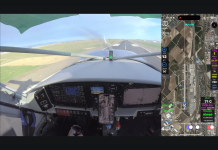
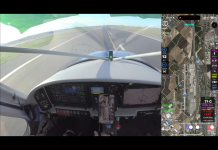
Last edited:
For all of our tests, we takeoff on speed (Vx) and transition to Vy (L/Dmax AOA) for climb, and then execute turn-back when the system computes "turn back possible" plus a three second delay prior to execution. Jeff uses airspeed for Vy since the Garmin AOA doesn't display it. I use L/Dmax AOA in the -4 to approximate Vy. As you insinuate, climbing at Vx is generally not a good technique. The app is called TLAR for a reason , by no means perfect and probably shouldn't be used to orbit a satellite; just better than the Mark I eyeball (and our primary intent is to get folks to consider performance and options BEFORE they push the throttle up for takeoff--the in-flight guidance is only a bonus). I posted Jeff's vid so you could see an example of flying the Garmin indexer, since all of my vids use a doughnut/chevron indexer ad tone.
Drop me an e-mail address NOTSO, we'll hook you up with the app so you can try it for yourself. The TO for the app is pretty thorough and worth a glance--it explains assumptions, settings and physics. You can download it at TLARPilot.com.
Great discussion,
Vac
, by no means perfect and probably shouldn't be used to orbit a satellite; just better than the Mark I eyeball (and our primary intent is to get folks to consider performance and options BEFORE they push the throttle up for takeoff--the in-flight guidance is only a bonus). I posted Jeff's vid so you could see an example of flying the Garmin indexer, since all of my vids use a doughnut/chevron indexer ad tone. Drop me an e-mail address NOTSO, we'll hook you up with the app so you can try it for yourself. The TO for the app is pretty thorough and worth a glance--it explains assumptions, settings and physics. You can download it at TLARPilot.com.
Great discussion,
Vac
Copy all! Good stuff!For all of our tests, we takeoff on speed (Vx) and transition to Vy (L/Dmax AOA) for climb, and then execute turn-back when the system computes "turn back possible" plus a three second delay prior to execution. Jeff uses airspeed for Vy since the Garmin AOA doesn't display it. I use L/Dmax AOA in the -4 to approximate Vy. As you insinuate, climbing at Vx is generally not a good technique. The app is called TLAR for a reason
Drop me an e-mail address NOTSO, we'll hook you up with the app so you can try it for yourself. The TO for the app is pretty thorough and worth a glance--it explains assumptions, settings and physics. You can download it at TLARPilot.com.
Great discussion,
Vac
I bolded that line - because I believe this is THE most important aspect of this entire discussion. I said it in my OP as well and something we discussed among our local RV group. I can't emphasize enough that any consideration to "turn back" needs to be thought through pretty carefully at 0 AGL and 0 GS. Things to consider are:
- What is the min altitude I'm even going to attempt this (this might change depending on performance, weight, DA, airfield environment, etc)
- Which way am I going to turn and why? (turn into a XW, where are the obstacles like towers, tall hangar rows, houses, other traffic, etc)
- Are there cross runways or even taxiways/airport roads available to land on?
Next most important (if not more important) is to go out and practice this maneuver before you even consider putting this into your tool box. As I said before, the time to try is NOT when your engine is sputtering on climb out at 200 ft AGL and 75kts with the speed rapidly dropping. This is not a pickup game sort of thing that you can figure out on the fly (so to speak). Its a pretty precise and aggressive maneuver that if not flown correctly is likely going to get you dead. I'd love to see something like this as part of every BFR.
I just didn't want the common sense stuff to get lost in the weeds of all this AOA minutia discussion.
Two days ago, I went and recalibrated my AOA system to a "No flap" stall speed since I don't have a flap position sensor (yet). I then went and tried to fly the turn using AOA only. Honestly, it did not go well. During the 45 deg bank, the AOA was telling me to really get the nose down to get "on speed" far more than what I would have expected and as a result I was coming up really short and would not have made any attempts. I'm going to pull the G3X data logs and see what actual AOA I was at throughout the maneuver. I also have video where you can hear the tones..... I need to go back and compare.
I was very diligent with the calibration and followed it by the book. So not sure what's going on.
I was very diligent with the calibration and followed it by the book. So not sure what's going on.
Thanks for this thread. I have a Garmin AOA through a G3X touch. I did not install a stall vane or stall audio alert when building my RV. I have my AOA calibrated for the green donut at 72Kts and the stall at 54 Kts clean. My stall with flaps is 48 Kts. I can see the AOA on approach but rarely do I focus visually on it. I am not one of the jet jockeys but I few in the military and I have had the benefit of the some of the greatest training. One of the emergency procedures on takeoff in one of the multi engine aircraft was secure the engine and land straight ahead because it would not climb on one engine and I am sure most of us have been taught, don't stall, don't stall, don't stall.
I fly from a municipal airport 05/23 that has nothing but dense trees north, east and west and homes on the south. Most of the old guys, of which I am one, cheat to the right as we lift off an I climb at 120/130 to keep my CHT under 400 and to give a chance to make a turn back if the altitude will permit or at least hit/dodge the trees near the airport so that someone may be able to help. With that in mind, several of us are interested in learning more than don't stall (and we believe that to be the most important action) and try not to hit the trunk of the tree.
I do not receive the steady aural tone until I am near the stall. If I have understood this thread correctly and I desire the aural tone alert at Onspeed which I understand is typically at 1.3 x 54kts (stall), how do I set that within the Garmin system and since I do not have another stall warning system in my RV7, do I want that? Thanks.
I fly from a municipal airport 05/23 that has nothing but dense trees north, east and west and homes on the south. Most of the old guys, of which I am one, cheat to the right as we lift off an I climb at 120/130 to keep my CHT under 400 and to give a chance to make a turn back if the altitude will permit or at least hit/dodge the trees near the airport so that someone may be able to help. With that in mind, several of us are interested in learning more than don't stall (and we believe that to be the most important action) and try not to hit the trunk of the tree.
I do not receive the steady aural tone until I am near the stall. If I have understood this thread correctly and I desire the aural tone alert at Onspeed which I understand is typically at 1.3 x 54kts (stall), how do I set that within the Garmin system and since I do not have another stall warning system in my RV7, do I want that? Thanks.
Fffflats
Well Known Member
Two days ago, I went and recalibrated my AOA system to a "No flap" stall speed since I don't have a flap position sensor (yet). I then went and tried to fly the turn using AOA only. Honestly, it did not go well. During the 45 deg bank, the AOA was telling me to really get the nose down to get "on speed" far more than what I would have expected and as a result I was coming up really short and would not have made any attempts. I'm going to pull the G3X data logs and see what actual AOA I was at throughout the maneuver. I also have video where you can hear the tones..... I need to go back and compare.
I was very diligent with the calibration and followed it by the book. So not sure what's going on.
What AOAs did you come up with in data pull?
I’m not a Garmin AOA, able to copy paste what they say? My understanding is that for fast end display value, you stabilize at desired speed but that really locks the AOA for given weight, do a stall for slow end, then do speeds for both onspeed and for audio warning to which you can skew multiples of stall. Don’t know if they have guidelines for what values to set these, what multiples of Vs did you use for each?

I have the Dynon system and the behavior of the AOA tone is similar to yours. It won't beep until the plane is about to stall which is for landing, it will sound when the plane is about to touch down over the runway. This isn't very helpful. For the Dynon, I calibrate only for no flap and I forced the system to register the stall at 60kts IAS . This is higher than the actual stall but the goal is to trick the system to sound the AOA beep earlier. It takes trials and errors to find the calibration stall speed where the beep will give you plenty of warning earlier when you has plenty of stall margin.Thanks for this thread. I have a Garmin AOA through a G3X touch. I did not install a stall vane or stall audio alert when building my RV. I have my AOA calibrated for the green donut at 72Kts and the stall at 54 Kts clean. My stall with flaps is 48 Kts. I can see the AOA on approach but rarely do I focus visually on it. I am not one of the jet jockeys but I few in the military and I have had the benefit of the some of the greatest training. One of the emergency procedures on takeoff in one of the multi engine aircraft was secure the engine and land straight ahead because it would not climb on one engine and I am sure most of us have been taught, don't stall, don't stall, don't stall.
I fly from a municipal airport 05/23 that has nothing but dense trees north, east and west and homes on the south. Most of the old guys, of which I am one, cheat to the right as we lift off an I climb at 120/130 to keep my CHT under 400 and to give a chance to make a turn back if the altitude will permit or at least hit/dodge the trees near the airport so that someone may be able to help. With that in mind, several of us are interested in learning more than don't stall (and we believe that to be the most important action) and try not to hit the trunk of the tree.
I do not receive the steady aural tone until I am near the stall. If I have understood this thread correctly and I desire the aural tone alert at Onspeed which I understand is typically at 1.3 x 54kts (stall), how do I set that within the Garmin system and since I do not have another stall warning system in my RV7, do I want that? Thanks.
Last edited:
