

Van's Air Force

The definitive Van's Aircraft support community! Buying, building or flying an RV? Join our exclusive family of mentors and enthusiasts!

Power to the Panel!

Ironflight

VAF Moderator / Line Boy
Mentor
I haven’t been doing a lot of status posting on the Rocket project because, frankly I’ve been busy building! Most of what I have been doing is building up interior panels, storage bins, and starting wiring - its so much easier to do that stuff before you start installing canopy rails, frames, and canopies! And that goes for panel and avionics wiring as well - so the past few weeks I have been wiring up the panel itself - and this week saw power on the panel-mounted avionics for the first time. The Garmin CAN bus starts out with the pitch servo in back, winds its way forward through a couple of boxes, goes into the panel, then comes back out of the panel to a couple of more boxes - and ends at the Magnetometer in the wingtip. In order to get the panel boxes to talk on the bus, I had to stick CAN terminators on the stub ends of the panel harness - and the result is cool! I can tune the radios from the GDU, and the GDU uses the AHARS data from the G5 - all like its supposed to work! Of course, most functionality has to wait until we get all the airframe boxes connected - but its always fun to light things up.
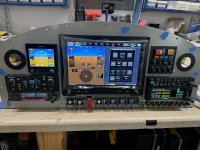
AB5132A0-20AA-4C18-988D-11C4A43AFDD8.jpeg

And they view from behind - you can tell I like lacing cord….. (the blue tie wraps are temporary and will be gone when the panel harness gets connected to the airframe harness….which is in work!
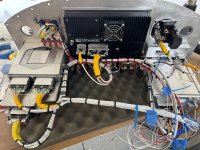
3541D4E2-EB25-466A-83E3-62B7529A0698.jpeg
 
I haven’t been doing a lot of status posting on the Rocket project because, frankly I’ve been busy building! Most of what I have been doing is building up interior panels, storage bins, and starting wiring - its so much easier to do that stuff before you start installing canopy rails, frames, and canopies! And that goes for panel and avionics wiring as well - so the past few weeks I have been wiring up the panel itself - and this week saw power on the panel-mounted avionics for the first time. The Garmin CAN bus starts out with the pitch servo in back, winds its way forward through a couple of boxes, goes into the panel, then comes back out of the panel to a couple of more boxes - and ends at the Magnetometer in the wingtip. In order to get the panel boxes to talk on the bus, I had to stick CAN terminators on the stub ends of the panel harness - and the result is cool! I can tune the radios from the GDU, and the GDU uses the AHARS data from the G5 - all like its supposed to work! Of course, most functionality has to wait until we get all the airframe boxes connected - but its always fun to light things up.

View attachment 66651

And they view from behind - you can tell I like lacing cord….. (the blue tie wraps are temporary and will be gone when the panel harness gets connected to the airframe harness….which is in work!
View attachment 66652
Big Step - Congrats !
 
That looks great Paul!! Very professional. Though, are you sure you have enough of a service loop in the main display cable? (I assume removal is pulling it into the cockpit). It seems like a large cockpit, but when things are closed up there's not as much room to sit in the seat and pull boxes out as you may think, especially with the stick in the center. Hope it works out well for you.
 
I'm curious about your alarm panel

Aren't the alarm functions already provided by the Garmin equipment?

are the rest to remind you when you forgot to turn something off?

I was thinking of implementing something using an arduino, got 90% of the code done and the circuits prototyped, but it has logic built in. So, for example only gave me oil pressure warning if RPM above a certain threshhold, alarmed that ignition was on when rpm below a threshold.

I got stalled trying to find or make a simple way to detect current flow in the wire without having to tap into the circuit, ie hall effect - need cheap and tiny. I don't want to have to fuse all my pick ups. Simply using a DP switch isn't effective - it tells you switch position but nothing about the device you are powering. I was looking for a way to alarm that the fuel pump has failed by detecting a drop in current.
 
Last edited:
I'm curious about your alarm panel

Aren't the alarm functions already provided by the Garmin equipment?

are the rest to remind you when you forgot to turn something off?

I was thinking of implementing something using an arduino, got 90% of the code done and the circuits prototyped, but it has logic built in. So, for example only gave me oil pressure warning if RPM above a certain threshhold, alarmed that ignition was on when rpm below a threshold.

I got stalled trying to find or make a simple way to detect current flow in the wire without having to tap into the circuit, ie hall effect - need cheap and tiny. I don't want to have to fuse all my pick ups. Simply using a DP switch isn't effective - it tells you switch position but nothing about the device you are powering. I was looking for a way to alarm that the fuel pump has failed by detecting a drop in current.
Well the Caution & Warning panel is partly habit, partly for sound engineering reasons, and partly becasue I needed something to visually balance the G5 to make the panel symmetrical! 😉

It’s true that the G3X does an incredible job of monitoring the systems and alerting you in case something goes out of limits. However, that assumes that the G3X is working. Back in my old job we had a (relatively speaking, for the time) sophisticated monitoring and alerting system in the computers. But we also had a hardware, hardwired C&W system to alert the crew to critical things in case the computers were out to lunch. Same idea here - the most critical thing being an Oil Pressure light hardwired to a pressure switch. The Fuel pump light is a “hey dummy” light to remind me that I left the switch on (doesn’t actually tell you anything about the pump, but the wire is pretty reliable….). The landing and taxi light switches are holdovers from old technology when lights drew lots of amps - LED’s make them pretty meaningless, and those might get changed before the plane is finished to some other functions. They just work with a ground or +12 volts - easy to wire to anything, and the text is easily changed.

Finally I like the hardware buttons/LED’s for Master and Caution - easier to mash to cancel the alarm in turbulence than hitting that little spot on the touchscreen for me.

Oh - the question on service loops - the photo angle foreshortens those a little - the GDU is easily removed (tried it) and disconnected. The entire panel will be removable, but based on my experience with other recent airplanes I have built, I almost never use that feature - pulling the GDU makes plenty of space to work on things, and this airplane has a removable skin above the panel area for major re-work.

Thanks for all the nice comments folks - all it takes is time, patience….and a big bag of cheap cable ties!

Paul
 
Last edited:
Paul,

Connecting the panel harness to the rest of the plane. Will you hard wire this or add connectors?

Carl
I’ll be using CPC connectors for that - not so much becasue I need to remove the panel, but becasue it will allow it, and if I have to have a splice (or more like 90 of them…..), I’d rather it be an aviation-quality connector. Having a connector also makes troubleshooting a little easier.
 
Looking good Paul.

Not trying to be picky, ( part of my job with our new aircraft), I do see a couple of things that I would check at this point though..... On the alarm panel, you have a wire zip tied to the bus bar itself....not a good idea. Also looks like a loose rivet under the inboard circuit breaker. Inboard audio panel connector looks to have a rivet jammed under it. The L bracket between the radio cage and the display has a nut that appears to have no thread protrusion. Last thing is that you might want to add a spacer to the adel clamp on the audio panel cage to make sure that harness can't flex and rub on the ground screw just aft of it.
 
Very nice Paul! I smiled when I saw the annunciator panel, shuttle switch guards, and cb's, and thought...hmmm, I recognize those (since I copied them a long time ago!). Lookin good! (y)

Cheers,
Bob
 
Looking good Paul.

Not trying to be picky, ( part of my job with our new aircraft), I do see a couple of things that I would check at this point though..... On the alarm panel, you have a wire zip tied to the bus bar itself....not a good idea. Also looks like a loose rivet under the inboard circuit breaker. Inboard audio panel connector looks to have a rivet jammed under it. The L bracket between the radio cage and the display has a nut that appears to have no thread protrusion. Last thing is that you might want to add a spacer to the adel clamp on the audio panel cage to make sure that harness can't flex and rub on the ground screw just aft of it.
I think the "loose" & "jammed" rivets you are seeing are actually dimpled holes in the radio racks. I agree with the wire being tied to the buss bar.
 
Looking good Paul.

Not trying to be picky, ( part of my job with our new aircraft), I do see a couple of things that I would check at this point though..... On the alarm panel, you have a wire zip tied to the bus bar itself....not a good idea. Also looks like a loose rivet under the inboard circuit breaker. Inboard audio panel connector looks to have a rivet jammed under it. The L bracket between the radio cage and the display has a nut that appears to have no thread protrusion. Last thing is that you might want to add a spacer to the adel clamp on the audio panel cage to make sure that harness can't flex and rub on the ground screw just aft of it.
Dont mind te scrutiny! AS others have mentioned, wat appears to be a loose rivet under the audio panel is just a dimple in te rack. Te apparent sort screw on te L-bracket on teh other side is identical behind the edge of the GDU - all the screws for te L-brackets are te same lengt and have at least three threads sowing. The comment on Adel clamp on the radio racks is OK - the angle of the picture doesn’t give a good view - and at any rate, tat is probably going to get a larger Adel clamps to capture all te wires going by it - but not until I finalize the routing of the cable bundle once the panel and airframe wiring is mated.

The zip tied wire to the bus bar is, as someone pointed out, a Grip-Tie, with silicone inner liner - in effect, it is a “super-mini” Adel clamp, and the wire is the feed for that bus bar - so if there was any motion resulting in a rubbed-through insulation it would simply be shorted to itself. Acceptable engineering solution (in my mind) to a tricky little securing problem. They don’t make a small enough Adel clamp to stop that wire from moving if I mounted to the #6 screw that holds te bus bar to circuit breaker….but you know - I can MAKE an Adel clamp that small! Hmmm……
 
I wanted to point out a detail that's visible in the behind-the-panel photo. Paul and I have a friendly difference of opinion on the proper way to use the strain relief feature on these D-sub connector backshells. He likes to put a layer of shrink tubing over the bar, which I think is better than nothing, but it doesn't protect the wires on 3 out of 4 sides. Would you use an adel clamp that was only 25% rubber-coated?

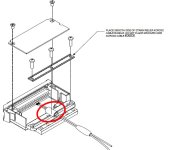
Given the trouble that can occur if some of these wires end up broken or chafed, it's important to have good strain relief on these connectors, so I like to see it done the way it says in the installation manuals:

Wrap the wire harness with silicone fusion tape at the point where the backshell strain relief and cast housing will contact the wire harness.

Place the smooth side of the backshell strain relief across the wire harness and secure using the screws.

backshell.jpg

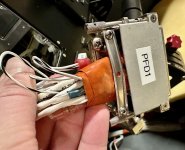
I usually tell people not to be shy with the tape - two or three wraps is better than one. For really fat wire bundles this can result in a big glob, which is fine with me since I'd rather have the strain relief bar clamped onto squishy silicone than my fragile wires. In practice it's also fine to omit the center screw if it's in the way, and don't be afraid to bend the bar into a banana shape if needed - just be sure the smooth side faces in. You also don't have to be a gorilla about tightening the screws, but you do want enough clamping force to resist a reasonable tug.

IMG_2114.jpg
 
I wanted to point out a detail that's visible in the behind-the-panel photo. Paul and I have a friendly difference of opinion on the proper way to use the strain relief feature on these D-sub connector backshells. He likes to put a layer of shrink tubing over the bar, which I think is better than nothing, but it doesn't protect the wires on 3 out of 4 sides. Would you use an adel clamp that was only 25% rubber-coated?

Given the trouble that can occur if some of these wires end up broken or chafed, it's important to have good strain relief on these connectors, so I like to see it done the way it says in the installation manuals:


View attachment 66716

I usually tell people not to be shy with the tape - two or three wraps is better than one. For really fat wire bundles this can result in a big glob, which is fine with me since I'd rather have the strain relief bar clamped onto squishy silicone than my fragile wires. In practice it's also fine to omit the center screw if it's in the way, and don't be afraid to bend the bar into a banana shape if needed - just be sure the smooth side faces in. You also don't have to be a gorilla about tightening the screws, but you do want enough clamping force to resist a reasonable tug.

View attachment 66714
 
Back
Top