

Hey all,
While waiting for my RV-10 kit to arrive I needed something to keep me busy, so I started building a small web app to track my shop time. What started as a simple "clock in / clock out" timer quickly grew: I wanted to note down the section, page, and step from the plans, attach photos, and eventually export everything into a proper PDF report for the LBA (the German equivalent of the FAA) at the end of the build. That's how BenchLog came to be.
It's a self-hosted tool you run on your own machine or home server (Raspberry Pi, NAS, whatever you have).
What it does:
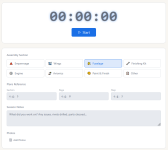
Time Tracker: Log every build session with a start/stop timer that runs server-side, meaning if you close the browser or walk away, the clock keeps ticking. Each session gets tagged with an assembly section (Empennage, Wings, Fuselage, etc.) and you can log the exact Section, Page, and Step from the Van's plans. Optional notes and photo attachments per session as well.
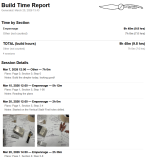
Build Report: When you need a record of your work, for the FAA, insurance, or just your own satisfaction, you can generate a formatted PDF report directly from the app. You can sort chronologically or group by section, include or exclude plans references and session notes, and even attach a custom logo. There's also a section summary showing total billable build hours before you generate.
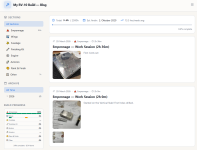
Build Journal / Blog: Every logged session automatically appears as a blog entry,no double entry needed. The journal is publicly accessible (of course, only if you share it on your server), so you can share your build log with the community. You can filter posts by assembly section or browse by month. A separate rich-text editor lets you write longer standalone entries with embedded images. My favourite feature in the "Build progress overview" (still have to find the proper names for it) is, that you can filter the blog for sections (for example if you click on the small book next to section 8 Horizontal stabilizer).
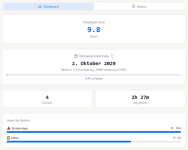
There's also a dashboard with total hours, estimated finish date based on your rolling pace, and hours broken down by section.
Demo: You can poke around a live demo here (read-only, no login needed): https://benchlogdemo.bihnairy.de/ be gentle, its hosted on my desktop computer . I currently only have some test posts with nonsense and pictures of my Training kit build but I hope you get the idea when browsing around.
Self-hosting:It runs in Docker, so getting it up takes about two minutes if you have Docker installed
Everything, sessions, photos, settings, lives in a single SQLite database on your machine. There's a full export/import function so you can back it up or migrate easily.
Full source and documentation on GitHub: https://github.com/tsaG1337/BenchLog
It's free for personal use. Happy to hear feedback or answer questions, especially from fellow RV builders who might have ideas for features that would actually be useful at the bench.
Cheers
Patrick
While waiting for my RV-10 kit to arrive I needed something to keep me busy, so I started building a small web app to track my shop time. What started as a simple "clock in / clock out" timer quickly grew: I wanted to note down the section, page, and step from the plans, attach photos, and eventually export everything into a proper PDF report for the LBA (the German equivalent of the FAA) at the end of the build. That's how BenchLog came to be.
It's a self-hosted tool you run on your own machine or home server (Raspberry Pi, NAS, whatever you have).
What it does:
Time Tracker: Log every build session with a start/stop timer that runs server-side, meaning if you close the browser or walk away, the clock keeps ticking. Each session gets tagged with an assembly section (Empennage, Wings, Fuselage, etc.) and you can log the exact Section, Page, and Step from the Van's plans. Optional notes and photo attachments per session as well.
Build Report: When you need a record of your work, for the FAA, insurance, or just your own satisfaction, you can generate a formatted PDF report directly from the app. You can sort chronologically or group by section, include or exclude plans references and session notes, and even attach a custom logo. There's also a section summary showing total billable build hours before you generate.
Build Journal / Blog: Every logged session automatically appears as a blog entry,no double entry needed. The journal is publicly accessible (of course, only if you share it on your server), so you can share your build log with the community. You can filter posts by assembly section or browse by month. A separate rich-text editor lets you write longer standalone entries with embedded images. My favourite feature in the "Build progress overview" (still have to find the proper names for it) is, that you can filter the blog for sections (for example if you click on the small book next to section 8 Horizontal stabilizer).
There's also a dashboard with total hours, estimated finish date based on your rolling pace, and hours broken down by section.
Demo: You can poke around a live demo here (read-only, no login needed): https://benchlogdemo.bihnairy.de/ be gentle, its hosted on my desktop computer
. I currently only have some test posts with nonsense and pictures of my Training kit build but I hope you get the idea when browsing around.Self-hosting:It runs in Docker, so getting it up takes about two minutes if you have Docker installed
Everything, sessions, photos, settings, lives in a single SQLite database on your machine. There's a full export/import function so you can back it up or migrate easily.
Full source and documentation on GitHub: https://github.com/tsaG1337/BenchLog
It's free for personal use. Happy to hear feedback or answer questions, especially from fellow RV builders who might have ideas for features that would actually be useful at the bench.
Cheers
Patrick
Last edited: