


Van's Air Force

The definitive Van's Aircraft support community! Buying, building or flying an RV? Join our exclusive family of mentors and enthusiasts!

ADAHRS not receiving GPS data

dbaflyer

Well Known Member
Friend
Anyone happen to know where to be looking for the issue? The external (GTN-650) and internal (G3X) gps are working fine. No other messages on the display. Did I somehow loose PFD-GSU25 data transmission? I wasn't sure if the GPS feed to the ADAHRS comes from internal always or depends on which you have selected in the PFD menu.
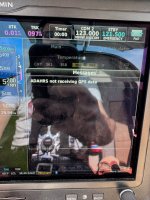
 

Attachments

  • ADAHRSnotReceivingGPSdata.jpeg
    ADAHRSnotReceivingGPSdata.jpeg
    3 MB · Views: 52
I’ve encountered this occasionally in some instances, so far it’s been an illusive issue. It may be a SW issue. Any other symptoms?
Did you send the data card file to g3expert?
Latest SW installed?
 
Last edited:
Was it working at one time and then quit working properly? Were any changes recently made other than database updates?
 
It's always been working until now. I have not made any changes recently. I'm on software version 9.41, but could probably upgrade to 9.52 Didn't want to do that last year while doing instrument instruction. Will send the log to g3xpert and see if they can see anything.
 
I did a test power up outside my hangar and had no issues. G3xpert would like to see the GPS status screen when the problem is occurring and the GTN650 and G5 powered off. I'm not sure that's going to be possible unless it happens on the ground again.

@mburch Not sure what you mean by this, but maybe it comes naturally for someone of your expertise.
Lots of diagnostic information available on the display to help you answer this.
 
I did a test power up outside my hangar and had no issues. G3xpert would like to see the GPS status screen when the problem is occurring and the GTN650 and G5 powered off. I'm not sure that's going to be possible unless it happens on the ground again.

@mburch Not sure what you mean by this, but maybe it comes naturally for someone of your expertise.

If you do suspect a communication issue related to your GSU 25, you can follow the CAN bus troubleshooting guidance in the installation manual (section 2.3.1.3.6 in the current revision, AZ). In this case it would be easiest to start at step 7.

A GTN 650 does not provide GPS data to a GSU 25, so you can ignore Garmin's request turn it off.

And, their request to have you power off the G5 would only be relevant if you do have the G5's internal GPS receiver enabled.
 
I got the same message recently and it’s now gone away without any changes. All the LRU paths in the diagnostic screens appeared good. I attributed it to poor satellite reception next to a hangar but that was a guess. I have the latest software versions. If it comes back, I’ll try harder to figure out what caused it.
 
I attributed it to poor satellite reception next to a hangar but that was a guess.

This is a good point to mention - in my experience it's not uncommon to see this message during powerup, prior to getting an acceptable GPS fix.
 
No new occurrence over the past few flights. At least now I know what to look for while it's occurring.
 
Back
Top
