Dan 57

Well Known Member
Friend
Discovered this online flight analysis tool a few months ago, and it is nothing but spectacular.

Flysto will not only show all your engine data, but also flight data, all of which can be replayed real time.
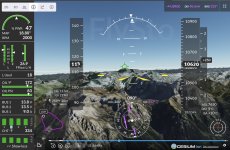
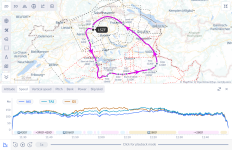
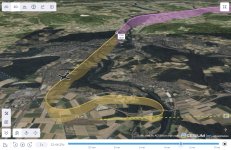
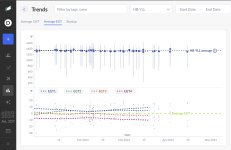
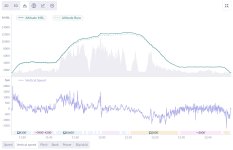
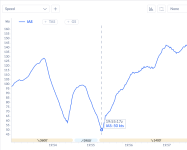
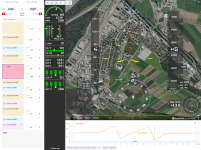
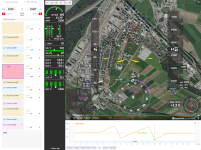
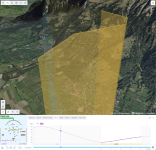
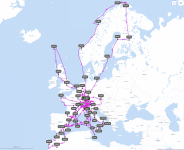
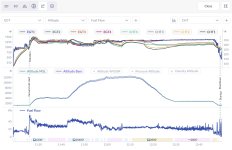
The amount of features offered is mind boggling, and it takes a few hours to realize the full potential of that program (at least for myself ;)). I will therefore not attempt describing all of the features, but just attach a couple of screen shots (all from my iPad mini) relating to a recent local flight.

And the best about Flysto? It is free (y)
IMG_6514.jpegIMG_6509.jpeg
IMG_6508.png
IMG_6515.jpegIMG_6518.jpegIMG_6519.jpegIMG_6511.jpeg
 
Last edited:
Sadly it does not (yet) work with GRT, but seems to support all the more popular EFIS. I've discussed with the owner to get GRT included, and it's promised, but no date yet.
 
It's cool for sure. Yesterday , I went back to November of 2023 to review a flight and all the traffic detail was still there !

Anyone know how long out flight ADSB data is being archived ?
 
Sadly it does not (yet) work with GRT, but seems to support all the more popular EFIS. I've discussed with the owner to get GRT included, and it's promised, but no date yet.
I also sent them an email along with GRT files (FDL *and* DEMO) for them to use as a test case. No feedback yet.
 
I talked to them last week at the AERO Friedrichshafen trade show.
They're working on the AFS datalog integration. Me and others requested about 2 months ago.
So I guess GRT will only be a matter of time.
Business model is not clear yet, for now it's apparently a CEO of a big software company's child, conceived while/after learning to fly *G*
 
I talked to them last week at the AERO Friedrichshafen trade show.
They're working on the AFS datalog integration. Me and others requested about 2 months ago.
So I guess GRT will only be a matter of time.
Business model is not clear yet, for now it's apparently a CEO of a big software company's child, conceived while/after learning to fly *G*
I got a reply saying that they are looking into the GRT data that I sent them.
 
Great find and share Dan !!
A couple of weeks ago, I re-calibrated my AOA at Max Gross Weight (or very close to), without and with flaps...
Uploaded the data.
Pretty close to Van's numbers I would say.
Here are the screen shots.
Fun to explore different parameters and instructive also...
Capture d’écran, le 2024-04-23 à 10.05.39.pngCapture d’écran, le 2024-04-23 à 10.05.54.png
 
I was wondering...

Today was pretty nice around here, and I couldn't resist hoping the Alps, lunch at the usual pizza joint at Locarno LSZL, and fly back. On the return flight I flew some aerobatics and had a look at the results now.

FlySto recognised a Loop as a flight manoeuvre, well done 😎

loop1-png.61427
loop2.png
 

Attachments

  • loop2.png
    loop2.png
    2.7 MB · Views: 86
  • loop1.png
    loop1.png
    2.6 MB · Views: 909
The linked YT vid has no music, most probably due to the lo 1Hz res of my Garmin avionics, and the resulting cockpit view is kinda jagged. Shown are a roll-of-the-top loop followed by another loop and 2 rolls, all good fun and smoother than shown here.
Viewer discretion is required as I will not be held responsible for anyone turning 🤢, or worse, covering their surroundings with 🤮

 
I'm really enjoying the Flysto but it loads all the previous flights as well as the newest flight from my Dynon data export. I have to keep going back and erasing all the duplicate flights. Anyone know an answer to only load the last flight?
 
Anyone know an answer to only load the last flight?
bit weird... I can upload flights which have already been uploaded before, but those will be automatically discarded, and the amount of "duplicates" shown in the upload info window. So only the new files are being kept.

Not sure how dynon presents the files, but if it creates a data log folder, selecting by date and uploading only the new ones is doable, no?
You could also email them at [email protected], they are quite responsive (y)
 
I've been using this to look at flights I did at the West Coast Formation Clinic. It doesn't recognize the lazy 8s and other figures we do, but I would't expect it to. What I found interesting was the traffic data. With 60+ airplanes operating all over the place in groups of 2, 3, and 4, the traffic data was useful in seeing how various flights go around, especially when launching and recovering at the airport. Pretty accurate, too, from my recollection.
 
Just wanted to give a heads up that AFS logs are now supported! (y)(y)(y)

And i hear GRT support is coming very soon, too!

Initial impression from my AFS logs is quite awesome...
 
Just wanted to give a heads up that AFS logs are now supported! (y)(y)(y)

And i hear GRT support is coming very soon, too!

Initial impression from my AFS logs is quite awesome...
I got an email that CONFIRMS your GRT coming comment.

What I found to be impressive is certain information that it was able to obtain from the Garmin dataset that I was playing with.
While is suspect NOT, I hope that they can get much similar information from the GRT dataset that I supplied.

What will be interesting is to see what "unexpected" data they extract from all of the suppliers (Garmin, Dynon, AFS, GRT, MGL(?), etc.)

Let's cheer them on!
 
I got an email that CONFIRMS your GRT coming comment.

What I found to be impressive is certain information that it was able to obtain from the Garmin dataset that I was playing with.
While is suspect NOT, I hope that they can get much similar information from the GRT dataset that I supplied.

What will be interesting is to see what "unexpected" data they extract from all of the suppliers (Garmin, Dynon, AFS, GRT, MGL(?), etc.)

Let's cheer them on!
Progress has been made with the GRT files that I sent.

I need to change an optional parameter (in my files) that will allow them to get higher fidelity and get that back to them for further testing.
 
Progress has been made with the GRT files that I sent.

I need to change an optional parameter (in my files) that will allow them to get higher fidelity and get that back to them for further testing.
The "parameter" that I changed was to sample data every 200 ms (was at 1000ms or every second).

That data has been sent.
 
Hi James, I've also sent a few logs at 5 Hz a few months ago to the flysto team - let me know if they need more data. I've got about 300 hours of GRT logs I can send them in a few minutes.
 
Hey Dan - very impressive.
I´d like to go via Morocco to the Canarian Islands during one of the next winters. I might ask you for some inputs then.
 
What did you change to get this? Does it change the log files or the CSV sampling (which seems a bit coarse to me)?
I changed the sampling rate of the "Flight Data Log" (FDL) file. Of course, moving from once per second to every 200 msec will make the file 5x larger, but I use a large memory stick. I have asked GRT if they could sample even faster, say at 100 msec. That would make for smoother takeoff and landing imagery.
 
I have asked GRT if they could sample even faster, say at 100 msec.
how would you use such a high sampling rate? I set the HDX to 1Hz and that seems to give a good resolution for day to day flights. There is a also the black box data file which keeps the last 20 minutes of flight at 16Hz. I've only used that to fine tune the AoA tone settings.
 
If this was done in Flysto, how did you do that??? :)
Did you MANUALLY put all flights into one, or is there a "magic button" somewhere that I overlooked?
James, first one has to import the data from the ship to the computer, in my case from my G3X data card to my iPad (doing this just after shutdown from a flight).
Back home, the data file from the iPad is then beamed to my computer using AirDrop.
FlySto is accessed thru my browser and the flights selected and imported.
It is then a simple matter to select a date range, then "map" from the "Insights" menu, and finally "real tracks" from the options.

Real quick and easy, this is only one of the ways to feed FlySto :)
 
James, first one has to import the data from the ship to the computer, in my case from my G3X data card to my iPad (doing this just after shutdown from a flight).
Back home, the data file from the iPad is then beamed to my computer using AirDrop.
FlySto is accessed thru my browser and the flights selected and imported.
It is then a simple matter to select a date range, then "map" from the "Insights" menu, and finally "real tracks" from the options.

Real quick and easy, this is only one of the ways to feed FlySto :)
Thanks and Roger all of this. But I cannot seem to find the "Insights" menu on my screen. (Using computer and browser, not iPad.)
I am OBVIOUSLY overlooking something as I was an early adopter and have done stuff with this (and given feedback) from the very beginning.

Help! :):):):)
 
Thanks and Roger all of this. But I cannot seem to find the "Insights" menu on my screen. (Using computer and browser, not iPad.)
I am OBVIOUSLY overlooking something as I was an early adopter and have done stuff with this (and given feedback) from the very beginning.

Help! :):):):)
OOOPS!!
"Never mind ..." (Overlooked by ME!)
 
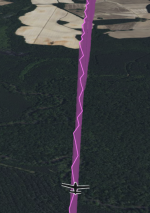
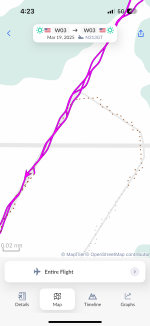
I really enjoying reviewing flights with FlySto, but have a weird phenomenon that I was wondering if anybody else has seen. In short, my track appears to zig-zag back and forth about 15' horizontally about once per second (also the sampling rate), making the view very choppy and leaving me wondering what's causing it. I am using a GRT Sport SX for data logging. This issue does not appear if I import the flight via ForeFlight track logs. Attached is a screenshot and a link to a sample flight is here: https://www.flysto.net/logs/tco0gnc...=-0.04&t=867&profile=on&view=3d&check=1nk1gs2

I have reached out to FlySto of course but wondered if any other GRT users here have seen this.

Screenshot 2025-02-11 at 08.51.10.png
 
I have not seen this, but I have my sampling rate to 0.2 seconds, or 5 Hz.
Yes, it needs to be at least that.
Also make sure that your GOS antenna is not blocked so that the accuracy is very high.

I first noticed it on takeoff roll when I was sampling at 1 second as I recall. I had looked at some data from a Garmin system and it was much smoother and thereby knew that it could be better.

I have asked the folks at GRT about an event faster sampling rate on those systems that had the power to do it.

I have talked to the people at "flysto" about a process to properly map the physical AUX inputs to logical functions, as in "AUX4"="MAP" so that becomes part of what you can track and analyze.
 
Yes, it needs to be at least that.
Also make sure that your GOS antenna is not blocked so that the accuracy is very high.

I first noticed it on takeoff roll when I was sampling at 1 second as I recall. I had looked at some data from a Garmin system and it was much smoother and thereby knew that it could be better.

I have asked the folks at GRT about an event faster sampling rate on those systems that had the power to do it.

I have talked to the people at "flysto" about a process to properly map the physical AUX inputs to logical functions, as in "AUX4"="MAP" so that becomes part of what you can track and analyze.
I'd love that AUX mapping function. I will check the GPS antenna and increase the sampling rate. Thanks!

Chris
 
I'd love that AUX mapping function. I will check the GPS antenna and increase the sampling rate. Thanks!

Chris
Send them a note. They say that it is on their list (I think that AFS **might** need this as well), but its priority might not be the highest as we have discussed this for many months. They did, though, have me submit some input, so they DEFINITELY seem to be discussing how to do it. I was promised to be notified when they had something to try. I will keep you all here posted.
 
with so much work flysto is doing i imagine they are very busy. i wonder when the shoe is going to drop and it becomes a subscription service.
 
So I am still getting this very wavy track in FlySto, which makes the replays almost impossible to watch, and also makes me wonder what is going on with whatever GPS is providing the data. I have set my sampling rate to 200hz with no change. I am wondering which GPS is being utilized to log these positions in the GRT FDL file. It has an internal GPS but currently I have my Garmin 175 set as GPS1 and my SafeFly GPS set to GPS2. Those are both TSO units that seem to be functioning fine. I was flying RNAV approaches yesterday with no issues.

Anybody know where the position data comes from?

Chris
 

Attachments

  • IMG_3973.png
    IMG_3973.png
    277.7 KB · Views: 9
So I am still getting this very wavy track in FlySto, which makes the replays almost impossible to watch, and also makes me wonder what is going on with whatever GPS is providing the data. I have set my sampling rate to 200hz with no change. I am wondering which GPS is being utilized to log these positions in the GRT FDL file. It has an internal GPS but currently I have my Garmin 175 set as GPS1 and my SafeFly GPS set to GPS2. Those are both TSO units that seem to be functioning fine. I was flying RNAV approaches yesterday with no issues.

Anybody know where the position data comes from?

Chris
I don't have the answer but I wonder if you've tried to load the GPS track from the csv file into any other tool to see if it's the flysto processing error or the track data itself is corrupted.

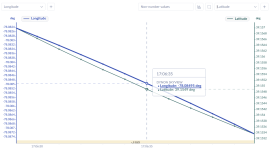
I compared the coordinates with one of my flights and your lines sure look jagged at the same scale

GRT
1742525945759.png

Dynon
1742525985636.png
 
I don't have the answer but I wonder if you've tried to load the GPS track from the csv file into any other tool to see if it's the flysto processing error or the track data itself is corrupted.

I compared the coordinates with one of my flights and your lines sure look jagged at the same scale

GRT
View attachment 83360

Dynon
View attachment 83361
I heard back from GRT support. The logged position comes from the active nav mode selected, ie GPS1 or GPS2. My Garmin 175 is always the active nav source, and this problem started when I installed it, I realized after looking at past logs. GRT says the newer GPS data is higher resolution that the GRT records at, which is only .01 degree of longitude and latitude (about 60 feet) and I believe that may be causing the issue as the data is downscaled. I may see if I can write a little script to smooth out the data if I get bored. It really isn’t a big issue it just makes the playback feature hard to watch and jerky. All the important feature of Flysto work fine.

Chris
 
I heard back from GRT support. The logged position comes from the active nav mode selected, ie GPS1 or GPS2. My Garmin 175 is always the active nav source, and this problem started when I installed it, I realized after looking at past logs. GRT says the newer GPS data is higher resolution that the GRT records at, which is only .01 degree of longitude and latitude (about 60 feet) and I believe that may be causing the issue as the data is downscaled. I may see if I can write a little script to smooth out the data if I get bored. It really isn’t a big issue it just makes the playback feature hard to watch and jerky. All the important feature of Flysto work fine.

Chris
I might be misunderstanding, but 0.01 degrees is about half a mile - my GRT logs down to values like this: 46.763996, 6.615020 If you look at that location, it's within about a foot of where my GPS antenna was when I stopped the aircraft after my most recent flight.

I have two GPS sources - once is the GRT EFIS built-in, and the other is the GRT Safe Fly 2020 GPS that I also use to feed my ADS-B out transponder. I'm normally on GPS2, the Safe Fly. Works fine. I think with a bit more "Sherlock Holmes" work you will figure out what's wrong - what you are seeing is not normal.
 
I might be misunderstanding, but 0.01 degrees is about half a mile - my GRT logs down to values like this: 46.763996, 6.615020 If you look at that location, it's within about a foot of where my GPS antenna was when I stopped the aircraft after my most recent flight.

I have two GPS sources - once is the GRT EFIS built-in, and the other is the GRT Safe Fly 2020 GPS that I also use to feed my ADS-B out transponder. I'm normally on GPS2, the Safe Fly. Works fine. I think with a bit more "Sherlock Holmes" work you will figure out what's wrong - what you are seeing is not normal.
I actually misquoted them. Here is their email:

**That could be the GPS1 serial data. The original "Aviation" GPS data format is only 0.01 minutes of a degree for latitude and longitude, which is about 60 feet in latitude and a little better in longitude (away from the equator), updated once per second. The ARINC 429 data contains latitude and longitude and the newer GPS175 ARINC data may have more resolution but the EFIS isn't using it yet. We'll be looking into that. The EFIS uses the NAV MODE selected GPS for the FDL as long as that GPS has a valid position. The EFIS extrapolates the position between GPS updates and that is also used in the FDL when it's set to a higher rate.**

What I know is this problem began when I installed the GPS175, which is generally my Nav source. Today, I flew a portion of the flight using GPS2, my SafeFly GPS as the nav source, and the track log was perfectly straight. I also know that the 175 position data is sound, as it is also the source of my ForeFlight position and track logs, which are perfect as well. So somewhere between the GPS175 and the FDL, the position data is getting slightly altered. Maybe rather than rounding to the nearest .01 minutes, the EFIS is simply ignoring the less significant digits received via ARINC. This would explain the wandering, I believe. Would be interesting to hear if anybody else with ARINC GPS sources and GRT Sport units have seen this.

Chris
 
Last edited:
I actually misquoted them. Here is their email:

**That could be the GPS1 serial data. The original "Aviation" GPS data format is only 0.01 minutes of a degree for latitude and longitude, which is about 60 feet in latitude and a little better in longitude (away from the equator), updated once per second. The ARINC 429 data contains latitude and longitude and the newer GPS175 ARINC data may have more resolution but the EFIS isn't using it yet. We'll be looking into that. The EFIS uses the NAV MODE selected GPS for the FDL as long as that GPS has a valid position. The EFIS extrapolates the position between GPS updates and that is also used in the FDL when it's set to a higher rate.**

What I know is this problem began when I installed the GPS175, which is generally my Nav source. Today, I flew a portion of the flight using GPS2, my SafeFly GPS as the nav source, and the track log was perfectly straight. I also know that the 175 position data is sound, as it is also the source of my ForeFlight position and track logs, which are perfect as well. So somewhere between the GPS175 and the FDL, the position data is getting slightly altered. Maybe rather than rounding to the nearest .01 minutes, the EFIS is simply ignoring the less significant digits received via ARINC. This would explain the wandering, I believe. Would be interesting to hear if anybody else with ARINC GPS sources and GRT Sport units have seen this.

Chris
It looks like this boils down to

- With GPS175 the position source is ARINC 429 stream which has a "low" 0.01 min resolution (110 and 111 labels) per the standard
- When SafeFly is the source the NMEA 0183 format is in use with a signficiantly more fine grained resolution
- GRT switches the position source according to the selected NAV source

This is in contrast with Dynon which has an independent setting for the position data. Dynon recommends to always set SV-GPS-2020 for position data even with the TSO gps as the NAV source. The dynon GPS also sends the position at 4Hz vs TSO gps which may send it only at 1Hz - this helps to have a smoother moving map animation.

may be it makes sense for GRT to implement a similar approach vs looking for the high res position data in the ARINC 429 feed..